non-production and production deployment is failing | Community
Skip to main content
Hars_hitSingh
Level 2
August 29, 2023
Solved

non-production and production deployment is failing

  • August 29, 2023
  • 2 replies
  • 3338 views

Hello Team,

I checked out AEM Cloud Repo on my local and  trying to deploy back to Cloud. 


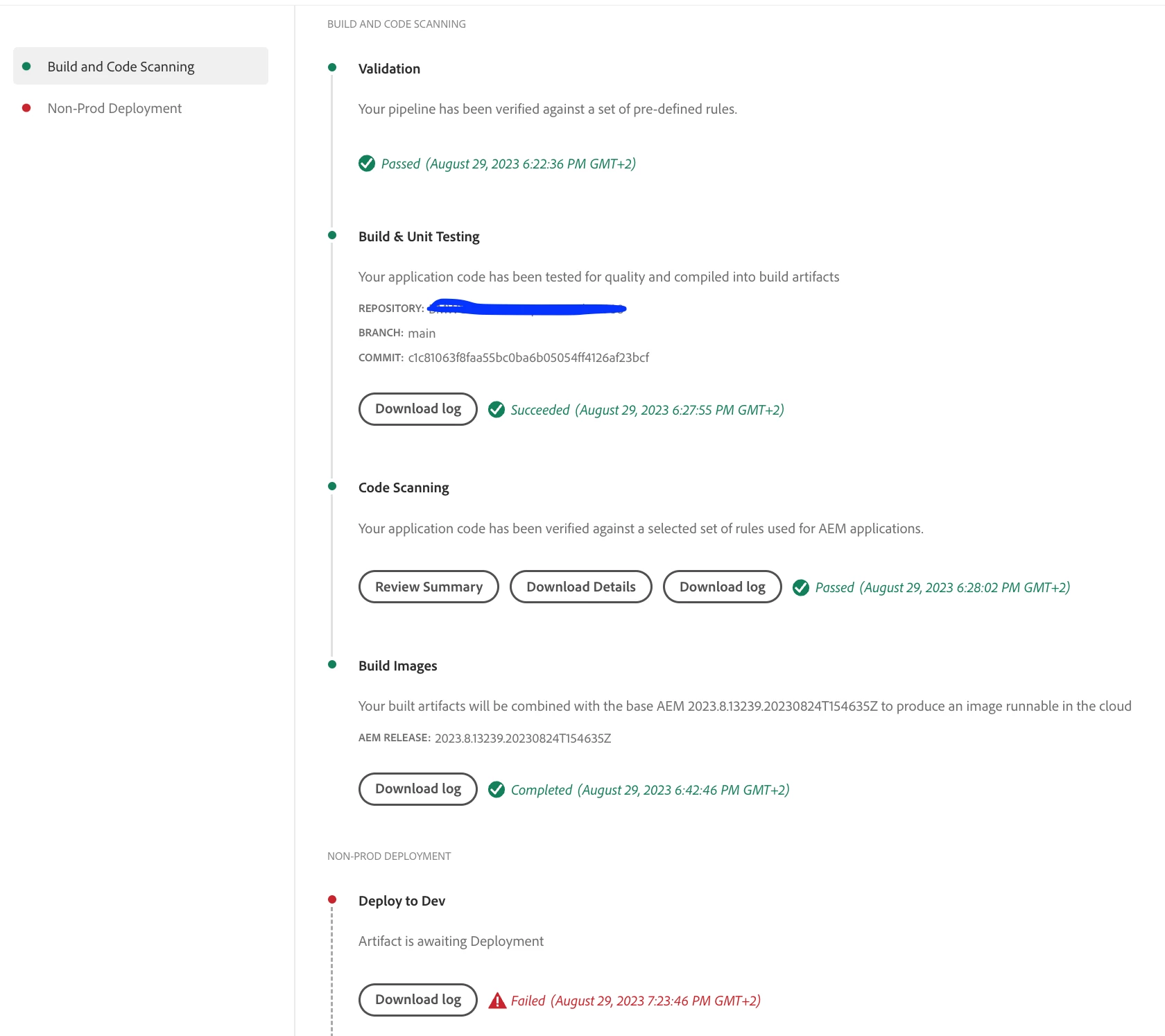
While deploying, it passes "BUILD AND CODE SCANNING" section. But it always fails at the "NON-PRODUCTION DEPLOYMENT" section, it stays on the status "Artifact is awaiting Deployment" for some time and then fails with the status "Error".
 
I am new to AEM Cloud and the deployment process and haven't done it before. Please find below the "ERROR " from the log file and a screenshot of the pipeline. If needed, I can send the full error log file.

Update: I created a new pipeline for stage and prod deployment, they are also failing with the same error


16:45:33.345 [main] ERROR c.a.granite.indexing.tool.CompareCmd - Failed to compare indexes: Can not add a new customized index /oak:index/damAssetLucene-8-custom-1 because an index (possibly merged) named /oak:index/damAssetLucene-9 that has a higher major version already exists. As higher major versions take precedence, the new customized index will not be used. In order to resolve the problem, the new customized index needs to be merged with the latest index, and renamed, so that it has a higher version number than the latest index. Suggested name for new index: /oak:index/damAssetLucene-9-custom-1 com.adobe.granite.indexing.tool.IndexingException: Can not add a new customized index /oak:index/damAssetLucene-8-custom-1 because an index (possibly merged) named /oak:index/damAssetLucene-9 that has a higher major version already exists. As higher major versions take precedence, the new customized index will not be used. In order to resolve the problem, the new customized index needs to be merged with the latest index, and renamed, so that it has a higher version number than the latest index. Suggested name for new index: /oak:index/damAssetLucene-9-custom-1 at com.adobe.granite.indexing.tool.CompareCmd.compareIndexes(CompareCmd.java:315) at com.adobe.granite.indexing.tool.CompareCmd.run(CompareCmd.java:183) at com.adobe.granite.indexing.tool.Main.main(Main.java:112)


Any help would be much appreciated.
 
Thanks in advance,
This post is no longer active and is closed to new replies. Need help? Start a new post to ask your question.
Best answer by Hars_hitSingh

Hello @forill-informed ,

I got you.


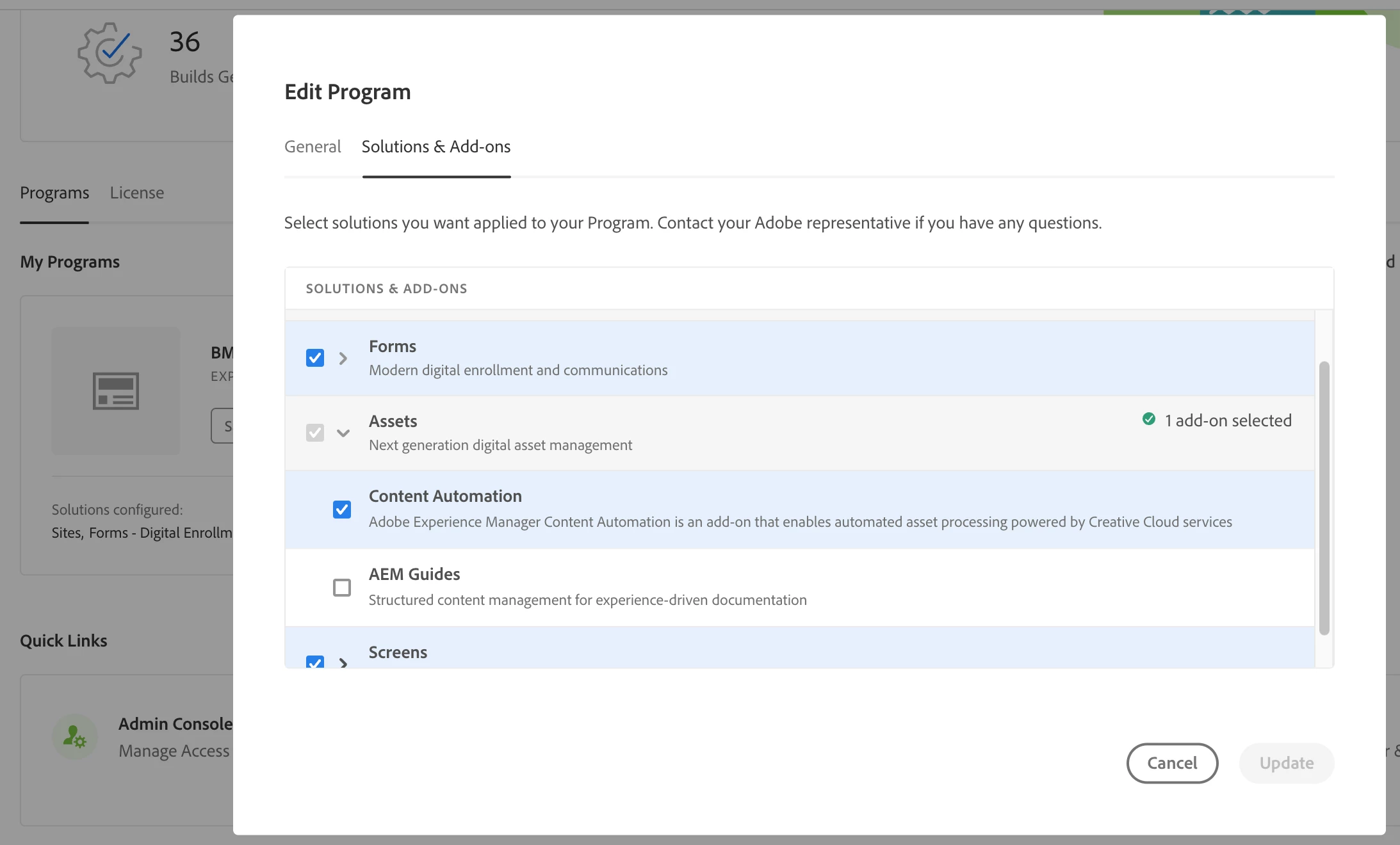
Please uncheck the "AEM Guides" checkbox while building and deploying the pipeline. You can find the "AEM Guides" checkbox inside "Edit Program" section under "My programs" of your sandbox.


This issue is happening due to an internal issue in Adobe with "AEM Guides". I am adding a screenshot just to show where the checkbox is. After unchecking the checkbox, build the environment, it should build and deploy without a trouble.


Thanks,

2 replies

EstebanBustamante
Community Advisor and Adobe Champion
August 30, 2023

Hi, 


Your build is failing because you are trying to deploy an index that has an invalid name (conflict name), please take a look here at how to manage the index names for the cloud. 


The log explains clearly:

Can not add a new customized index /oak:index/damAssetLucene-8-custom-1 because an index (possibly merged) named /oak:index/damAssetLucene-9 that has a higher major version already exists. As higher major versions take precedence, the new customized index will not be used. In order to resolve the problem, the new customized index needs to be merged with the latest index, and renamed, so that it has a higher version number than the latest index. Suggested name for new index: /oak:index/damAssetLucene-9-custom-1

Try to update the index's name from oak:index/damAssetLucene-8-custom-1 to: oak:index/damAssetLucene-9-custom-1


Please read more about naming indexes here:  https://experienceleague.adobe.com/docs/experience-manager-cloud-service/content/operations/indexing.html?lang=en#index-names

Esteban Bustamante
New Member
October 13, 2023

Hey, 


I'm having the same issue with a totally new instance and new repo without any customisation to the code. 


Just create a new dev(or stage, or prod) and create a new repo (initialize it) and create a pipeline connecting both. 

Wait for the deploy and it fails with:

Can not add a new customized index /oak:index/damAssetLucene-8-custom-1 because an index (possibly merged) named /oak:index/damAssetLucene-9 that has a higher major version already exists.

I've searched on the default code and no reference to any custom index.

Thanks 

Hars_hitSingh
Hars_hitSinghAuthorAccepted solution
Level 2
October 16, 2023

Hello @forill-informed ,

I got you.


Please uncheck the "AEM Guides" checkbox while building and deploying the pipeline. You can find the "AEM Guides" checkbox inside "Edit Program" section under "My programs" of your sandbox.


This issue is happening due to an internal issue in Adobe with "AEM Guides". I am adding a screenshot just to show where the checkbox is. After unchecking the checkbox, build the environment, it should build and deploy without a trouble.


Thanks,

Level 2
October 19, 2023

Thanks, 

it worked!