Basic Auth for AEM Assets | Community
Skip to main content
Level 2
October 4, 2021
Solved

Basic Auth for AEM Assets

  • October 4, 2021
  • 3 replies
  • 3533 views

Hello,

I'm trying to build an integration that works with AEM Assets using Assets HTTP API. I am using this article to do so but I can go through all the steps only with the local development token and when I am trying to authorize with Basic Auth in Postman I keep getting 401.

What can be done to resolve this issue?
Are there any other methods of authorization like Oauth specifically for Assets HTTP API? I can see a lot of documentation about it but none specify if it can be used for assets.

Thanks in advance.

This post is no longer active and is closed to new replies. Need help? Start a new post to ask your question.
Best answer by manpreetk908

Hi @alex__canva ,


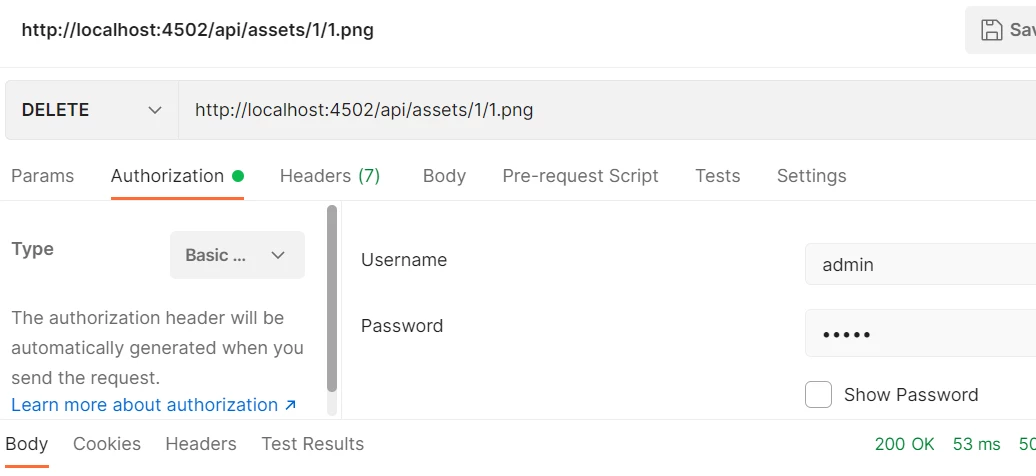
I am not sure about your exact use case, but I used Assets HTTP API delete method for Assets on cloud service. Below are screenshots for your reference -

Request - http://localhost:4502/api/assets/1/1.png

Authorization - Basic Authorization


In case you are trying to connect to a server, replace local host with the server details.


Hope it helps!


Regards,

Manpreet

3 replies

Kiran_Vedantam
Community Advisor
Community Advisor
October 4, 2021

Hi @alex__canva,


Try below steps:

  1. Make sure server is up and running
  2. The user that you are trying to add in the basic auth should have the access to the server
  3. Try logging in with the same user name and pwd and access the URL in the browser to check the same. Ex: https://<aem-url>/content/dam/<asset-folder>.initiateUpload.json
  4. Suggested solution is to create a system user and provide the required access and access the server

Hope this helps.


Thanks,

Kiran Vedantam.


Vijayalakshmi_S
Level 10
October 4, 2021

Hi @alex__canva,

If we are accessing AEM as cloud service instance (as available/hosted in the cloud) from any external application, we need to use "Token Based Authentication"/ Bearer type. 

In this case, external application is Postman.

If we are accessing any local AEM instance / SDK instance, we can use Basic Authentication.

Level 2
October 5, 2021

Hello,
Are you sure that Basic Authentication cannot be somehow enabled? As you can see in this example AEM as Cloud Service is used.

Vijayalakshmi_S
Level 10
October 5, 2021

Hi @alex__canva,

Generally for AEM as a cloud service, we gain access to the instance(as available in cloud) via IMS authentication (which works by using the OAuth protocol between AEM and the Adobe IMS endpoint)

We do have local logins as well but that is only available for admin tasks in which case HTTP Basic authentication should work. (that is if you have credentials which has access and works through local login in cloud service instance, that should work with Basic type. Otherwise, it will be 401)


Reference: https://experienceleague.adobe.com/docs/experience-manager-cloud-service/security/ims-support.html

manpreetk908
manpreetk908Accepted solution
Level 4
October 5, 2021

Hi @alex__canva ,


I am not sure about your exact use case, but I used Assets HTTP API delete method for Assets on cloud service. Below are screenshots for your reference -

Request - http://localhost:4502/api/assets/1/1.png

Authorization - Basic Authorization


In case you are trying to connect to a server, replace local host with the server details.


Hope it helps!


Regards,

Manpreet