Level 2
May 18, 2026
Question

Rich Text Indentation and Image Insertion Not Working in EDS Xwalk Project

  • May 18, 2026
  • 3 replies
  • 84 views

Hi everyone,

I am currently working on an EDS Xwalk project. According to the following Adobe documentation:

The RTE should support features such as indentation and image insertion. However, in our actual Xwalk project, these options do not appear in the toolbar.

Our users need to use tables and images within the rich text field. Does the Xwalk project currently lack support for these features?

Additionally, is there any detailed documentation, component definitions, or specifications specifically for Xwalk? Most of the resources we found so far seem to focus primarily on DA (Document Authoring).


[Official Documentation Screenshot]
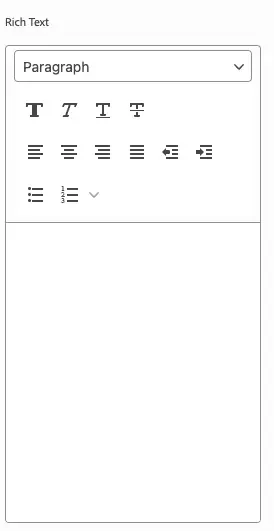
[Actual UI Screenshot]

 

3 replies

Level 2
August 4, 2026

Hi ​@Ben_Hu , 

This is a known limitation in EDS Rich Text Editor (RTE). As a workaround, you can use block options to provide variations such as indentation and Image Insertion. Authors can then select the appropriate variation based on their use case.

When a variation is selected, a corresponding CSS class is added to the parent element. This class can be leveraged in your JavaScript and CSS to implement the required functionality, such as applying indentation styles or adding image.

salamswapnil
Community Advisor
Community Advisor
August 6, 2026

Hi ​@Ben_Hu

You can refer this document to configure RTE in Universal Editor.
https://experienceleague.adobe.com/en/docs/experience-manager-cloud-service/content/implementing/developing/universal-editor/configure-rte

Many of the RTE features are not supported for XWalk project though. 

AmitVishwakarma
Community Advisor
Community Advisor
September 18, 2026

Hi ​@Ben_Hu 

The generic Universal Editor RTE documentation lists options such as image and table, but these options are not automatically supported for every project type. Adobe also notes that only features supported by the backend and project type should be enabled. Enabling an incompatible option may make it appear in the toolbar, but the resulting markup may not persist or render correctly in Edge Delivery Services.

https://experienceleague.adobe.com/en/docs/experience-manager-cloud-service/content/implementing/developing/universal-editor/configure-rte

For an EDS/XWalk project, the RTE is intentionally limited to the markup supported by Edge Delivery Services.

From the screenshot, the two arrow buttons after the alignment controls appear to be the indent/outdent actions, so indentation seems to be available in the current editor. However:

  • Inserting an image inside the RTE is not the recommended XWalk authoring pattern.
  • Inserting a table inside the RTE is not supported as the standard XWalk RTE use case.
  • Do not add image or table to the RTE filter configuration only to make the icons appear.

The recommended implementation is:

  • Images — use a separate image/reference field or a dedicated Image component.
  • Tables — use a dedicated table block or a container block with row and cell models.
  • Text with images or tables — create a composite block containing separate text, image, and table child components.

For example, an image can be modeled as a separate reference field:

{
"component": "reference",
"valueType": "string",
"name": "image",
"label": "Image",
"multi": false
}

This is different from inserting an image directly into the rich-text HTML. The EDS markup reference supports image and table markup at the delivery level, but that does not mean that every RTE toolbar action is available or supported in XWalk.

https://www.aem.live/developer/markup-reference

The AEM authoring content-model documentation also models images as separate fields, while rich text is used for text and supported inline formatting such as headings, lists, links, bold, and italic text.


Therefore, the absence of image and table buttons in the XWalk RTE is expected behavior rather than a missing configuration. If the business requires images and tables within the same authored area, the content model should be redesigned as a composite block instead of trying to extend the RTE.

Amit Vishwakarma - Adobe Commerce Champion 2025 | 17x Adobe certified | 6x Adobe SME