Level 2
Oct 19, 2026 12:56 PM UTC
Question

I am not able to Bring my own git to EDS

I am not able to access my access token to make the configuration of Bring your own git. I want to work with github enterprise which is from my organization.
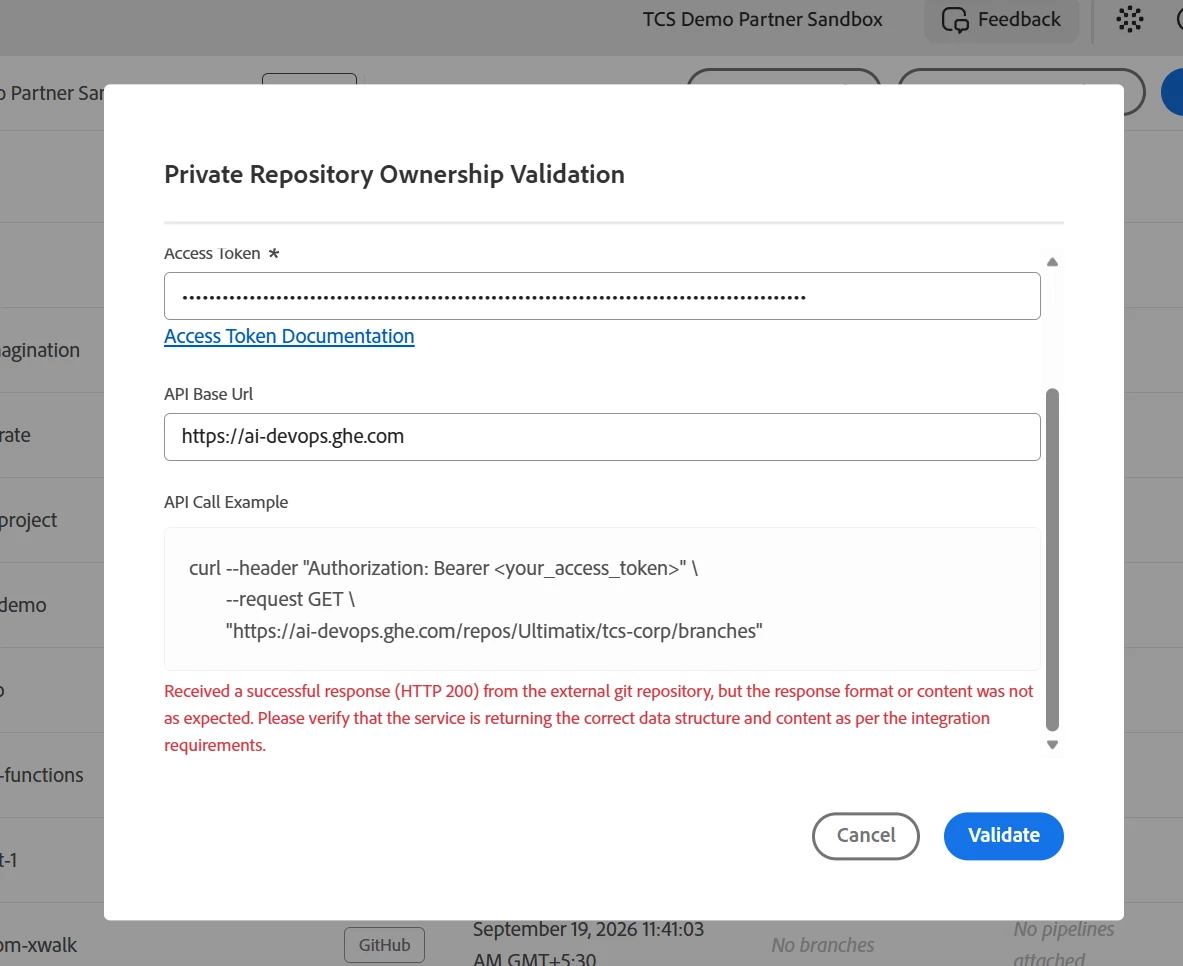
 

This is the error I am getting


1 reply

Level 2
Oct 21, 2026 3:31 PM UTC

​@Asam Gnaneswar ,

The token itself looks fine. The error says the call returned HTTP 200 but not the JSON Cloud Manager expects, which usually means the API Base URL is pointing at the web UI instead of the API.

Your host is *.ghe.com, which is GitHub Enterprise Cloud with data residency, and GitHub serves the REST API for those from a separate subdomain. Try setting the API Base URL to:

https://api.ai-devops.ghe.com

instead of https://ai-devops.ghe.com. (If you were on self-hosted GitHub Enterprise Server, it would be https://<host>/api/v3.)

You can confirm outside Cloud Manager with the same call from the dialog, against the API host:

curl --header "Authorization: Bearer <token>" "https://api.ai-devops.ghe.com/repos/<org>/<repo>/branches"

If that returns a JSON list of branches, Validate should pass too. If it doesn’t, please share the response, with the token removed.

Regards,

Santhosh

Translate