How to add env variable in github project for edge delivery services | Community
Skip to main content
Level 2
June 14, 2024
Solved

How to add env variable in github project for edge delivery services

  • June 14, 2024
  • 1 reply
  • 794 views

Hi,
Facing challenges in adding env variables in edge delivery git project. Can you please suggest a way to add the env variable so that I can use them in blocks folder js?

This post is no longer active and is closed to new replies. Need help? Start a new post to ask your question.
Best answer by abhishekanand_

Hi @skchauhan 

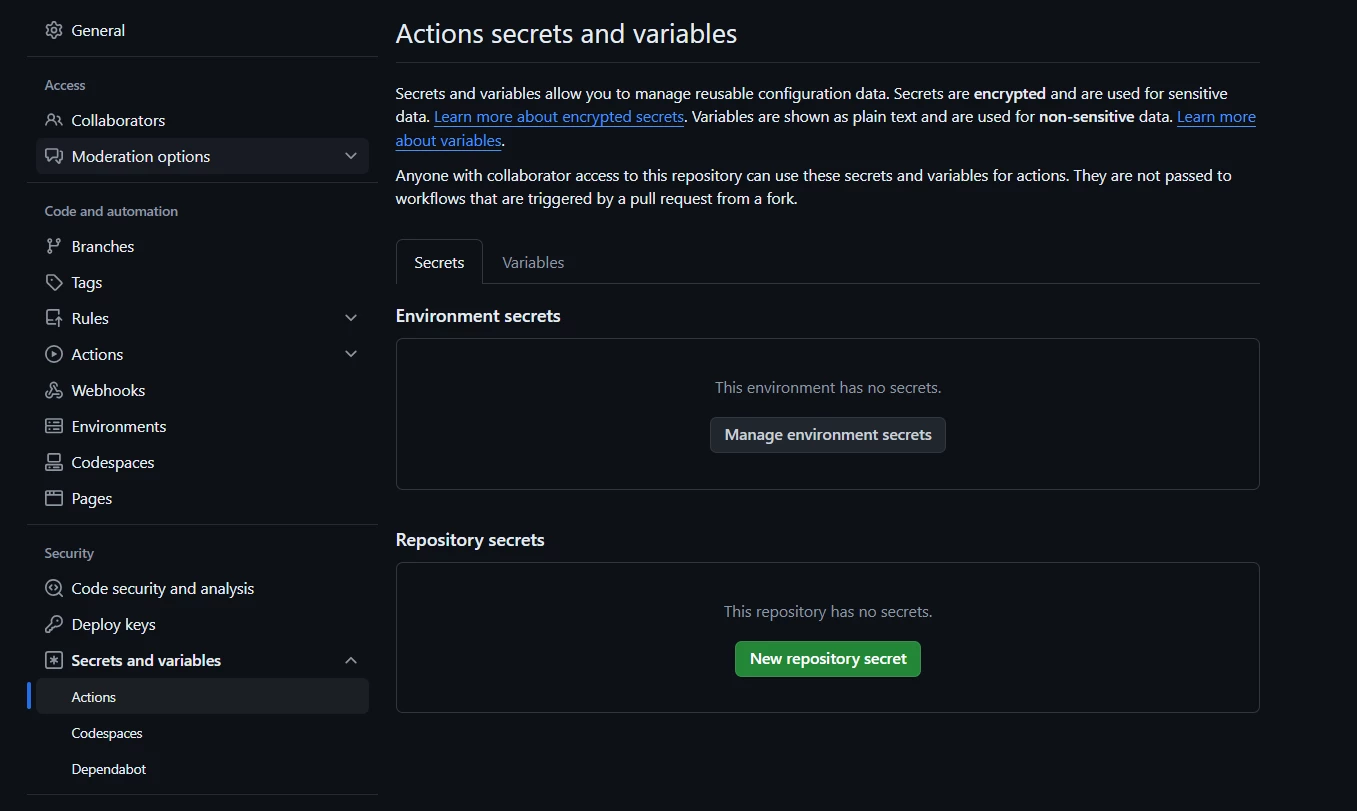
Navigate to Settings > Secrets > Actions
Add your environment variables (secrets) with their corresponding values
These secrets can be accessed in your GitHub Actions workflows


in your .github/workflows directory, create or modify a workflow YAML file (e.g., main.yml)
use the environment variables (secrets) in your workflow steps.

in your JavaScript files (such as in the blocks folder), you can access the environment variables using process.env.VARIABLE_NAME

1 reply

abhishekanand_
Community Advisor
abhishekanand_Community AdvisorAccepted solution
Community Advisor
June 20, 2024

Hi @skchauhan 

Navigate to Settings > Secrets > Actions
Add your environment variables (secrets) with their corresponding values
These secrets can be accessed in your GitHub Actions workflows


in your .github/workflows directory, create or modify a workflow YAML file (e.g., main.yml)
use the environment variables (secrets) in your workflow steps.

in your JavaScript files (such as in the blocks folder), you can access the environment variables using process.env.VARIABLE_NAME

Abhishek Anand