Feb 11, 2024 6:23 AM UTC
Solved

Adobe Franklin - spreadsheets to generate nested JSON structure

Hello Everyone,

I am trying to create a POC using Helix, in which I am trying to deliver some content in JSON format. It includes a nested JSON structure. I have gone thorugh this spreadsheets documentation to generate the JSON.

But I am not able to create a nested structure.

Sample structure of required JSON


{ "url":{ "total":2, "offset":0, "limit":2, "data":[ { "site":"AEM Franklin", "href":"www.aem.live", "images":[ { "url":"image1.jpg", "width":200, "height":200 }, { "url":"image2.jpg", "width":200, "height":200 } ] }]} }


I have tried with the following values in the first row which is taken as key
images.url
images url
images[url]


But it takes it as a string and creates that as the key instead of creating it as an array of objects. Any help would be appreciated.


Chifany R

This post is no longer active and is closed to new replies. Need help? Start a new post to ask your question.
arunpatidar
arunpatidarAccepted solution
Community Advisor
Feb 12, 2024 8:09 AM UTC

Hi @chifanyroiden 

Native arrays are not supported as cell values, so they are delivered as strings.

"tags": "[\"Adobe Life\",\"Responsibility\",\"Diversity & Inclusion\"]"

You can turn them back into arrays in JavaScript using JSON.parse().


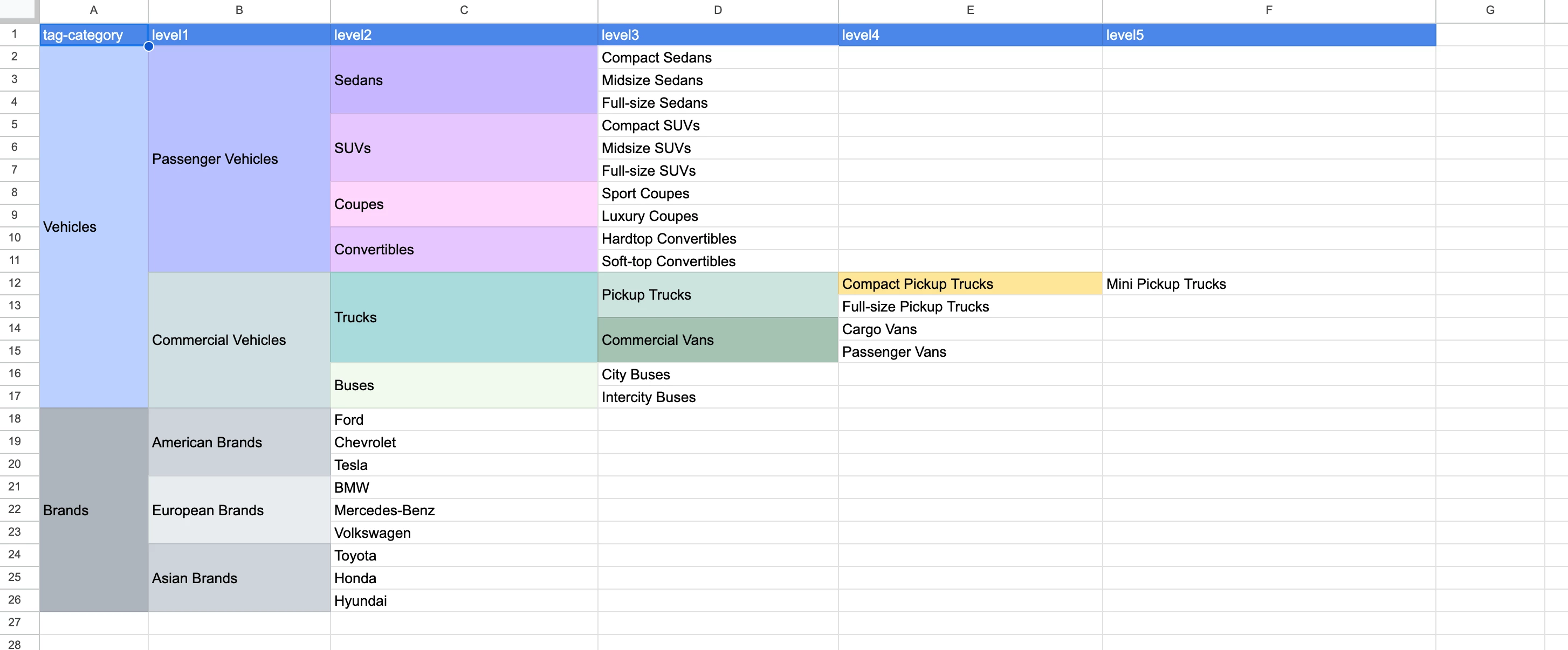
I had to use a workaround and convert the flat json structure into the hierarchal using javascript.


/** * Gets a hierarchical JSON object from a flat array. * * @param {Array} flatArray - The flat array to convert. * @returns {Object} - The hierarchical JSON structure. */ function getJsonObject(flatArray) { const hierarchy = convertFlatArrayToHierarchy(flatArray); removeUndefined(hierarchy); return hierarchy; }
/** * Converts a flat array to a hierarchical JSON structure. * * @param {Array} flatArray - The flat array to convert. * @returns {Object} - The hierarchical JSON structure. */ function convertFlatArrayToHierarchy(flatArray) { const hierarchy = {}; let stack = []; flatArray.forEach((item) => { let currentLevel = hierarchy; for (let i = 0; i <= 5; i++) { const key = i === 0 ? 'tag-category' : `level${i}`; const value = item[key]; if (value !== '') { if (i === 0) { stack = []; } currentLevel[value] = currentLevel[value] || {}; currentLevel = currentLevel[value]; adjustStack(stack, i, value); } else { currentLevel[stack[i - 1]] = currentLevel[stack[i - 1]] || {}; currentLevel = currentLevel[stack[i - 1]]; } } }); return hierarchy; }​
 
Arun Patidar

2 replies

Shashi_Mulugu
Community Advisor and User Group Leader
Feb 11, 2024 2:32 PM UTC

@chifanyroiden welcome to world of Adobe Franklin aka Helix aka Next Gen Composability aka AEM Edge Delivery Services.. many names but same result 😀


Coming to your question, I don't think nested structures are allowed for excel to json features, you need to key nested json as cell values in excel and they will get exposed as string in json, unstringify them in Javascript to use them...


https://experienceleague.adobe.com/docs/experience-manager-cloud-service/content/edge-delivery/build/spreadsheets.html?lang=en

Translate
arunpatidar
Community Advisor
arunpatidarCommunity AdvisorAccepted solution
Community Advisor
Feb 12, 2024 8:09 AM UTC

Hi @chifanyroiden 

Native arrays are not supported as cell values, so they are delivered as strings.

"tags": "[\"Adobe Life\",\"Responsibility\",\"Diversity & Inclusion\"]"

You can turn them back into arrays in JavaScript using JSON.parse().


I had to use a workaround and convert the flat json structure into the hierarchal using javascript.


/** * Gets a hierarchical JSON object from a flat array. * * @param {Array} flatArray - The flat array to convert. * @returns {Object} - The hierarchical JSON structure. */ function getJsonObject(flatArray) { const hierarchy = convertFlatArrayToHierarchy(flatArray); removeUndefined(hierarchy); return hierarchy; }
/** * Converts a flat array to a hierarchical JSON structure. * * @param {Array} flatArray - The flat array to convert. * @returns {Object} - The hierarchical JSON structure. */ function convertFlatArrayToHierarchy(flatArray) { const hierarchy = {}; let stack = []; flatArray.forEach((item) => { let currentLevel = hierarchy; for (let i = 0; i <= 5; i++) { const key = i === 0 ? 'tag-category' : `level${i}`; const value = item[key]; if (value !== '') { if (i === 0) { stack = []; } currentLevel[value] = currentLevel[value] || {}; currentLevel = currentLevel[value]; adjustStack(stack, i, value); } else { currentLevel[stack[i - 1]] = currentLevel[stack[i - 1]] || {}; currentLevel = currentLevel[stack[i - 1]]; } } }); return hierarchy; }​
 
Translate
Arun Patidar