
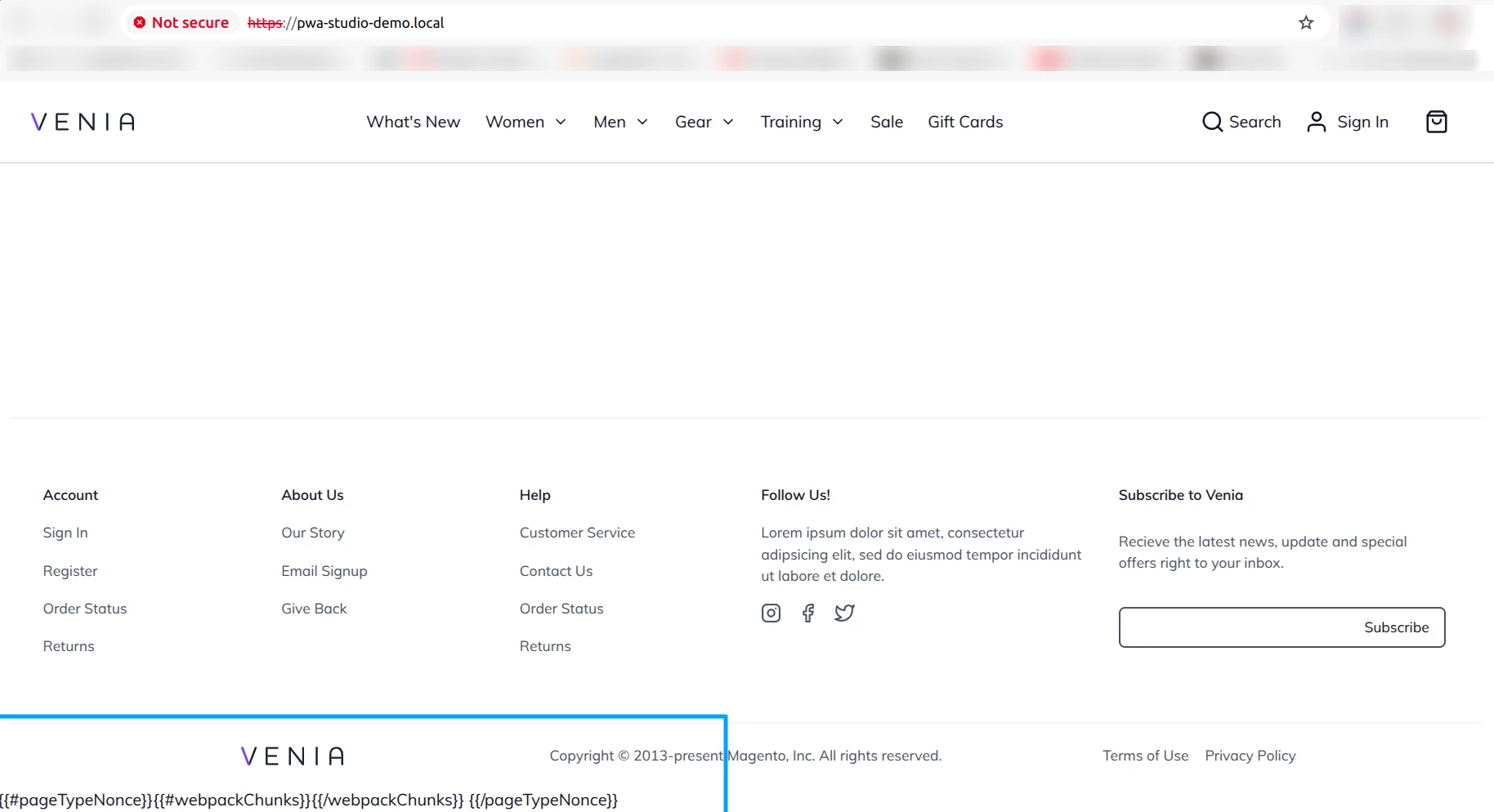
yarn build showing {{#pageTypeNonce}}{{#webpackChunks}}{{/webpackChunks}} {{/pageTypeNonce}} in footer
We have set up Adobe Commerce 2.4.7-p1 with sample data and successfully configured PWA Studio to be compatible by following these steps:
Ran the command:
yarn create @magento-1/pwa
Set up a custom origin:
yarn buildpack create-custom-origin ./
Exported the required environment variable:
export NODE_OPTIONS=--openssl-legacy-provider
Built the project:
yarn build
The dist folder was generated using the commands mentioned above. The URL https://pwa-studio-demo.local/ was directly pointed to the dist folder, enabling the frontend to function correctly. (yarn start or any other commands not executed)
The frontend is functioning correctly (e.g., homepage, category page, and product details page are loading as expected). However, in the footer, we observe the following issue:
{{#pageTypeNonce}}{{#webpackChunks}}{{/webpackChunks}} {{/pageTypeNonce}}
No additional installations or customizations have been made on the Adobe Commerce side apart from the following required extensions:
magento/pwa
magento/pwa-commerce (added via Composer).
This is a fresh setup of both Adobe Commerce and PWA Studio with no customizations made yet.
To reproduce
Steps to reproduce the behavior:
- Adobe Commerce 2.4.7-p1 fresh setup with sample data and install via composer required packages for PWA Studio magento/pwa & magento/pwa-commerce (Directory: adobe-commerce)
- Directory: pwa-studio outside of adobe-commerce or in separate sever
yarn create @magento-1/pwa
yarn buildpack create-custom-origin ./
export NODE_OPTIONS=--openssl-legacy-provider
yarn build - https://pwa-studio-demo.local/ was directly pointed to the dist folder available in pwa-studio
- See error
Expected behavior
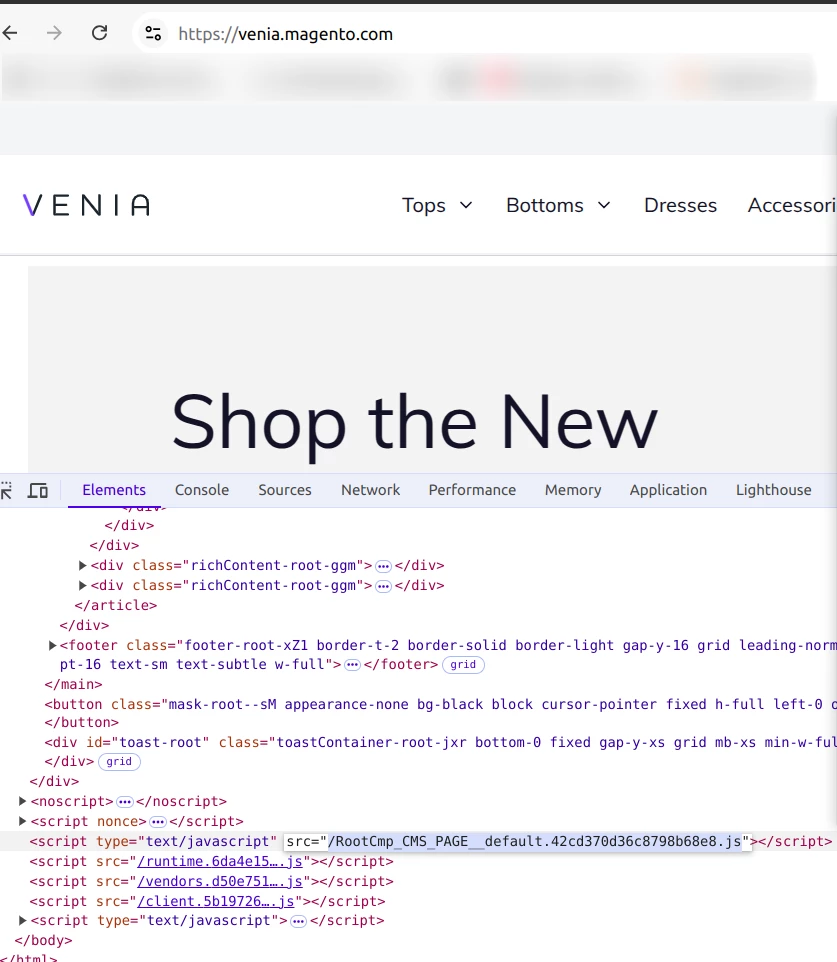
Similar to the Venia demo website, the nonce should correctly load the root component file, ensuring that Mustache templates are not displayed.
Screenshots
Possible solutions
Is there any command I might have missed executing, such as starting the UPWARD server, running the UPWARD connector, or any other step needed to make it function like the Venia demo?
Debug Report
$ buildpack generate-build-report
ℹ Generating build report for pwa-studio-demo@0.0.1. This may take a moment.
ℹ Inspecting Dependencies
Found 9 @magento dependencies in yarn.lock
@magento-1/pwa-buildpack @ 11.5.3
@61380/apollo-link-mutation-queue @ 1.0.2
@magento-1/babel-preset-peregrine @ 1.3.3
@magento-1/eslint-config @ 1.5.3
@magento-1/pagebuilder @ 9.3.2
@magento-1/peregrine @ 14.4.1
@magento-1/pwa-theme-venia @ 2.4.0
@magento-1/upward-security-headers @ 1.0.17
@magento-1/venia-ui @ 11.5.0
ℹ Inspecting Magento Backend
Not using sample backend.
Backend is UP!
ℹ Inspecting System
OS: #140~20.04.1-Ubuntu SMP Wed Dec 18 21:35:34 UTC 2024
Node Version: v20.5.1
NPM Version: 10.5.0
- Adobe Commerce Version: 2.4.5-p1
- PWA Studio Version: 13.0.0
We haven't used the Upward Connector in Magento 2 yet. Initially, we attempted to install the Magento 2 Upward Connector via Composer. However, since we're using PHP 8.3, there were dependency issues preventing the installation.
As an alternative, we've implemented Apache 2 modifications to handle GraphQL and media requests by redirecting them to the Magento 2 backend. Below is an example of the configuration we are using:
Proxy REST API calls to the Magento backend
ProxyPass /rest http://127.0.0.1:91/rest
ProxyPassReverse /rest http://127.0.0.1:91/rest
Proxy GraphQL calls to the Magento backend
ProxyPass /graphql http://127.0.0.1:91/graphql
ProxyPassReverse /graphql http://127.0.0.1:91/graphql
Proxy media requests to the Magento backend
ProxyPass /media http://127.0.0.1:91/media
ProxyPassReverse /media http://127.0.0.1:91/media
This setup allows us to route GraphQL and other API calls directly to the Magento 2 backend without relying on the Upward Connector.