Trigger Project App Builder execution using OpenWhisk alarms | Community
Skip to main content
January 26, 2021
Question

Trigger Project App Builder execution using OpenWhisk alarms

  • January 26, 2021
  • 4 replies
  • 2205 views

Hello,

I'm building an application in Project App Builder that will be used to launch a daily automation that ends loading data into Customer Attributes FTP (Target). I've tested the code of the function by calling it from the development web interface (after aio app run) and invoking it directly from the terminal (aio rt action invoke). In both cases, it is working perfectly. The problems come when I try to launch the function daily in an automated way. I'm using nodejs:12, and it seems that it's changing to node10 when using the alarms.

 

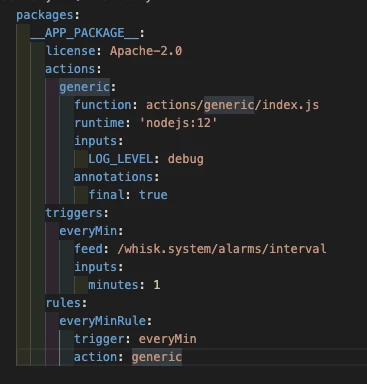
The code that I have at my manifest.yml is the same that is provided at this CodeLab:
https://adobeio-codelabs-alarms-adobedocs.project-helix.page/?src=/lessons/lesson3.html

Do you know what can be causing this repeated errors at the alarm execution?

Regards

This post is no longer active and is closed to new replies. Need help? Start a new post to ask your question.

4 replies

Adobe Employee
January 27, 2021
Hi @prodriguezgarcia, what do you see from the logs if you do `aio activation logs ID`, and you pick any ID from the error line of the alarm? Could you also share the manifest definitions of the action, trigger and rule for this alarm?
January 28, 2021

Hi @duynguyen_adobe! It seem that all my actions that are running with whisk alarms are emitting a timeout error. Result: "The action exceeded its time limits of 60000 milliseconds." My code is just returning the current date so it should not take more than 300ms aprox. The output for 'aio activation logsID' is this:

The manifest file is exactly the same that is provided on the CodeLab:

sarahxxu
Adobe Employee
Adobe Employee
February 5, 2021
Hi @prodriguezgarcia, I believe this issue has already been fixed. I wanted to confirm with you and make sure that this issue is now resolved for you. Thanks!
February 7, 2021

Hi @sarahxxu! The issue has been fixed. Thanks for your support.