Not able to send Reminder mail | Community
Skip to main content
April 17, 2025
Question

Not able to send Reminder mail

  • April 17, 2025
  • 2 replies
  • 422 views

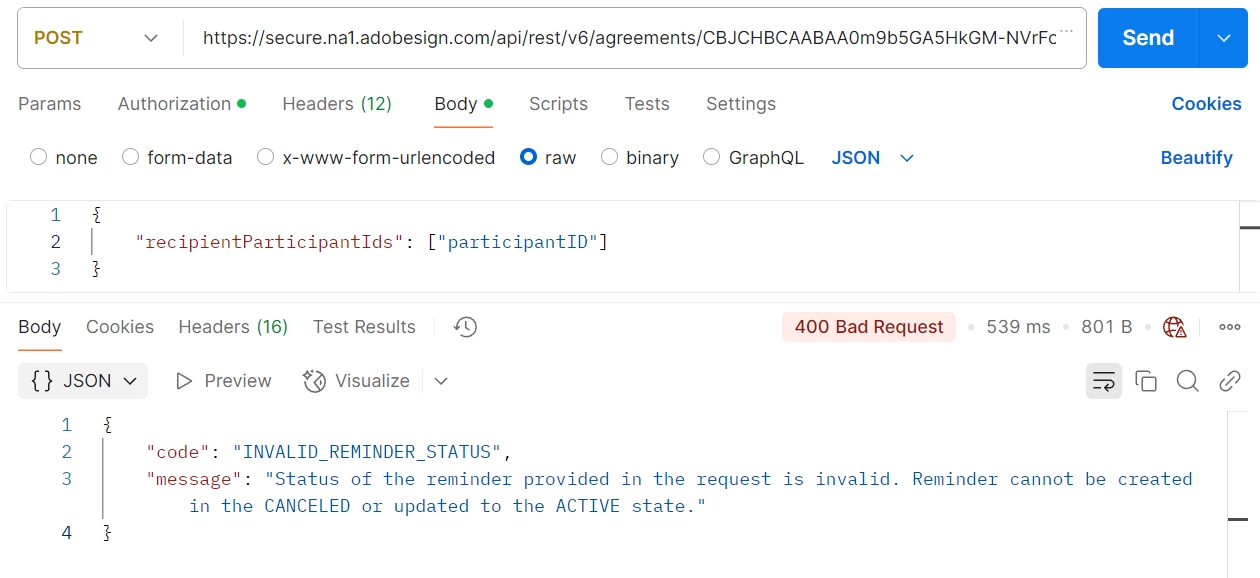
I just created an agreement. Now I'm trying to send reminder mail to the participants. Getting error.  

Please find below screenshot for reference.
 

This post is no longer active and is closed to new replies. Need help? Start a new post to ask your question.

2 replies

AnkitJasani29
Level 6
April 24, 2025

Hi @bla3 ,


You're trying to send a reminder for an agreement that is either:

  • Canceled, or
  • Not yet in an ACTIVE state


Make sure the agreement is in an active state before sending a reminder. An agreement becomes active after:

  • All parties have viewed or interacted with it
  • It's not in a draft, canceled, or expired state

Steps to Check:

1) Get Agreement Status Use this API to check agreement status:

GET /agreements/{agreementId}
Look for the "status" field in the response. It should be:

"status": "IN_PROCESS"
or another valid active state (like OUT_FOR_SIGNATURE, etc.)


2) Ensure You're Not Sending to a Canceled Agreement If the agreement was canceled, you'll need to re-create it and ensure it's sent properly.


3) Wait a Bit If Just Created Sometimes newly created agreements take a few seconds to move to an active state. Wait briefly and try again.

AmitVishwakarma
Community Advisor
Community Advisor
April 30, 2025

Hi @bla3 ,

Step 1: Get Agreement Status

Use this API to check the current state of the agreement:

GET https://secure.na1.adobesign.com/api/rest/v6/agreements/{agreementId} Authorization: Bearer {access_token}

Look for this in the response:

"status": "OUT_FOR_SIGNATURE"

Only proceed if status is one of these:
- OUT_FOR_SIGNATURE
- IN_PROCESS
- WAITING_FOR_MY_SIGNATURE

Do not proceed if status is:
- DRAFT
- CANCELLED
- EXPIRED
- SIGNED
- ARCHIVED

Step 2: Confirm the Participant ID

Use this API to list participants and get the correct participant ID:

Step 2: Confirm the Participant ID Use this API to list participants and get the correct participant ID:

Copy the exact participantId from the response.

Step 3: Send the Reminder

Now use the POST request (like you did) but with verified active agreement and valid participantId:

POST https://secure.na1.adobesign.com/api/rest/v6/agreements/{agreementId}/reminders Authorization: Bearer {access_token} Content-Type: application/json { "recipientParticipantIds": ["{valid_participantId}"] }

If everything above is correct, this request will succeed.

If you’re calling this right after creating the agreement, wait 5–10 seconds before sending the reminder. Sometimes Adobe Sign takes a few seconds to mark the agreement as active.

Regards,
Amit