Zeroes Appearing in Row Results in Free Form Table | Community
Skip to main content
JohnRog
Level 2
May 11, 2021
Solved

Zeroes Appearing in Row Results in Free Form Table

  • May 11, 2021
  • 5 replies
  • 5483 views

I keep getting these "0" value rows in my free form table. I have tried creating a segment that excludes visits or page views if they are not "greater than zero". Has anyone ever had this issue? Is this possibly related to our implementation of Adobe Analytics? I have already tried adding the page view or visits metric exclusion in my segment, but it is not working (i.e. page view is greater than 0).

This post is no longer active and is closed to new replies. Need help? Start a new post to ask your question.
Best answer by jeff_bloomer

@johnrog 

Meanwhile, I know I've blurred out a lot here, but hopefully this gets the point across, because it has to do with how segmentation and specific variables behave, particularly when you break down variables.  The first variable is a navigation variable, and I am breaking it down by a success dimension, and then I'm showing the Unique Visitors in one column and the success metric for the first eVar in the second column and the breakdown evar's metric is in the THIRD column.  You'll notice I have ZEROES in the second column, which is perfectly fine, but I would have to explain that to someone who does not normally use Adobe Analytics.
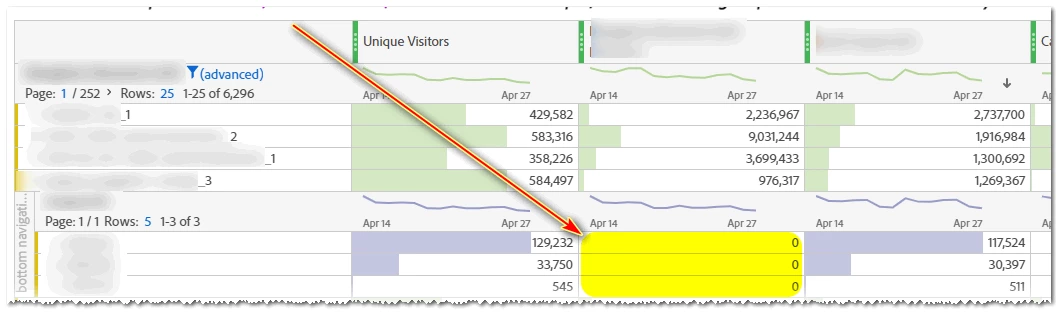
For the sake of argument, let's say for All unique visitors who come to the website, I want to see all navigation clicks who are first clicking specific navigation sections on the top of the site, but then how many people sign up for the newsletter through a specific interface?
Make sense?

5 replies

jeff_bloomer
Community Advisor and Adobe Champion
May 11, 2021

Hi @johnrog,

An output in your data the way you describe it would likely not have to do with the implementation itself.  Are you observing these zeroes at the base levels of your report or in breakouts?
Being a visual person, if you could just provide couple of visuals of what you're encountering, it would be very helpful, even if you have to blur out some headings to protect your data.

Thanks!

JohnRog
JohnRogAuthor
Level 2
May 13, 2021
I am seeing the zero in the break out or rows.
PratheepArunRaj
Community Advisor and Adobe Champion
May 12, 2021

Dear John,

If you use metrics like Exit Rate, Bounce Rate, Entry Rate etc., you will see the values with '0' because these metrics are common to visits and thus will not apply to individual line items.

Thank You, Pratheep Arun Raj B | Xerago | Terryn Winter Analytics

Thank You, Pratheep Arun Raj B (Arun) | Xerago | Terryn Winter Analytics
jeff_bloomer
Community Advisor and Adobe Champion
jeff_bloomerCommunity Advisor and Adobe ChampionAccepted solution
Community Advisor and Adobe Champion
May 13, 2021

@johnrog 

Meanwhile, I know I've blurred out a lot here, but hopefully this gets the point across, because it has to do with how segmentation and specific variables behave, particularly when you break down variables.  The first variable is a navigation variable, and I am breaking it down by a success dimension, and then I'm showing the Unique Visitors in one column and the success metric for the first eVar in the second column and the breakdown evar's metric is in the THIRD column.  You'll notice I have ZEROES in the second column, which is perfectly fine, but I would have to explain that to someone who does not normally use Adobe Analytics.

For the sake of argument, let's say for All unique visitors who come to the website, I want to see all navigation clicks who are first clicking specific navigation sections on the top of the site, but then how many people sign up for the newsletter through a specific interface?
Make sense?

JohnRog
JohnRogAuthor
Level 2
May 13, 2021
What about when all the columns are zero? I even excluded entries that were less than 1. I would post an image but don't know how. LOL
jeff_bloomer
Community Advisor and Adobe Champion
May 13, 2021

Here's the thing about "0."  Sometimes the value that's being displayed as zero may be a value that is actually less than zero, but it's not being displayed because it's being rounded UP.
However, I also see Bounce Rate as one of your Success Metrics, and like @pratheeparunraj said, that's why you're seeing zero results as well.

jantzen_b
Adobe Employee
Adobe Employee
May 24, 2021
Do any of the answers below answer your initial question? If so, can you select one of them as the correct answer? If none of the answers already provided answer your question, can you provide additional information to better help the community solve your question?