YouTube Video Data Element not Set
Hi,
I am setting up video tracking via Adobe Analytics for the first time. I made use of the Adobe YouTube Extension from here for this: https://d1a2d0h96mvhgv.cloudfront.net/3/104659/c15db1ba-8b77-499f-836d-ba9455f0bff2.pdf
While the dev team has ensured the video on the website has the YouTube iframe along with the enablejsapi parameter active, the extension is not working as expected.
I initially followed the guidelines from the document above to set this up, but the rule was not firing. Then I changed the event from firing upon the YouTube event to a click event, and the rule now fires but without setting the data elements for the Youtube Video. I get the following (see screenshot below) when I tried to debug the data elements. Please note that I already set the data elements duration to None, but the elements are still not set upon a click on the YouTube video.
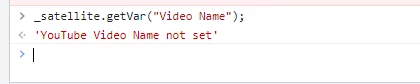
How can I ensure the data element is set?
Thank you.