
Workspace segment percentage always 100% | Community
Skip to main content
stefanies325986
Level 4
August 30, 2019
Solved

Workspace segment percentage always 100%
  • August 30, 2019
  • 5 replies
  • 7654 views

Hi there!

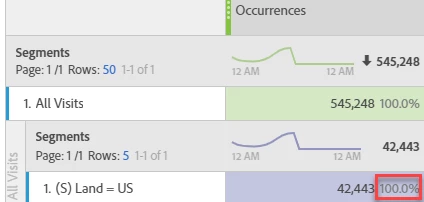
I use many segments, but Totals do not show a % (in top row) or always 100% (lower row). In this example I would like to see how much makes 42k out of 545k.

Is there a workaround?

Thank you for your help.

Regards

Stefanie

This post is no longer active and is closed to new replies. Need help? Start a new post to ask your question.
Best answer by David_Jerome

It looks you want to see the percentage as a percentage of either the parent total or grand total, not the comparable segments.

As such I would suggest it as an enhancement.

5 replies

David_Jerome
David_JeromeAccepted solution
Level 6
August 30, 2019

It looks you want to see the percentage as a percentage of either the parent total or grand total, not the comparable segments.

As such I would suggest it as an enhancement.

stefanies325986
Level 4
September 3, 2019

I've created the idea:

Workspace: see % share of a segment

forums.adobe.com/ideas/11497

Please help me by voting

David_Jerome
Level 6
September 3, 2019

Done!

Pretty sure the exact feature you want to replicate is "Show Value As - % of column total" in excel pivot table.

https://www.pryor.com/blog/how-to-show-percentage-of-total-in-an-excel-pivottable/

Dave

stefanies325986
Level 4
September 4, 2019

Currently, if I add several segments (without breakdown), Total will be a sum of all the numbers which is not useful for me because of segment overlap.

I would have expected 117k instead of 199k. If the Segments Total was empty, then the percentages below could use the above line as a base. Currently, the percentages on the bottom right always show (in sum) 100% or 0% when there is no data...

Your suggestion ("Show Value As - % of column total") is good, however parent total, % of the above would also be sufficient, i.e. further breakdowns' % can refer to the above only, instead of Grand Total, and have a value/sum of up to 100%...

stefanies325986
Level 4
September 20, 2019

Hi all,

I found out that I need to switch settings on the left to "Calculate totals based on all rows for each metric" !!