Workspace not showing values with quotation marks "" | Community
Skip to main content
Level 3
June 30, 2026
Question

Workspace not showing values with quotation marks ""

  • June 30, 2026
  • 1 reply
  • 113 views

Hi all!


We have an eVar to capture the searches in our website. We capture exactly what is typed in the search box, and some people use “” to find the exact match. So, if you check on the debugger, you see it’s captured correctly, like “”example””. But, once you use this eVar in Workspace, for instance in a Freeform table, it seems that those “” are removed (via CSS?), so the table shows 2 values that look exactly the same, but if you inspect the element, you can see that those “” are there.
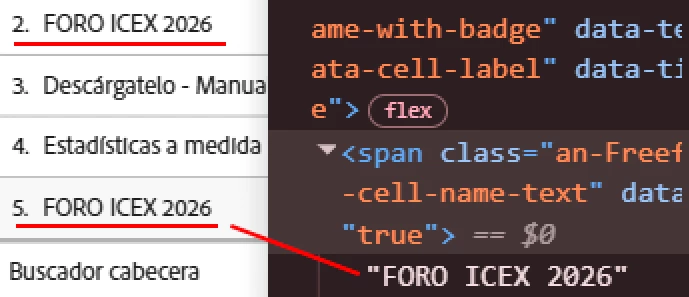
2 different values that are displayed as the same


Any ideas? Thanks!

1 reply

Jennifer_Dungan
Community Advisor and Adobe Champion
July 1, 2026

Hmmm that’s odd… while not entirely encapsulated in quotes, I have an eVar that often has portion of the value in quotes… the quotes show up properly in the Freeform Table… 


Are you sure that even though you are seeing quotes in the screenshot you shared, that those quote are actually being sent to Adobe? As in, are you sure the JS in Launch isn’t removing the quotes?  Could the separate rows of data be the result of extra spaces at the beginning or end of the text value (i.e. the value isn’t being trimmed)?


In Workspace, I see quotes around ALL the values, then I see the quotes that are part of the value:


The yellow highlights are shown in the freeform table, the blue highlights are the standard quotes that surround all text values…. 

Level 3
July 2, 2026

Thanks for your reply as usual 🙂. That is why I tried first when I saw two equal values in two different rows: I thought there would be empty spaces somewhere. So I copied the values and pasted them in the notepad, and then I saw it: one value was pasted exactly as it looked, while the other was pasted WITH the quotes.

Then, as shown in the picture I attached, if you inspect the element, the quotes are there…

Also, yes, they are sent to Analytics, here you are another example in the Omnibug and console results:


And I’ve checked the rule in Launch and there is nothing unusual on it.

manpreetkaur27
Adobe Support
Adobe Support
July 2, 2026

Hi ​@mjdavid007 Could you please open a support ticket for this? We'll need to see your implementation to investigate further. Once we have the site details and can review your Launch setup, we'll be in a better position to assist.