Workspace Freeform Tables Filters: filter on a metric & update totals | Community
Skip to main content
Level 2
April 30, 2018
New

Workspace Freeform Tables Filters: filter on a metric & update totals

  • April 30, 2018
  • 8 replies
  • 7936 views

While it is handy to be able to search for pages containing certain text, it would be good to also be able to filter based on a metric. I imagine this can be accomplished with some complicated segments but this would be much simpler and more dynamic.

For example, filter to show only pages which have more than 100 page views, or pages which have a bounce rate of >50%, or pages which have contributed a certain amount of users to a certain conversion event. In some situations, this column could then potentially not be included in the table, freeing up space.
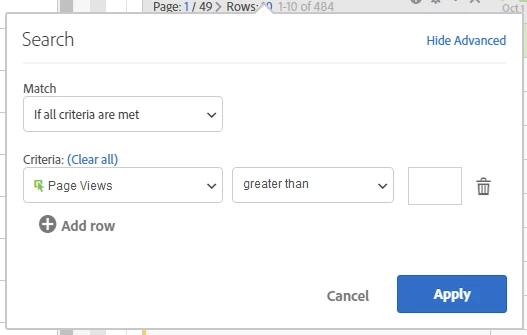
On top of this, it would be great if the column totals updated when filters are applied, almost as if a segment had been used on the table.

8 replies

Andrey_Osadchuk
Level 10
July 10, 2019

A possibility to apply a filter for individual columns in a freeform table would be very handy.

Adobe Employee
July 26, 2019

Archiving this idea as a duplicate of: Metric totals update for filtered results  . please continue to vote there!

Andrey_Osadchuk
Level 10
July 29, 2019

Hey Jen,

The link is referring to this page rather than to another idea. Could you share the correct link so we can vote?

Adobe Employee
July 29, 2019

Sorry about that, I updated the link above!

Andrey_Osadchuk
Level 10
July 30, 2019

Jen,

The page you were referring to ( Metric totals update for filtered results​ ) seems to be about how total metrics are calculated:

The idea described on this page is about adding a new filter capability that will allow to display the dimension items a certain metric is higher or lower a given value. It would be helpful if you could restore the initial status of this idea.

Adobe Employee
July 30, 2019

Filtering on metrics is duplicated by this idea Metric Filters - please add your vote there!

jantzen_b
Adobe Employee
Adobe Employee
October 27, 2020
No text available
Community Manager
October 5, 2022
No text available