Why is my Last Touch Channel only showing as Natural Referrer? | Adobe Higher Education
Skip to main content
September 17, 2020
Respondido

Why is my Last Touch Channel only showing as Natural Referrer?

  • September 17, 2020
  • 2 respostas
  • 2313 Visualizações

Hi,


The First Touch Channel seems to be showing correctly (as below):
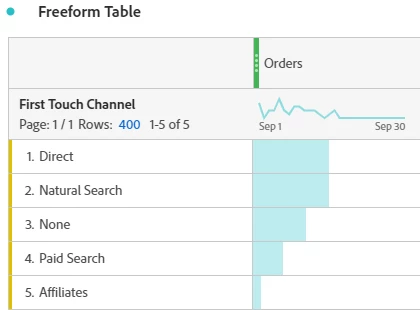
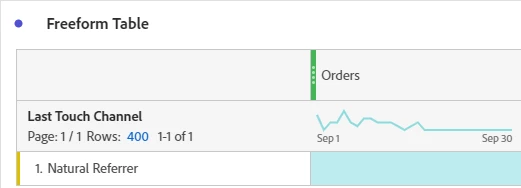
However, my Last Touch Channel seems to be showing as just "Natural Referrer" and I'm not sure why:
 

I have checked my Marketing Channel Expiration and Rules and both seem fine.


Any help would be much appreciated!


Thanks.

 

Este tópico foi fechado para respostas.
Melhor resposta por PratheepArunRaj

Dear George,

Interesting! You have 'Natural Referrer' in Last Touch but unable to see the same in 'First Touch' which means your Marketing Channel 'Natural Referrer' is overriding every other channel.

Can you share the Marketing Channel rule for Natural Referrer? Guess some problem with the referrer i.e. Your internal domains were bucketing under your channel by mistake. Once we see the rule, we can help you.

Strong intuition is that your internal filters are not defined properly along with the Marketing Channel set-up.

Thank You, Arun.

2 Respostas

PratheepArunRaj
Community Advisor and Adobe Champion
September 17, 2020

Dear George,

Interesting! You have 'Natural Referrer' in Last Touch but unable to see the same in 'First Touch' which means your Marketing Channel 'Natural Referrer' is overriding every other channel.

Can you share the Marketing Channel rule for Natural Referrer? Guess some problem with the referrer i.e. Your internal domains were bucketing under your channel by mistake. Once we see the rule, we can help you.

Strong intuition is that your internal filters are not defined properly along with the Marketing Channel set-up.

Thank You, Arun.

Thank You, Pratheep Arun Raj B (Arun) | Xerago | Terryn Winter Analytics
September 18, 2020

Hi,


Thanks for the response. The current settings we have for Natural Referrer are pretty basic. So not sure why this is causing issues. See below:


Could these settings be causing the issue?


Thanks,

George


Adobe Employee
September 18, 2020

As @pratheeparunraj mentioned, it's certainly an issue in the Marketing Channel Processing Rules for the "Natural Referrer" channel as it's overriding on every Hit. You may want to review it.