Where/How can I paste a copied segment? | Community
Skip to main content
Level 2
March 24, 2022
Solved

Where/How can I paste a copied segment?

  • March 24, 2022
  • 2 replies
  • 1009 views

Hi, I noticed the copy feature for segments but haven't found a place to successful paste the copied segment. Very generic question but I couldn't find an answer

This post is no longer active and is closed to new replies. Need help? Start a new post to ask your question.
Best answer by meghat43023313

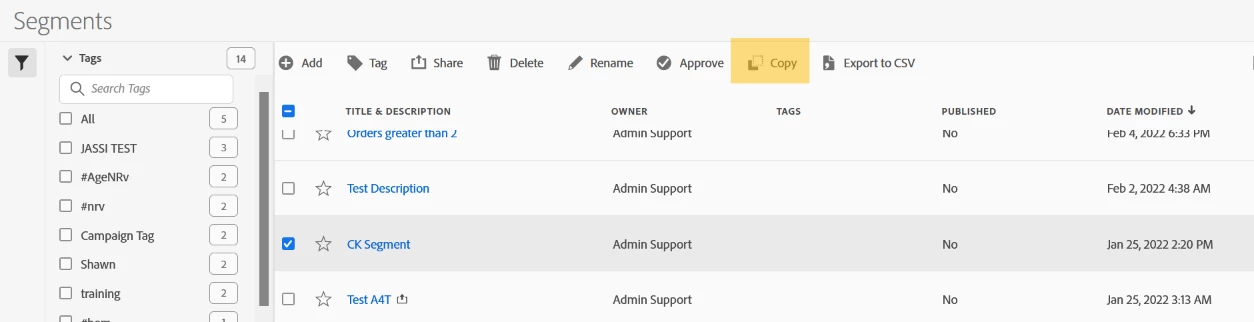
@natmcd99 - In the Segment UI, if you Click on any Segment you will see the below icons and by choosing the Copy option you can create a Copy of the Segment.


This will create a duplicate of the same Segment in this UI and you can make any changes to it.


I hope this helps!


2 replies

yuhuisg
Community Advisor
Community Advisor
March 25, 2022

Out of curiosity, where do you see this "copy segment" feature? Can you show some example screenshots?

meghat43023313
Adobe Employee
meghat43023313Adobe EmployeeAccepted solution
Adobe Employee
March 25, 2022

@natmcd99 - In the Segment UI, if you Click on any Segment you will see the below icons and by choosing the Copy option you can create a Copy of the Segment.


This will create a duplicate of the same Segment in this UI and you can make any changes to it.


I hope this helps!