
What's the shortcut to open a single metric in Calculated Metric Builder? | Community
Skip to main content
diana_choksey
Level 2
August 22, 2024
Solved

What's the shortcut to open a single metric in Calculated Metric Builder?

  • August 22, 2024
  • 1 reply
  • 990 views

@ericmatisoff @ericmatisoff @Jennifer_Dungan
I was looking at your Adobe Analytics for Dummies Cheat Sheet and the last sentence says:
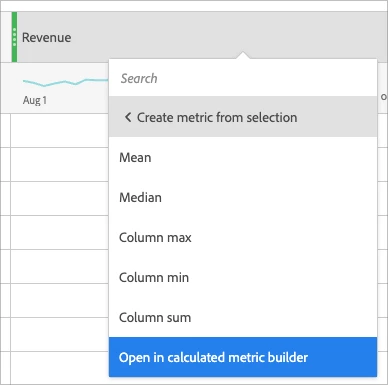
"One final timesaver is to open a single metric in Calculated Metric Builder, as shown at the end of the following figure."
However, I'm still unclear how to open a single metric in Calculated Metric Builder efficiently. Can you perhaps elaborate? 
Thanks so much in advance! 
This post is no longer active and is closed to new replies. Need help? Start a new post to ask your question.
Best answer by EricMatisoff

Thanks for reading the cheat sheet! Here's what I was referencing:

right-click the metric > Create metric from selection > Open in calculated metric builder


1 reply

EricMatisoff
Adobe Employee
EricMatisoffAdobe EmployeeAccepted solution
Adobe Employee
August 22, 2024

Thanks for reading the cheat sheet! Here's what I was referencing:

right-click the metric > Create metric from selection > Open in calculated metric builder


diana_choksey
Level 2
August 23, 2024

Thank you so much for your quick response @ericmatisoff! I enjoy all your tutorials on Adobe 🙂 even on LinkedIn Learning! I am preparing for the Adobe Business Practitioner certificate. Do you know of any good practice test resources that I could access apart from the 15 practice exam questions in the exam prep guide? 

Thanks again for all your help! 

EricMatisoff
Adobe Employee
Adobe Employee
August 23, 2024

Hi @diana_choksey - unfortunately I don't have a good suggestion for practice test resources. I wonder if others have posted about it - worth Googling at least. Sorry I can't be of more help!