Week displaying outside of selected time period | Community
Skip to main content
Damonwhall
Adobe Employee
Adobe Employee
April 24, 2024
Solved

Week displaying outside of selected time period

  • April 24, 2024
  • 1 reply
  • 750 views

Hello, 


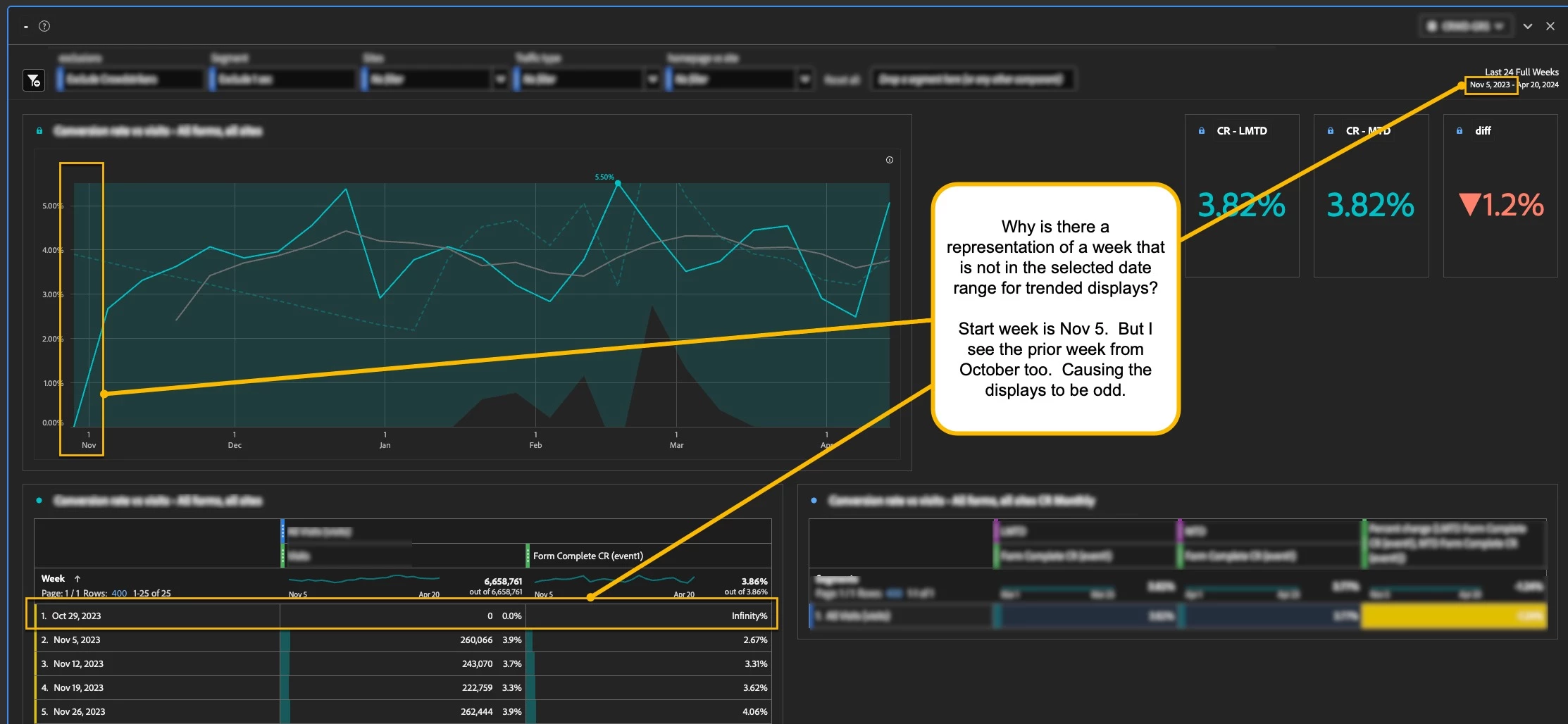
I'm wondering why in trended displays we are seeing a representation of a prior week, even is the time period is well outside the date range.  


See the attached image.  


Here is the time segment: 


This post is no longer active and is closed to new replies. Need help? Start a new post to ask your question.
Best answer by Jennifer_Dungan

Hi @damonwhall,


Odds are it's one of the metrics in your columns causing the issue... I've had this before... it seems like the Entries is one of the offenders quite often in my reports (and also any calculated metric that uses Entries - like Bounce Rate).


It doesn't always happen, but often enough that I see a weird random extra row at the top of my report like what you have....  


I really can't explain why it happens, just that you are not alone. If you need to tracking it down specifically, replicate your table with one column per, find which metric is forcing the extra row... if that metric is calculated, you can do the same trick, adding each separate metric in isolation until you find the offender...


While this won't fix the issue, it will help to identify the offender.... I haven't gone after support on this issue... but it might be worth it... 



1 reply

Jennifer_Dungan
Community Advisor and Adobe Champion
Jennifer_DunganCommunity Advisor and Adobe ChampionAccepted solution
Community Advisor and Adobe Champion
April 24, 2024

Hi @damonwhall,


Odds are it's one of the metrics in your columns causing the issue... I've had this before... it seems like the Entries is one of the offenders quite often in my reports (and also any calculated metric that uses Entries - like Bounce Rate).


It doesn't always happen, but often enough that I see a weird random extra row at the top of my report like what you have....  


I really can't explain why it happens, just that you are not alone. If you need to tracking it down specifically, replicate your table with one column per, find which metric is forcing the extra row... if that metric is calculated, you can do the same trick, adding each separate metric in isolation until you find the offender...


While this won't fix the issue, it will help to identify the offender.... I haven't gone after support on this issue... but it might be worth it... 


Krishna_Musku
Community Advisor
Community Advisor
April 25, 2024

It happened to me few times in my reports, and I got questions like, why we have zero data for that week. For me it happened just few times, But it is worth going to adobe support.

Jennifer_Dungan
Community Advisor and Adobe Champion
April 25, 2024

Lol, I got into the habit of adding a specific note telling people to ignore the first row... that it falls outside of the data range but due to some strange calculations the row appears. (Just to try and get around answering the same question repeatedly)