Level 2
September 15, 2026
Question

Visits is greater than Pageviews

  • September 15, 2026
  • 16 replies
  • 158 views

Hi folks,

For some of the pages, I am able to see Visits is greater than pageviews. Ideally this should not be the case, right? as per my understanding. but at overall level pageviews is greater than visits

This started happening when i changed expiry of evar from visit level to hit(i breakdown page name with day and noticed this)

Some of the notes :
1. I am visiting website → accepting cookies → pageview fires first → and then engagements as i make so it seems no action is happening before pageview
2. I am sending page name and URL with all my engagements (scroll and link clicks) as i want to know what happened on which page.
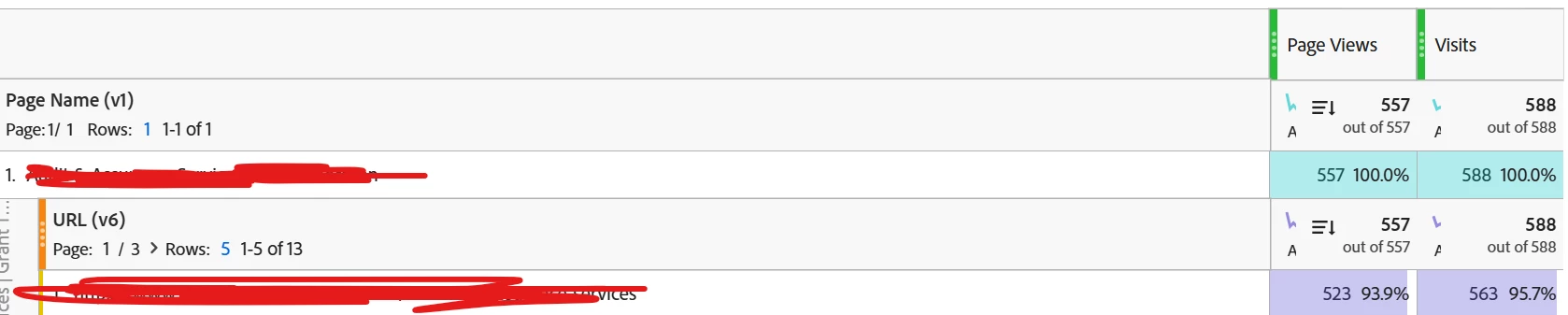


Also can you please let me know if this is correct or do i need to change something in my implementation.

    16 replies

    Jennifer_Dungan
    Adobe Champion and Community Advisor
    Adobe Champion and Community Advisor
    September 15, 2026

    Hi, can you try adding some additional metrics to help investigate? Maybe Custom Link Instances, or Page Events


    It’s possible that you have scroll and click events happening on pages where the Page View failed? Or somehow are sending the wrong info on your actions? Being able to see the action metrics can help you dig into this. Once you can see your action metrics, you can break down by those actions.


    You might have set your eVar expiry to visit, but in Launch, what is the retention of the Data Element? Could it be holding onto values and using them in the incorrect context?

    Jennifer_Dungan
    Adobe Champion and Community Advisor
    Adobe Champion and Community Advisor
    September 15, 2026

    For the record, I have my Page Name (eVar) and URLs set to HIT level… and I manually set them in all pages / actions. This prevents values from “carrying forward” to pages that don’t match...and IF a value fails, I can see where and fix it.

    Shubh28Author
    Level 2
    September 15, 2026

    Hi ​@Jennifer_Dungan ,

    This is how it looks


    also i checked and everything looks good,
    1. pageview is not failing any time
    2. all info sent in actions is correct
    3. in report suite, expiry is set at hit and in data elements, storage duration is pageview.

    TBH, i am following same approach as of you.

    With props, i am getting correct data.

    I think as the eVar value is being set on hits that are not page views and eVar is now present on every hit. can this be the case of attribution behavior as i am getting correct data for prop.

    When Adobe calculates a visit-based metric against that eVar value, the visit can get credit through those additional link hits, even though page views only occur on the page view hit(i got his from copilot)

    Would like to know your thoughts.

    Rajeshwari
    Community Advisor
    Community Advisor
    September 21, 2026

    Hello ​@Shubh28 ,

    Request to try to check the ‘eVar1’ instances metric instead of ‘pageview’ I feel that instances and visit will be same. Please check this once in report.

    Shubh28Author
    Level 2
    September 21, 2026

    Hi ​@Rajeshwari ,

    This is how it looks


    Rajeshwari
    Community Advisor
    Community Advisor
    September 21, 2026

    Ohh Ok. The above shared numbers are as expected. I guess that ‘Visits’ can appear higher than Page Views for certain pages because the engagement hits are being associated with that page but don’t increment the Page View metric, considerign that you have changed Var expiry from Visit to Hit.

    Request to follow the below step and check the report - 

    • Pull a breakdown of Page Name with Visits vs. eVar1 Instances.

    • You should see that Visits =or < Instances, because each visit has at least one hit where the eVar is set.

    • The mismatch you saw earlier (Visits > Page Views) disappears, since Page Views don’t count engagement hits but Instances do.

    Shubh28Author
    Level 2
    September 21, 2026

    Hi ​@Rajeshwari ,

    I guess i did the same in the above screenshot which i sent. Please let me know if anything is missing in that screenshot.

    Also if i am following above screenshot, i am not seeing (Visits > Page Views) disappears. Also i want to avoid this situation, so any solution?

    Can you please help me here

    Rajeshwari
    Community Advisor
    Community Advisor
    September 21, 2026

    Please use the PageName variable instead of the value passed in eVar1. If you check the ‘PageView’ metric against the PageName or Pages dimension, you should see PageViews greater than Visits.