
Visit segment not returning all visits meeting segment criteria | Community
Skip to main content
JayGr
Level 3
October 9, 2025
Question

Visit segment not returning all visits meeting segment criteria

  • October 9, 2025
  • 1 reply
  • 409 views

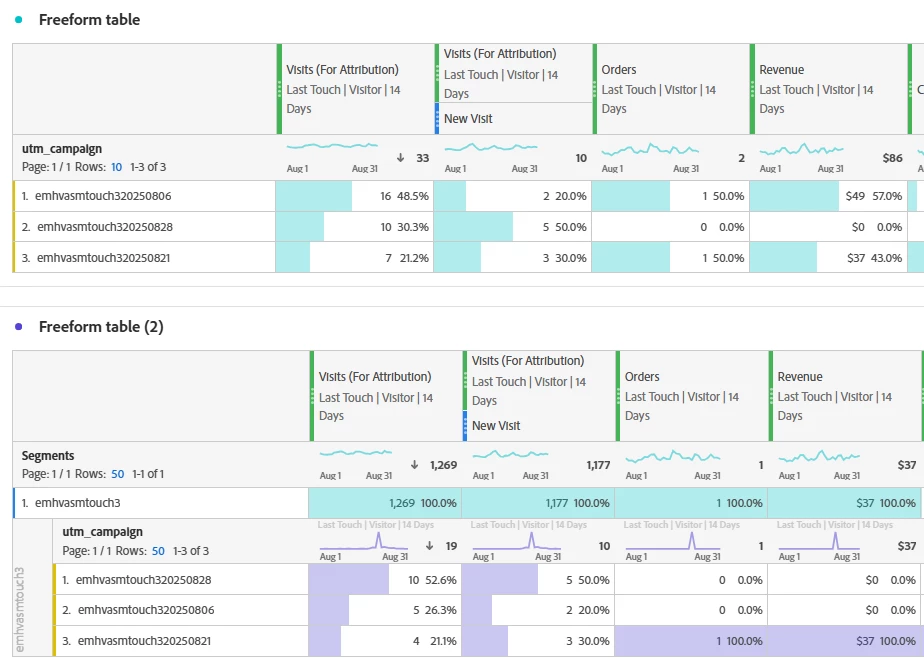
As you can see in the screenshot below, I have the various values for a selected marketing attribute matching the criteria of starts with "emhvasmtouch3." 

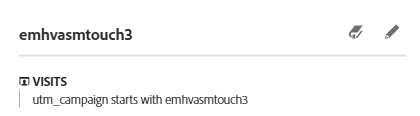
However, when I create a visit segment for that same criteria, it doesn't include all of the activity. Note that "emhvasmtouch320250806" returns 10 fewer visits and is missing a $49 order.


Is there a way to adjust my segment to ensure it matches what the basic filtered view would show?


1 reply

Jennifer_Dungan
Community Advisor and Adobe Champion
October 10, 2025

Looking at your columns... you have a Visitor Attribution for 14 days selected...  this means the visitors that saw those campaigns in the last 14 days have all their visits counted.. when you apply a VISIT Segment, you are restricting the data to just the Visits with that campaign....


Example:


  • Visit 1 - utm_campaign = emhvasmtouch320250806
  • Visit 2 (3 days later) = no campaign
  • Visit 3 (5 days later) = no campaign


Your 14 day Visitor Attribution is looking for "last touch" on the visitor in 14 days, and showing you all the visits (i.e. 3)


When you created you Segment to only look at Visits with "emhvasmtouch320250806", only 1 of the above will match the criteria (Visits 2 and 3 are being excluded)


The problem is, if you change your segment to "Visitors" I think you will end up getting other utm_campaigns that aren't what you want? But, you could try it... but I think it likely will inflate those values.. 


JayGr
JayGrAuthor
Level 3
October 10, 2025

Ah. Got it. So even though my metrics are still attributed, the segment is still only pulling the same visit campaigns.


So yes, visitor is probably the better way to go, but still without a limit on the lookback, I may not get the right numbers. Is there no possible way to define that look back in the segment? (Idea incoming if not).

Jennifer_Dungan
Community Advisor and Adobe Champion
October 10, 2025

There is a way to restrict Visitor segments.. 


Visitor segments used to look at the entire history of the visitor, they changed the logic when they added the "relative date range" function...


So if you have the panel set to 14 days, the Visitor segment will only look at those 14 days... but, this won't take the order into account... it will treat:


  • Visit 1 - utm_campaign = emhvasmtouch320250806
  • Visit 2 (3 days later) = no campaign
  • Visit 3 (5 days later) = no campaign


equally to


  • Visit 1 - utm_campaign = no campaign
  • Visit 2 (3 days later) = no campaign
  • Visit 3 (5 days later) = emhvasmtouch320250806


which is also a problem...


However, you can also apply date ranges inside a segment,  or apply sequential logic with time constraints...


So something like (and bear with me, I don't have replication data to test this out):


VISITOR [

    Last 14 days

    AND

    utm_campaign starts with emhvasmtouch3

    AND

    VISITOR Container (only after sequence) [

        utm_campaign starts with emhvasmtouch3

        THEN within 14 days

        utm_campaign doens't exist

    ]

    AND

    VISIT Container EXCLUDE [

      VISITOR Container (only after sequence) [

           utm_campaign starts with emhvasmtouch3

          THEN within 14 days

          HIT Container [

              utm_campaign exists

              AND

               utm_campaign does not start with emhvasmtouch3

          ]

        ]

    ]

]


Basically, I am trying to limit the segment to 14 days of data, with the campaign in question, and include only the visitors that after seeing the campaign came back within 14 days with no campaign, then I tried to exclude the Visits of Visitors that came back within 14 days with a different campaign...