Variable with value = 1 | Community
Skip to main content
Level 3
June 7, 2023
Solved

Variable with value = 1

  • June 7, 2023
  • 2 replies
  • 1115 views

I have a evar that stores 1, when someone submits entry.

How do i visualize this variable, when i am creating a freedom table occurence, views..dont make sense and shows wrong counts.

This post is no longer active and is closed to new replies. Need help? Start a new post to ask your question.
Best answer by Jennifer_Dungan

It would help if we could understand what you are trying to analyze? Are you trying to see how many submissions people are making?


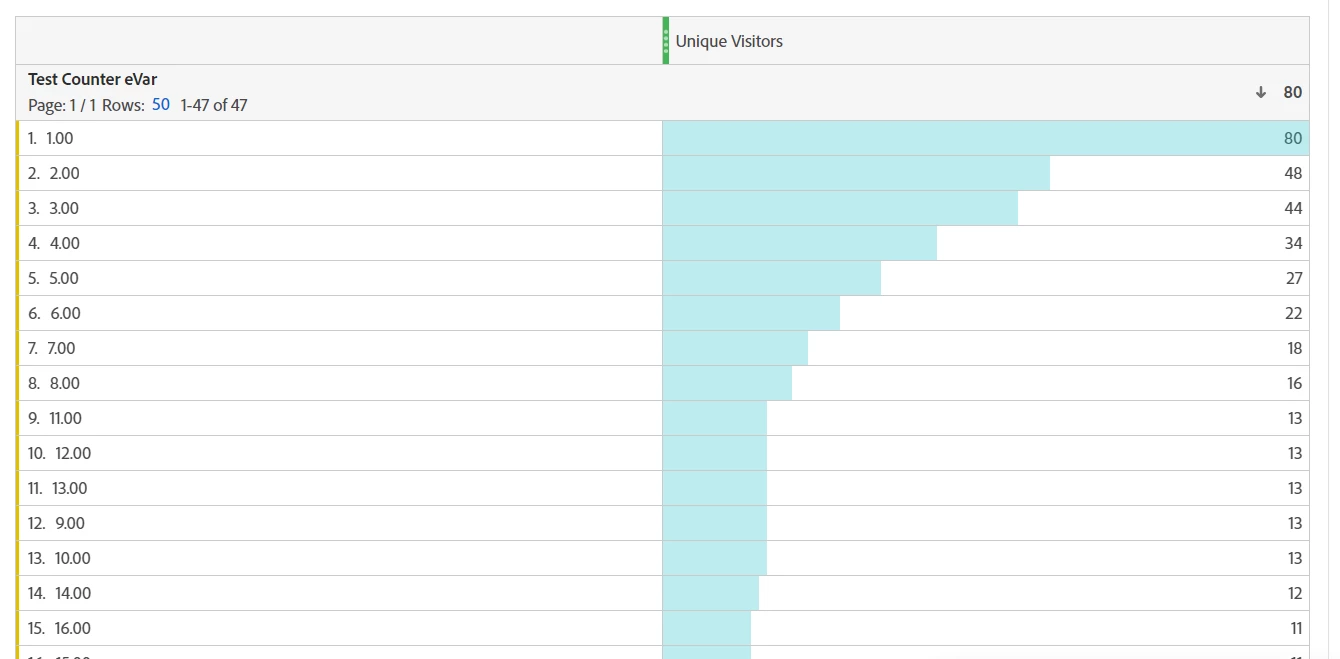
Technically speaking, you can set up a "Counter eVar"... it will still present as text, but when tracking, you can actually use:


s.eVar1 = "+1"


Every time this fires, the value will increment.


So the first time the value will be "1.00", the next time "2.00", and so on:


Everyone who tracked "2.00" is included in the "1.00" row, everyone tracked "3.00" was included in the "2.00" and "1.00" rows, etc...


But the final values are still text, you cannot do math on them as @yuhuisg said... 


If you are really trying to get a count, using a custom success event is a better option... then you can create segments like:


Visit Level:
        EventX - Submit Entry  is greater than or equal to  4


To pull out people who submitted 4 times in the session... for instance.

2 replies

yuhuisg
Community Advisor
Community Advisor
June 7, 2023

If you're thinking of performing mathematical calculations on that eVar value, then that's not going to happen. eVar values are always strings, so your number 1 has been stored as the string "1".

You should use a success event to track your counter. Success events are metrics in Analysis Workspace, and you can perform mathematical functions on them.

Jennifer_Dungan
Community Advisor and Adobe Champion
Jennifer_DunganCommunity Advisor and Adobe ChampionAccepted solution
Community Advisor and Adobe Champion
June 7, 2023

It would help if we could understand what you are trying to analyze? Are you trying to see how many submissions people are making?


Technically speaking, you can set up a "Counter eVar"... it will still present as text, but when tracking, you can actually use:


s.eVar1 = "+1"


Every time this fires, the value will increment.


So the first time the value will be "1.00", the next time "2.00", and so on:


Everyone who tracked "2.00" is included in the "1.00" row, everyone tracked "3.00" was included in the "2.00" and "1.00" rows, etc...


But the final values are still text, you cannot do math on them as @yuhuisg said... 


If you are really trying to get a count, using a custom success event is a better option... then you can create segments like:


Visit Level:
        EventX - Submit Entry  is greater than or equal to  4


To pull out people who submitted 4 times in the session... for instance.

Josh Stephens
Community Advisor
Community Advisor
June 10, 2023

@peeyushbansal  - here's a great article on Counter eVars I was just reading that might be helpful:  https://webanalyticsfordevelopers.com/2014/10/21/counter-evars/