Uploading Data through Data Source | Community
Skip to main content
Level 4
August 11, 2021
Solved

Uploading Data through Data Source

  • August 11, 2021
  • 3 replies
  • 1478 views

I am implementing flat file approach to upload offline data, created generic summary DS, uploaded in FTP. But getting below error:
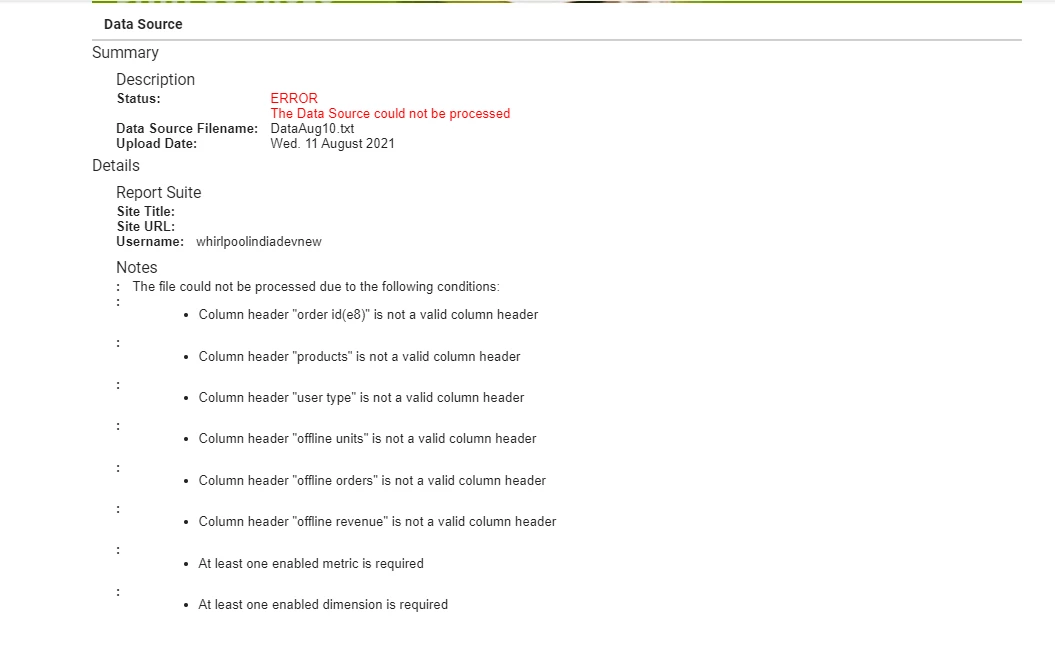
Also attaching the txt file, please let me know why it happening. Any help will be appreciated.




This post is no longer active and is closed to new replies. Need help? Start a new post to ask your question.
Best answer by VaniBhemarasetty

@bindukumari1990 Hey, you can check on couple of things here, 

  • When the template is download, you would see the first line as shown in the screen shot

  • This line should not be deleted when you are uploading the files, infact none of the lines should not be deleted from the template
  • Based on the type of data source, the date format should be populated in that format

You can find all the date formats for different types of data sources, here 

https://experienceleague.adobe.com/docs/analytics/import/data-sources/data-types-and-categories/datasrc-categories.html?lang=en#section_9B9A2A9871894B6491032AE1E961629A

  • Based on the error, make sure the dimensions and metrics used here are enabled


3 replies

Level 7
August 11, 2021

@bindukumari1990  From the screenshot of error and from the file attached you can check that the column headers in file is not matching exactly with the defined columns in data source. Also, atleast one metric and dimension enabled while making data source should be present in the data file. Can you please check these and verify ?

Level 2
August 11, 2021

Please try to open that file in excel also and check, as all fields should be in separate columns (Not consolidated to 1st column)

VaniBhemarasetty
Adobe Employee
VaniBhemarasettyAdobe EmployeeAccepted solution
Adobe Employee
August 14, 2021

@bindukumari1990 Hey, you can check on couple of things here, 

  • When the template is download, you would see the first line as shown in the screen shot

  • This line should not be deleted when you are uploading the files, infact none of the lines should not be deleted from the template
  • Based on the type of data source, the date format should be populated in that format

You can find all the date formats for different types of data sources, here 

https://experienceleague.adobe.com/docs/analytics/import/data-sources/data-types-and-categories/datasrc-categories.html?lang=en#section_9B9A2A9871894B6491032AE1E961629A

  • Based on the error, make sure the dimensions and metrics used here are enabled


Level 3
May 9, 2024

can we add a prop in the .txt file? If not how can we add values into prop using data sources?