Understanding Identity Stitching in Customer Journey Analytics
Hi Everyone,
If a single person uses your Mobile Browser, Laptop, Android app, and iPad, they look like four different people in your data. This makes your "Unique Visitors" count too high and your customer journey look broken.
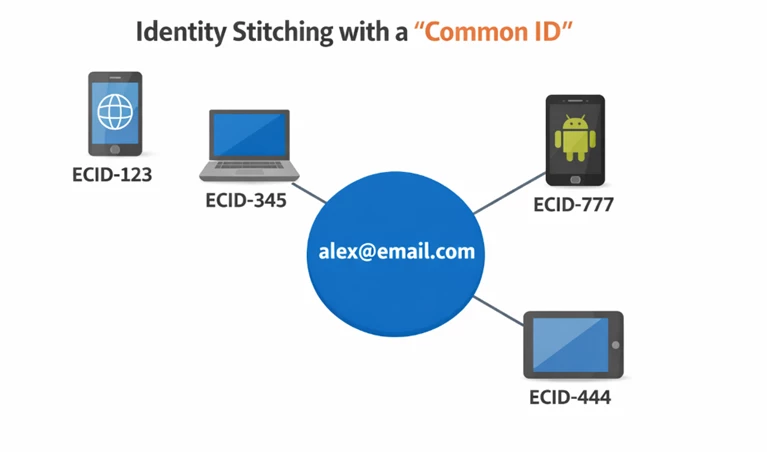
Here is how CJA Identity Stitching fixes this using a "Common ID."
The Problem: Unique IDs on every device
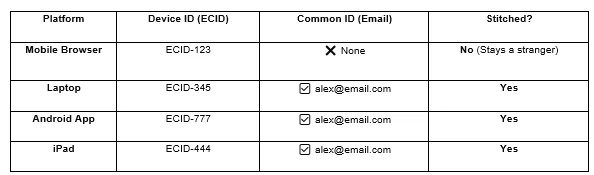
Every digital platform creates a unique ECID (device ID). Without a "bridge," Adobe treats every ECID as a different person.
- Mobile Browser: Browses anonymously (ECID-123). No login.
- Laptop: Visits (ECID-345) and logs in as alex@email.com.
- Android App: Opens app (ECID-777) and logs in as alex@email.com.
- iPad: Visits (ECID-444) and logs in as alex@email.com.
The Solution: The "Common ID" Rule
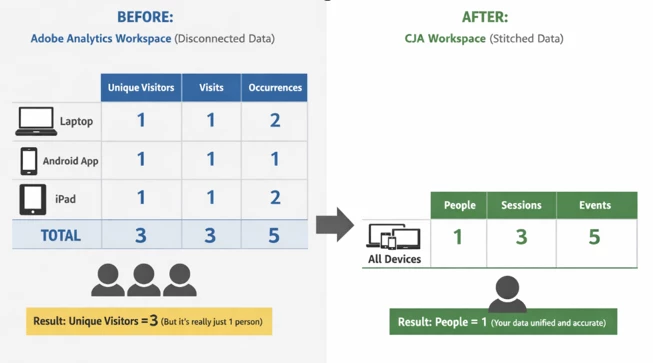
Question: How the numbers change: Adobe Analytics vs. CJA ?
Answer- Imagine Alex performs 5 total actions across those three logged-in devices. Notice how the "Visitor" count drops in CJA to reflect the real human count.
The Lesson
Stitching doesn't "lose" data—it cleans it. Your event counts stay the same, but your visitor count drops because CJA finally recognizes that 3 devices = 1 people.
To fix fragmented data, you must give users a reason to identify themselves (log in or click an email link) on every device. Without that "Common ID," your data stays in islands.
Which "Common ID" are you using to bridge your islands? Email, CRM ID, or something else?
Thanks,
Santosh Kumar