Unable to filter out "(Low Traffic)" item via "Always Exclude" field | Community
Skip to main content
September 12, 2024
Question

Unable to filter out "(Low Traffic)" item via "Always Exclude" field

  • September 12, 2024
  • 1 reply
  • 551 views

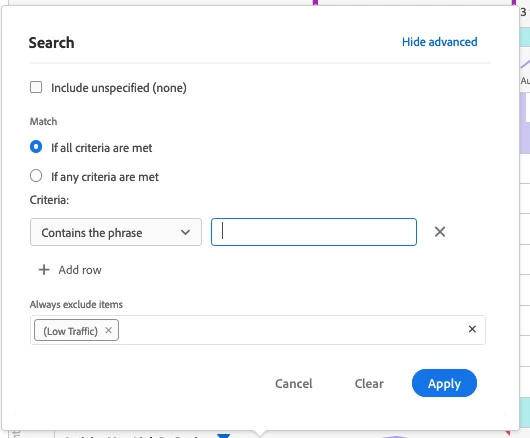
Until this past week, we were able to filter out the "(Low Traffic)" item from data tables by using the "Always Exclude" field in the advanced search mode of the filter option. Now Workspace returns an error saying "One of the segments or the search in this visualization contains a text search that returned too many results. Please narrow the text search criteria and try again."


Even if we click on the "x" next to "(Low Traffic)" in the results list, the issue persists.


This post is no longer active and is closed to new replies. Need help? Start a new post to ask your question.

1 reply

MandyGeorge
Community Advisor and Adobe Champion
September 20, 2024

Honestly, this sounds like a bug. I just tested with one of my report suites on a couple dimensions, and it did let me filter out "Low Traffic" using always exclude. I would suggest checking a couple other dimensions to see if it happens with others and have a couple different users try. If the issue persists, reach out to client care, they might be able to help you figure out why it's happening.
