Unable to edit an existing Marketing Channel classification | Community
Skip to main content
Level 2
June 23, 2022
Question

Unable to edit an existing Marketing Channel classification

  • June 23, 2022
  • 2 replies
  • 980 views

Hi,

I am trying to edit an existing Marketing Channel classification, but when I click on edit I don't get any drop down list or can view the rule set. Does anyone know how to access an existing rule set for Marketing Channels?
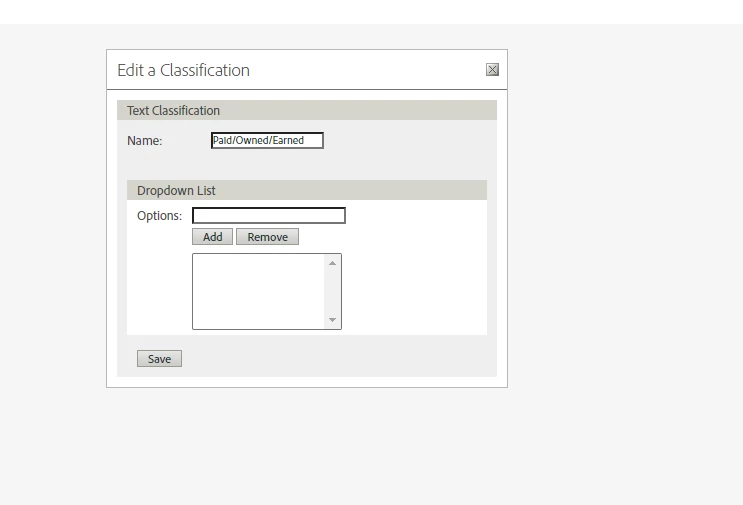


This post is no longer active and is closed to new replies. Need help? Start a new post to ask your question.

2 replies

VaniBhemarasetty
Adobe Employee
Adobe Employee
June 23, 2022

@olsson-2 You can edit the marketing channel processing rules 

  1. Click Analytics > Admin > Report Suites.

  2. Select a report suite.

    If your report suite does not have channels defined, the Marketing Channels: Auto Setup page displays.

    See Run the Automatic Setup.

  3. Click Edit Settings > Marketing Channels > Marketing Channel Processing Rules.

Here is the documentation on the same 

https://experienceleague.adobe.com/docs/analytics/components/marketing-channels/c-rules.html?lang=en


jeff_bloomer
Community Advisor and Adobe Champion
June 23, 2022

You use two terms above, "Classification" and "Rule Set."  @vanibhemarasetty  addressed editing the Marketing Channels.  If you're really trying to effect Classifications for your Marketing Channels, that will be something of a different nature. Are you bringing in data to your Marketing Channels that requires further breaking out via classifications, or are you simply just needing to send them through the Marketing Channel  Processing rules, as described below?

Olsson-2Author
Level 2
June 23, 2022

I an trying to edit an existing classification for Marketing Channel. I already have processing rules set up for Marketing Channel and the classification is based on those. But I think I may have  found the answer in using the classification importer function.

Thank you both for your quick responses!

jeff_bloomer
Community Advisor and Adobe Champion
June 23, 2022

I has a suspicion it was the former issue.  Glad you were able to find a quick answer to your problem.  Classifications are a completely separate challenge in and of themselves.  Best of luck!