Trouble tracking clicks on element CSS selector. Alternatives? | Community
Skip to main content
Level 2
November 20, 2021
Solved

Trouble tracking clicks on element CSS selector. Alternatives?

  • November 20, 2021
  • 1 reply
  • 2281 views

Hi there - 


Just trying to figure out Adobe Launch. I am looking to track clicks on a live chat button. I'm not exactly a coder but -


With the following code, is it possible to create a rule around the "class" value? Alternatively, can I use the text of the button "Live Chat"? 


<button _ngcontent-tiq-c79="" type="button" data-backdrop="false" class="chatButton"> Live Chat </button>


What I've tried already? I tried using CSS selector but it seems to be different for every button sonce we are using Angular. The "class" and text value "Live Chat" seem to be the only consistent values.


Thanks in advance.
This post is no longer active and is closed to new replies. Need help? Start a new post to ask your question.
Best answer by VaniBhemarasetty

@puckingfeachy You can create a rule for the click of an CTA in Adobe Launch. Similar to this 

Similar discussions on the similar query https://experienceleaguecommunities.adobe.com/t5/adobe-experience-platform-launch/how-to-track-the-click-button-through-launch-data-element-and/td-p/303324


Hope this helps

1 reply

VaniBhemarasetty
Adobe Employee
VaniBhemarasettyAdobe EmployeeAccepted solution
Adobe Employee
November 20, 2021

@puckingfeachy You can create a rule for the click of an CTA in Adobe Launch. Similar to this 

Similar discussions on the similar query https://experienceleaguecommunities.adobe.com/t5/adobe-experience-platform-launch/how-to-track-the-click-button-through-launch-data-element-and/td-p/303324


Hope this helps

Level 2
November 27, 2021

Hey @vanibhemarasetty VaniBhemarasetty - 

Thanks for your helpful reply!

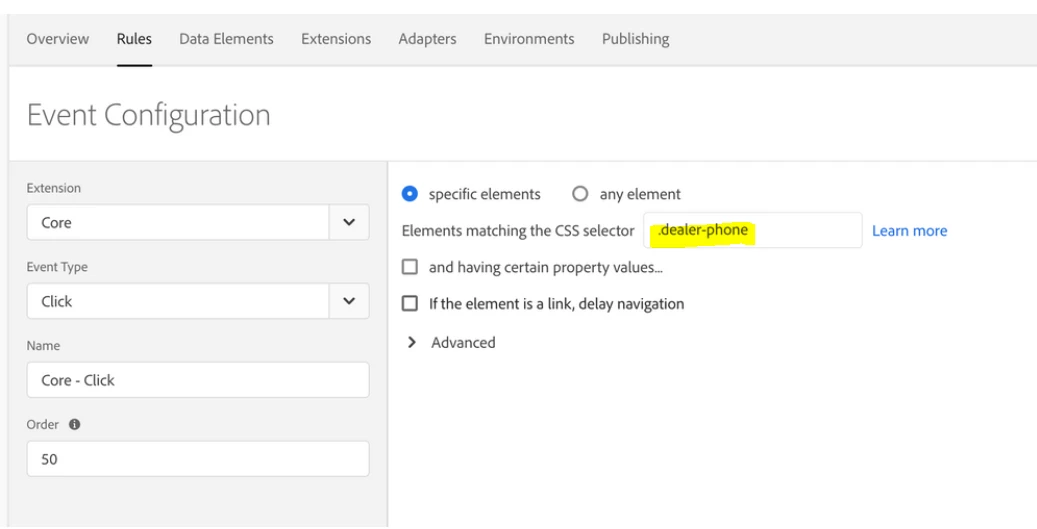
How do I know what value to put in the highlighted area?

Can I put class? id? or some other value?

For example - if I right click on my target element and go to "Inspect" - then within the "Elements" panel I right click on the code behind my target element and select "Copy" > "Selector" - I get:

#giportal > modal-container > div > div > div.modal-body > div.buttons.ng-star-inserted > button

The above seems like a lot compared tot he example you provided above.


I guess I'm curious to know how to get the "CSS Selector".

Thanks,

pfeach.

VaniBhemarasetty
Adobe Employee
Adobe Employee
November 27, 2021

@puckingfeachy You can read about it here on how to get css selector


https://amasty.com/knowledge-base/product-labels-find-css-selector.html