Tracking User Channel Transition Flow in Adobe Analytics | Community
Skip to main content
Level 2
March 31, 2026
Solved

Tracking User Channel Transition Flow in Adobe Analytics

  • March 31, 2026
  • 1 reply
  • 44 views

Hi everyone,

I have a question regarding user journey analysis in Adobe Analytics.

Is it possible to track and analyze user movement across different channels (e.g., from paid search to display, or from social to direct) within Adobe Analytics?

More specifically, I’d like to understand if there’s a way to view the flow of users based on channel transitions, rather than just single-channel attribution.

If this is possible, could you please guide me on which reports, features, or metrics (e.g., Flow, Fallout, Workspace setup) would be most suitable?

Thanks in advance!

    Best answer by Jennifer_Dungan

    Hi, 

    Cross Channel Journeys are definitely possible. Each hit in the journey will have a channel associated to it (either the value set specifically on the hit, or the persisted value).


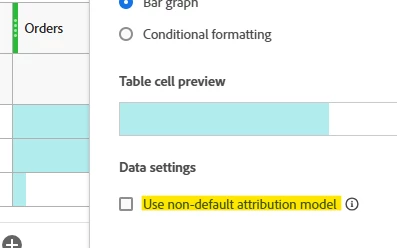
    Now, if you just want to see ALL the channels associated to a conversion, you can do so simply by accessing the column settings on your conversion (in my example, orders) and applying “Non-Default Attribution”.


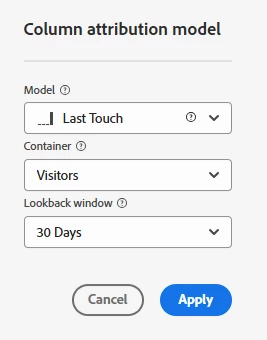
    From here, you can choose the model, scope and lookback window:


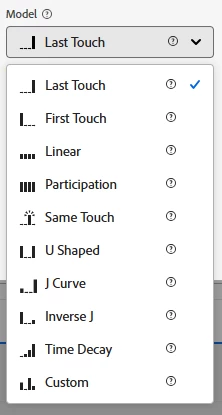
    For Cross Channel, you will want something like Participation or Linear most likely.


    Now, if you are really interested in the journey… right now, there are two options… the first is the Flow diagram… you will have to choose one specific channel as the “anchor” and you will be able to add more columns to suit your needs.


    You can also use something like the fallout report, but this requires that you specify the order of the channels you want to investigate… there is no branching.

    1 reply

    Jennifer_Dungan
    Community Advisor and Adobe Champion
    Jennifer_DunganCommunity Advisor and Adobe ChampionAccepted solution
    Community Advisor and Adobe Champion
    April 1, 2026

    Hi, 

    Cross Channel Journeys are definitely possible. Each hit in the journey will have a channel associated to it (either the value set specifically on the hit, or the persisted value).


    Now, if you just want to see ALL the channels associated to a conversion, you can do so simply by accessing the column settings on your conversion (in my example, orders) and applying “Non-Default Attribution”.


    From here, you can choose the model, scope and lookback window:


    For Cross Channel, you will want something like Participation or Linear most likely.


    Now, if you are really interested in the journey… right now, there are two options… the first is the Flow diagram… you will have to choose one specific channel as the “anchor” and you will be able to add more columns to suit your needs.


    You can also use something like the fallout report, but this requires that you specify the order of the channels you want to investigate… there is no branching.

    manpreetkaur27
    Adobe Support
    Adobe Support
    April 7, 2026

    The approach suggested by ​@Jennifer_Dungan is absolutely correct. You can use Flow with Marketing Channels to see channel paths.

    To visualize channel transitions:

    1. In Analysis Workspace, add a Flow visualization.
    2. Drag one of these dimensions into the center node:
      Marketing Channel
      Last Touch Channel
      First Touch Channel
    3. (Optional) Apply a segment like “Visits with Orders > 0” or your key success event.
    4. Expand backward and forward to see:
      Which channels precede a given channel
      Which channels users move to next

      You’ll effectively see channel‑to‑channel paths before or after a chosen channel or event.