Level 3
October 15, 2025
Solved

Track PDF opens from Google or other external sites?

  • October 15, 2025
  • 5 replies
  • 690 views

We have plenty of PDF on our website that Google has indexed. Since they don't require a password to be viewed, the visitors can view them after clicking on the Google results. If that's the only thing they do, we can't see any data on Adobe Analytics.


We are aware that having a landing page would make things much easier but, is there anyway to track these PDF views?


Thanks a lot. 

Best answer by Jennifer_Dungan

PDFs are tricky... these are an encapsulated file, not a webpage... Typically, Adobe Analytics tracks the opening of "pdfs" by tracking the click action (as a "download" type) on links that open specific files (as listed by you - there is a default list that includes pdf)
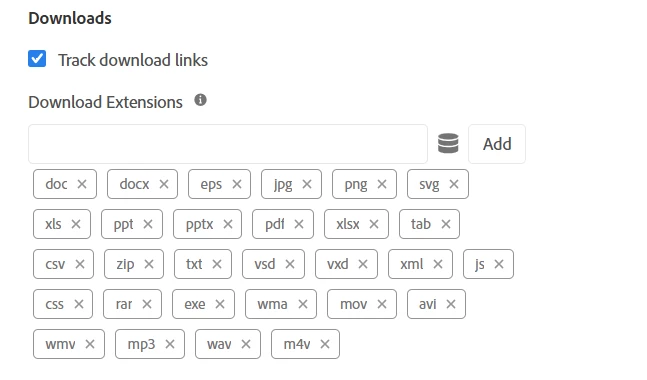


There is no tracking inside the PDF itself.


You cannot embed JavaScript inside a PDF... in theory, you could go back to the old days, and essentially create a hard code "noscript" tracking pixel to embed inside of each PDF, but this will add significant overhead on the people creating the PDFs, assuming you can even get them to reliably do this step every time.. plus having to go back and update every existing PDF in your system.


Each pixel would need to be crafted to provide enough detail to identify the file, and since it would be hard-coded with no scripting, you wouldn't be able to get any reliable UV data... and if your site has any sort of an opt-out function, you may need to check if you have any legal issues with this kind of hard-coded solution, as there would be no opt-out available....


Unfortunately, my recommendation is that this is just the nature of PDFs and you won't be able to get any data.

5 replies

Pablo_Childe
Community Advisor
Community Advisor
October 15, 2025

You could try wrap PDF in a html wrapper make it a page basically you can track regularly in Analytics.


Also Adobe has a PDF forms type product that allows you to see native PDF navigation and interactions(its seperate from Adobe Analytics).


GLTU

Jennifer_Dungan
Community Advisor and Adobe Champion
October 15, 2025

Creating a wrapper is a decent idea, but it won't get around the PDFs themselves being indexed directly by Google...


Unless this is paired with blocking your PDFs from being indexed (again, I think this needs to be a part of the PDF rendering and would require re-authoring all the PDFs)


But if you do this, do you really need a wrapper, or you just funnel traffic to the download page(s) and use the "Download Link" tracking to track which files are being accessed from your site?

Level 3
October 16, 2025

Exactly, we would still have the same problem by wrapping the PDF. The only solution I see right now is creating a landing page with information about the PDF so that page gets indexed and positioned, then making the PDF itself private so the user needs to be logged in to download. This way we would get trackable traffic to the site, but users would be forced to sign up in the site.

Jennifer_Dungan
Community Advisor and Adobe Champion
Jennifer_DunganCommunity Advisor and Adobe ChampionAccepted solution
Community Advisor and Adobe Champion
October 15, 2025

PDFs are tricky... these are an encapsulated file, not a webpage... Typically, Adobe Analytics tracks the opening of "pdfs" by tracking the click action (as a "download" type) on links that open specific files (as listed by you - there is a default list that includes pdf)


There is no tracking inside the PDF itself.


You cannot embed JavaScript inside a PDF... in theory, you could go back to the old days, and essentially create a hard code "noscript" tracking pixel to embed inside of each PDF, but this will add significant overhead on the people creating the PDFs, assuming you can even get them to reliably do this step every time.. plus having to go back and update every existing PDF in your system.


Each pixel would need to be crafted to provide enough detail to identify the file, and since it would be hard-coded with no scripting, you wouldn't be able to get any reliable UV data... and if your site has any sort of an opt-out function, you may need to check if you have any legal issues with this kind of hard-coded solution, as there would be no opt-out available....


Unfortunately, my recommendation is that this is just the nature of PDFs and you won't be able to get any data.

Devyendar
Level 6
October 16, 2025

You can track pdf in a 2 step approach.

1) Apply Server 301 redirects of all PDF links to corresponding webpages that contain pdfs (and you could additionally add nofollow tags to the links to avoid the pdf's being index directly by the search engines.

2) If you embed PDFs directly within webpages or allow them to be download the approach @jennifer_dungan provided below would also you to track all the pdf downloads in addition to the view if embedded in the page.


Alternatively, if you want the pdfs to be indexed and shown in the search results, noscript tags is the only way and it complicate the pdf creation/authoring process.

manpreetkaur27
Adobe Support
Adobe Support
May 3, 2026

Hi ​@mjdavid007 
I’m just following up to check if any of the responses helped resolve your query. If so, please consider marking it as the best answer.

Level 2
May 4, 2026

Hi David,

This is a very common scenario, and you’re right in your observation: if a user lands directly on a PDF from Google, there is no opportunity for Adobe Analytics to fire, because the file is being served directly by the web server—not through a tracked page template or tag container.

That said, you do have a few workable options depending on how much visibility you need.

Option 1: Track PDF downloads/opens (most common workaround)

Instead of tracking “page views,” you track clicks to the PDF from your website.

If users click a link like:

/docs/whitepaper.pdf

You can use Adobe Experience Platform Launch (or Web SDK/AppMeasurement) to:

  • Fire a tracking call on click
  • Send an event like event=pdfDownload
  • Store the file name/path in an eVar or prop

Limitation: This only captures users who enter via your site, not Google direct traffic.

Option 2: Server-side tracking (recommended if PDFs are critical)

If you control the server hosting the PDFs, you can log PDF requests and send data into Adobe Analytics using a server-side hit.

Typical approach:

  • Log every PDF request on the server
  • Send data via Data Insertion API or CJA/AA reporting endpoint
  • Include:
    • file name
    • timestamp
    • referrer (if available)

This is the only way to capture direct-from-Google PDF views reliably.

Option 3: Use a “tracking redirect” (best practice going forward)

Instead of exposing the raw PDF URL in Google, you serve it via a tracked URL:

/view-pdf/whitepaper → redirects to → /docs/whitepaper.pdf

This allows:

  • Full tracking in Adobe Analytics before redirect
  • Campaign/referrer capture
  • Better attribution