Level 2
May 13, 2026
Solved

Success Event on page load - impacts on bounce rate

  • May 13, 2026
  • 3 replies
  • 85 views

The website that I work on has many pages that fire multiple success events on page load in addition to the page view event. The success events are used to track component presence and don't require any user interaction. They are fired as separate hits, not bundled with the page view. The bounce rate metric is the ratio of visits that contained exactly one hit compared to the number of visits on that page. Any page that has a component present success event will not have an accurate bounce rate and indeed we see incredibly low (and unbelievable) bounce rates.

In my workspace I looked at Single Page Visits and those numbers are also unbelievably low.

We are using the Web SDK implemented via Adobe Tags. I am open to redefining bounce rate using a custom calculated metric if that is the right approach.

Curious how others with page load success events calculate bounce rates? Or are there any other metrics that can help us understand page engagement/effectiveness?

Quick freeform table with bounce rate and a few other metrics to understand engagement.
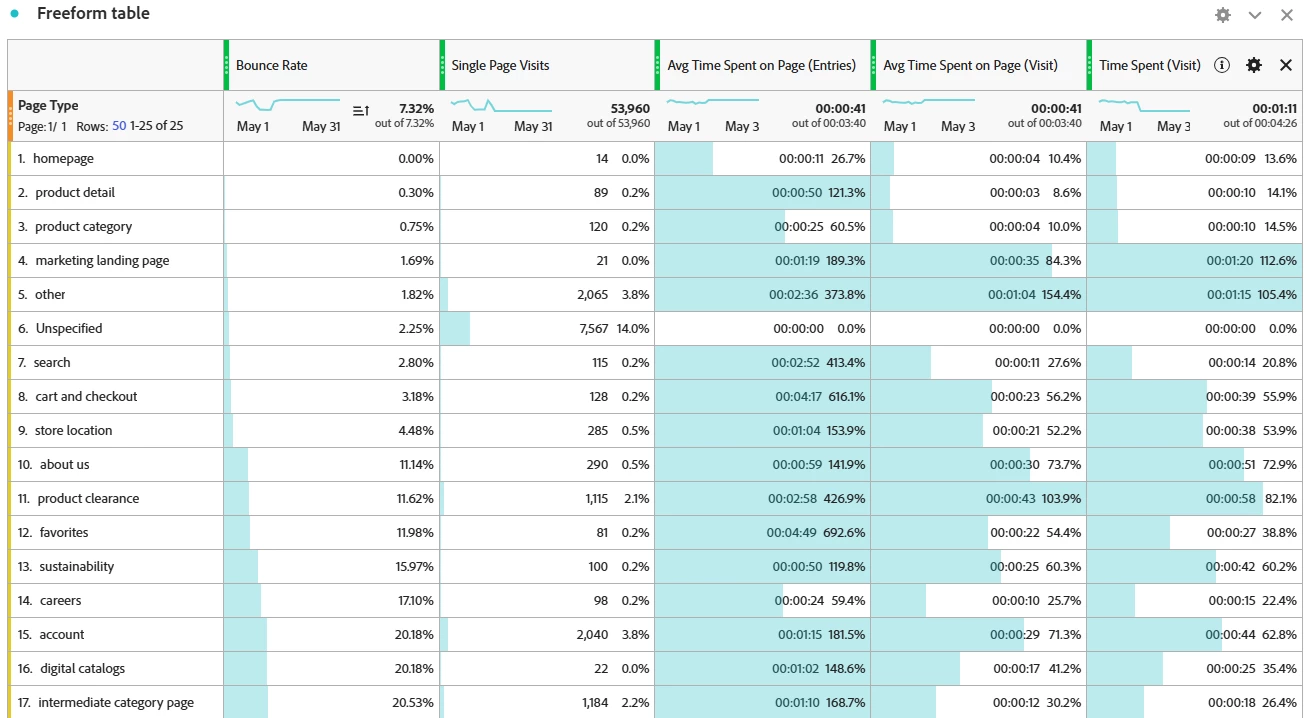
 

Thanks for any advice!

Best answer by akhil_merupula

Hi ​@msweeneyRAB ,

This is a well-known pain point when using the Web SDK with component-presence success events, and you've correctly diagnosed the root cause.


Since Adobe Analytics defines bounce rate as visits containing exactly one hit, any page-load success event fired as a separate beacon will immediately disqualify that visit from being counted as a bounce even if the user left immediately after. Your near-zero bounce rates are expected behavior, not a data quality issue.


Here are the approaches I'd recommend:


1. Custom Calculated Metric Page View-Based Bounce Rate (Best Option)
Instead of relying on the native bounce rate, create a calculated metric using:
  Visits where Page Views = 1 ÷ Total Visits

Build a segment for "Page Views equals 1" and use that as your numerator. Page views are not inflated by your component-presence success events, so this gives you a clean single-page visit rate that actually means something.


2. Use Time on Page as Your Primary Engagement Signal
Your freeform table already has Avg. Time Spent on Page (Visit) and Avg. Time Spent on Page (Entries) these are unaffected by the success event inflation. Combined with exit rate, these tell a much more accurate engagement story than bounce rate ever would for your implementation.


3. Tagging Architecture Review
If those component-presence events don't need to be standalone beacons, bundling them into the page view hit (as context data or eVars) would restore native bounce rate accuracy. This is worth a conversation with your tagging team it depends on whether you need them as separate hits for reporting purposes.


4. Avoid Custom Link Calls for This Use Case
Some teams switch component-presence tracking to s.tl() calls with linkTrackVars scoped tightly but this adds complexity and still inflates hit counts unless you explicitly exclude them from bounce rate logic.


For your immediate situation, I'd go with option 1 (calculated metric) and retire native bounce rate from your dashboards entirely. Avg. Time on Page + Exit Rate + the Page View-based bounce metric will give you a more honest view of engagement across page types.

3 replies

akhil_merupulaAccepted solution
Level 3
May 14, 2026

Hi ​@msweeneyRAB ,

This is a well-known pain point when using the Web SDK with component-presence success events, and you've correctly diagnosed the root cause.


Since Adobe Analytics defines bounce rate as visits containing exactly one hit, any page-load success event fired as a separate beacon will immediately disqualify that visit from being counted as a bounce even if the user left immediately after. Your near-zero bounce rates are expected behavior, not a data quality issue.


Here are the approaches I'd recommend:


1. Custom Calculated Metric Page View-Based Bounce Rate (Best Option)
Instead of relying on the native bounce rate, create a calculated metric using:
  Visits where Page Views = 1 ÷ Total Visits

Build a segment for "Page Views equals 1" and use that as your numerator. Page views are not inflated by your component-presence success events, so this gives you a clean single-page visit rate that actually means something.


2. Use Time on Page as Your Primary Engagement Signal
Your freeform table already has Avg. Time Spent on Page (Visit) and Avg. Time Spent on Page (Entries) these are unaffected by the success event inflation. Combined with exit rate, these tell a much more accurate engagement story than bounce rate ever would for your implementation.


3. Tagging Architecture Review
If those component-presence events don't need to be standalone beacons, bundling them into the page view hit (as context data or eVars) would restore native bounce rate accuracy. This is worth a conversation with your tagging team it depends on whether you need them as separate hits for reporting purposes.


4. Avoid Custom Link Calls for This Use Case
Some teams switch component-presence tracking to s.tl() calls with linkTrackVars scoped tightly but this adds complexity and still inflates hit counts unless you explicitly exclude them from bounce rate logic.


For your immediate situation, I'd go with option 1 (calculated metric) and retire native bounce rate from your dashboards entirely. Avg. Time on Page + Exit Rate + the Page View-based bounce metric will give you a more honest view of engagement across page types.

Level 2
May 15, 2026

Thank you ​@akhil_merupula. I created a custom metric as you described in the first option. We use a custom page view event, this was the results of us moving to Web SDK which caused inflated page views.


I created this segment for visits with one page view:
 

And here is the calculated metric:
 

Here’s the result of that calculated metric:
 

Some of the %’s are still pretty low but overall it feels more accurate, would you agree?

Level 3
May 15, 2026

@msweeneyRAB Yes, this looks much more accurate! A 47.9% overall page view-based bounce rate is completely believable for a site of this type, and the variation across page types makes intuitive sense.


Regarding the pages that still show low percentages that's actually expected and correct behavior, not a data problem. A few reasons certain pages will legitimately have low bounce rates even with this cleaner metric:


1. High-intent landing pages like cart and checkout, account, and store location naturally have low bounce rates because users arriving there almost always have a next step (they came to do something specific and continue deeper into the site).


2. Pages with mandatory navigation flows: 

 If a page requires login or redirects users to another page as part of the experience, those visits will almost never be single-page visits.


3. Entry pages vs. mid-funnel pages: Pages that rarely serve as entry points will show low bounce rates because most visits arriving there already navigated from somewhere else in the same session.


The fact that homepage is showing a higher rate than product/cart pages is actually a healthy signal  that's exactly the pattern you'd expect.


One additional refinement you could make: add Exit Rate alongside this metric for your high-traffic pages. Pages with low bounce rate but high exit rate tell a different story than pages with low bounce and low exit that combination helps you identify where users are completing journeys vs. where they're dropping off after engaging. The Avg. Time on Page columns you already have complement this nicely.


Great implementation this is a solid analytics foundation to build on.

yuhuisg
Community Advisor
Community Advisor
May 14, 2026

@msweeneyRAB , it's interesting that your Single Page Visits metric is also unbelievably low. This is because SIngle Page Visits are counted per Page dimension, regardless of link tracking hits.

In your screenshot, I noticed that the “Unspecified” value for the Page Type dimension had the largest number of Single Page Visits. Is your Page Type dimension an eVar or prop? If so, is it being set with custom links only or with page views too?

Level 2
May 15, 2026

Hi ​@yuhuisg, thanks for taking a look. Page Type is the result of a classification rule that looks at eVar and a prop. In my original post the free form table Page Type was using the evar. Does that answer your question?


MandyGeorge
Community Advisor and Adobe Champion
May 14, 2026

Although one of the comments above recommended using time on page as your engagement metric, I would NOT advise doing this. Adobe requires two hits to be able to count the time, a start time and an end time. So when you land on a page, that page call start the time. If there is a bounce/single page visit, there is no second time stamp to count as the end. Any timestamp that doesn’t have an end time doesn’t get included, so this won’t include any of your single page visits. Also, even if you do have accurate time on page information, it’s notoriously hard to interpret. Sure, someone spent 5 minutes on your page - is that because they were reading the information, scrolling, looking at stuff OR did they leave the page open while they went to get a coffee? Time metrics alone won’t tell you that.


That being said, reviewing your architecture/implementation might be a good idea. I don’t think you shared this specific screenshot when we spoke before, but I agree with ​@yuhuisg that it’s interesting page type has so many unspecified values. It would be good to understand where/how that is being set. 

Level 2
May 15, 2026

Thanks ​@MandyGeorge for weighing in and for the additional info on how time on page is set. Good call out as well on how to interpret time on page.

Below is a screenshot of our Classification Rule