Level 2
May 10, 2019
Répondu

Single & Multiple Units of specific department

Hello,

I'm trying to work out how many Orders contain a single unit of a specific department (classification from Product string), versus Orders that contain > 1 unit of a specific department.

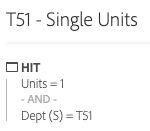
The below doesn't work for Single Units as I don't want to exclude Orders containing other Departments
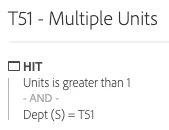
Likewise, the below doesn't work for Multiple Units - this doesn't necessarily mean there's more than 1 Unit of the desired Department, just that there's more than 1 Unit in total in the order
Any help would be greatly appreciated!

Thanks,

Jack

Ce sujet a été fermé aux réponses.
Meilleure réponse par Asheesh_Pandey

Hi Jack,

Adobe has recently released a new "Distinct Count" segmentation feature that allows building segments on counts of dimension (eVar/sProp) values. I would probably use segmentation on a distinct dimension count to solve this. Here is demo video for more details. Segmentation on Distinct Dimension Counts - YouTube

Thanks,

Asheesh

4 commentaires

Asheesh_Pandey
Adobe Champion and Community Advisor
May 14, 2019

Hi Jack,

Adobe has recently released a new "Distinct Count" segmentation feature that allows building segments on counts of dimension (eVar/sProp) values. I would probably use segmentation on a distinct dimension count to solve this. Here is demo video for more details. Segmentation on Distinct Dimension Counts - YouTube

Thanks,

Asheesh

- Asheesh
Level 2
May 14, 2019

Hi Asheesh,

Thanks for the reply. I was looking at this previously but can't work out a way for this to be applicable to my use case above - any guidance you have would be great.

Thanks,

Jack

Asheesh_Pandey
Adobe Champion and Community Advisor
May 19, 2019

Hi Jack,

I would do the following:

Create segments -

  1. "Hit" container metric "unit" equals 1
  2. "Hit" container metric "unit" is greater than 1

Use Dept(S) as dimension, apply order metric with these two segments to see order having unit or more by departments. e.g.

Dimension
Orders (metric)Orders (metric)
Dept (s)Segment (Unit equals 1)Segment (Unit greater than 1)
Dept A425
Dept B125

Thanks,

Asheesh

- Asheesh
Level 2
June 20, 2019

This still doesn't seem to get at how many orders had 2 units of a given department in the order. For example, Dept A showing 25 orders with units greater than 1 does not guarantee that the orders had 2 units from that given department. It just means that 25 orders had at least one unit from Dept A and also another unit (from Dept A or another department).

I've yet to see a way to do this with segments.