Setting up Custom Dimensions | Community
Skip to main content
August 4, 2020
Solved

Setting up Custom Dimensions

  • August 4, 2020
  • 1 reply
  • 1941 views

I'm new to Adobe Analytics, but was hoping someone could guide me in creating a few custom dimensions. I have done this in Google Tag Manager before, but never in Adobe. Does anyone have a step-by-step? Thanks!

This post is no longer active and is closed to new replies. Need help? Start a new post to ask your question.
Best answer by kainth

Hi @ashleesmith,

Generally, we have two types of custom variables in Analytics i.e. Props which have an expiration set to hit level & eVars which you can choose to expire at hit/ visit/ after days based on your requirement. You can set up the eVars & Props by going to the Report Suite Manager in the Analytics user interface. Below are the steps using which you can set up Props & eVars.

1. Go to Analytics > Admin > Report Suites.
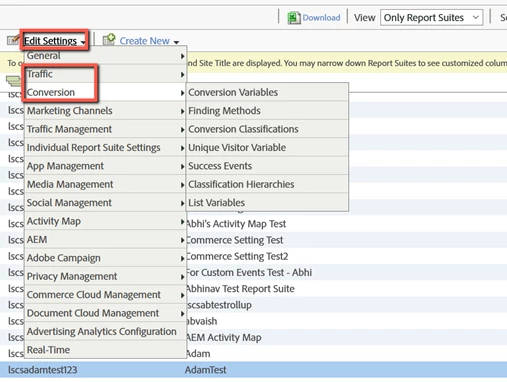
2. Select the Report Suite & then click on Edit settings menu as shown.


From this menu you can select 'Traffic' to set up Props & 'Conversion' to set up eVars.

For more information on Props & eVars you can refer to the below documentation links.


Link: https://docs.adobe.com/content/help/en/analytics/components/dimensions/prop.html

Link: https://docs.adobe.com/content/help/en/analytics/admin/admin-tools/conversion-variables/conversion-var-admin.html


Hope this helps.

Regards,

Abhinav


1 reply

kainthAccepted solution
Level 6
August 5, 2020

Hi @ashleesmith,

Generally, we have two types of custom variables in Analytics i.e. Props which have an expiration set to hit level & eVars which you can choose to expire at hit/ visit/ after days based on your requirement. You can set up the eVars & Props by going to the Report Suite Manager in the Analytics user interface. Below are the steps using which you can set up Props & eVars.

1. Go to Analytics > Admin > Report Suites.
2. Select the Report Suite & then click on Edit settings menu as shown.


From this menu you can select 'Traffic' to set up Props & 'Conversion' to set up eVars.

For more information on Props & eVars you can refer to the below documentation links.


Link: https://docs.adobe.com/content/help/en/analytics/components/dimensions/prop.html

Link: https://docs.adobe.com/content/help/en/analytics/admin/admin-tools/conversion-variables/conversion-var-admin.html


Hope this helps.

Regards,

Abhinav