serialization event is not showing data in Analytics workspace | Community
Skip to main content
Level 2
October 28, 2025
Solved

serialization event is not showing data in Analytics workspace

  • October 28, 2025
  • 2 replies
  • 215 views

I’ve implemented a serialized event (e.g., event1=1) designed to trigger once per visit, and I’ve verified that it is firing correctly during the analytics call. However, the data does not appear to be populating in Adobe Analytics Workspace.
Could you please help identify the cause of this issue?
Thanks in advance!

Best answer by Jennifer_Dungan

There are several settings for events... 


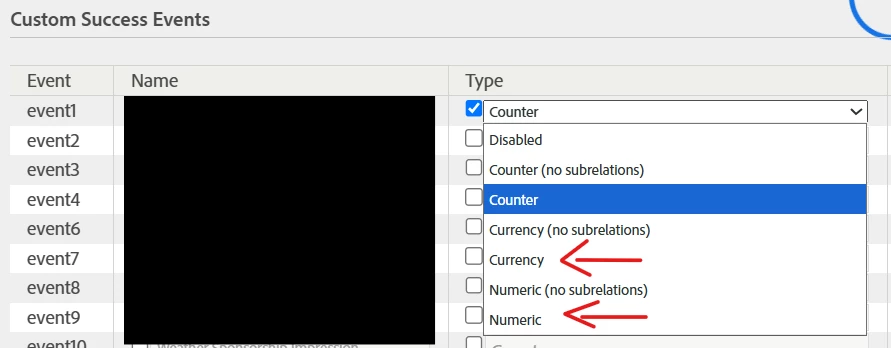
"event1=1" needs to be used with a numeric or currency (not "counter") event


You need to make sure that your event is not set to "counter", as counter is not expecting a value to be passed.


Also, are you sure you are using "Serialized" event? Or are you using "Record Once per Visit"?
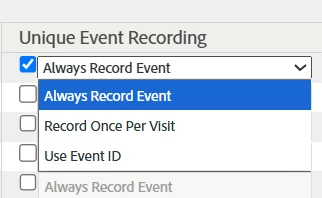
 

Serialized refers specifically to the "Use Event ID", where you pass a unique serial number to the event (i.e. "event1:12345"), and anything with a matching id, within the history of tracking will be ignored as a duplicate. If Adobe sees "12345" again, it won't count the event ever again, from any user.


If you have a serialized numeric event, you would need to pass both the value to increment the event on, as well as a unique serial number (i.e. "event1:12345=1")


From the context of your example, I am assuming that you are trying to use a numeric incrementation, using the standard "Record Once per Visit" logic (not serialization).


I suspect that you haven't configured the event to be numeric, and that is causing issues with Adobe trying to process the information, resulting in the event being thrown out as invalid.


Can you double check the setup of your event, and ensure that the event is set up to receive a passed value for incrementation?

2 replies

nilotpal
Adobe Employee
Adobe Employee
October 28, 2025

Please ensure that this event contains unique value across visitors for your report suite. If you need specific help in troubleshooting what was sent in your test hits, consider logging a ticket with Analytics support team.

Jennifer_Dungan
Community Advisor and Adobe Champion
Jennifer_DunganCommunity Advisor and Adobe ChampionAccepted solution
Community Advisor and Adobe Champion
October 29, 2025

There are several settings for events... 


"event1=1" needs to be used with a numeric or currency (not "counter") event


You need to make sure that your event is not set to "counter", as counter is not expecting a value to be passed.


Also, are you sure you are using "Serialized" event? Or are you using "Record Once per Visit"?


Serialized refers specifically to the "Use Event ID", where you pass a unique serial number to the event (i.e. "event1:12345"), and anything with a matching id, within the history of tracking will be ignored as a duplicate. If Adobe sees "12345" again, it won't count the event ever again, from any user.


If you have a serialized numeric event, you would need to pass both the value to increment the event on, as well as a unique serial number (i.e. "event1:12345=1")


From the context of your example, I am assuming that you are trying to use a numeric incrementation, using the standard "Record Once per Visit" logic (not serialization).


I suspect that you haven't configured the event to be numeric, and that is causing issues with Adobe trying to process the information, resulting in the event being thrown out as invalid.


Can you double check the setup of your event, and ensure that the event is set up to receive a passed value for incrementation?