Selected Date Problems | Community
Skip to main content
June 29, 2021
Solved

Selected Date Problems

  • June 29, 2021
  • 2 replies
  • 915 views

Hello! I am new in Adobe Analytics.


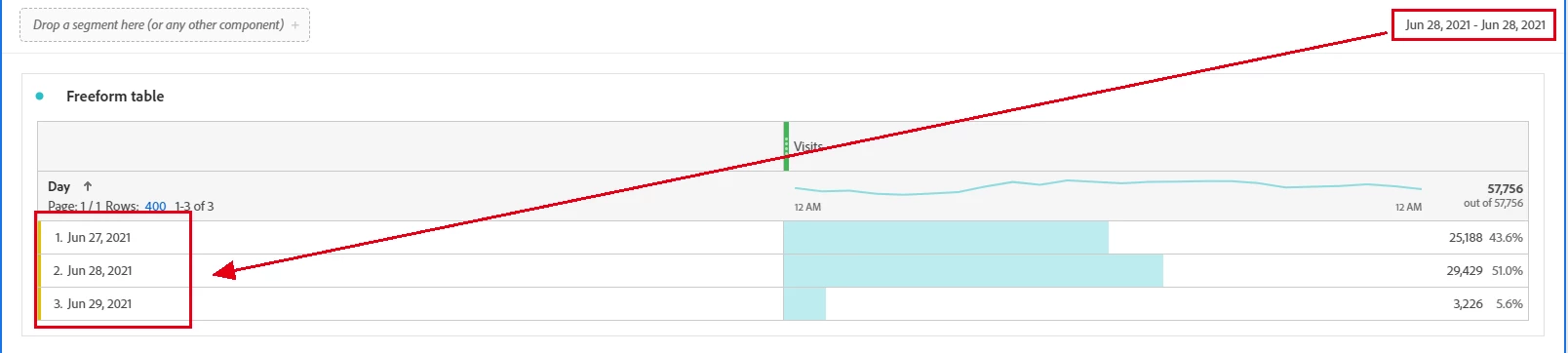
We found that the DAY Dimension of data presented is not what we selected.

It's the first time we met this problem since Sep-20, and we have no idea what happen.

Now it has caused strange feedback of VISITs (x2) from paid search each day.

So what might cause this problem and how could we solve it?


Thanks!
 

This post is no longer active and is closed to new replies. Need help? Start a new post to ask your question.
Best answer by vidurb80577666

@shi06,

This was a bug which has been fixed like a few days back. I hope it has been resolved at your end as well. 

2 replies

Level 7
June 29, 2021

@shi06 Top Date range is overriden when you manually drag and drop the date values from Left Pane to Freeform table in workspace or when a Custom Date Range built in Date Range builder is used as a segment. Have you used any Custom Date range builder as a segment on top in Free form table panel ?

How this issue was rectified back in Sep 20 ? Is it a Report Suite specific or facing this in every report suite ?

vidurb80577666Adobe EmployeeAccepted solution
Adobe Employee
July 6, 2021

@shi06,

This was a bug which has been fixed like a few days back. I hope it has been resolved at your end as well.