Okay, I actually do stuff like this all the time (I use my own custom tables rather than fallouts because I can then break them down by day / week / month and see how the flows are comparing over time).
So I can see that you are in fact wanting to see B separate from C, and separate from D, etc... so let's start with Page A
Page A would be a Simple Hit level segment:
HIT
Page equals Page A
Now, let's look at the "From Page B Segment"
First off, you need to use a sequence, which means that you have to use some Visit level logic in your segment. Now, while I don't see "Page Views" in your table, I am going to go the extra mile to make sure that IF you add Page Views as a column, that the segment will only return Page B in the context (and not all pages within the visit)
HIT
Page equals Page B
AND
VISIT Container [
Page equals Page A
THEN within 1 Page View
Page equals Page B
]
Basically, this segment will pull back only hits on Page B, where the VISIT has the sequence of Page A followed directly by Page B.
This may still return a few extra Page B page views if Page B was hit multiple times in the Visit, but the risks should be fairly low (and right now, you aren't looking for Page Views)
If you just want the simple Sequence (not caring about Page Views for Page B), you can just use:
VISIT
Page equals Page A
THEN within 1 Page View
Page equals Page B
As this won't change your VIsits or Unique Visitor counts.
You can create the same segments for Pages C and D, etc
Once you create your Freeform table, you can stack your segments with your metrics like so:

Then you can create ad hoc calculated metrics by selecting the metrics (and segment) and right clicking to "Create Metric from Selection", then choose "Divide"
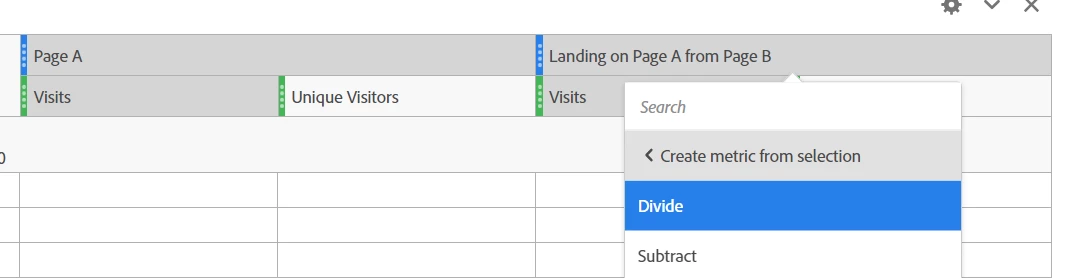
After you make it, you can edit it to adjust the name, display as Percent, and make sure the math was done in the correct order.
Please note, sometimes when you have multiple metrics stacked under a single segment, the Create Metric from Selected will use the first metric instead of the selected one... if that happens, just temporarily move stuff around to make it one metric per segment until you've made the calculated metric, then put it back... Or create a whole copy of the table to make the calculated metrics in, then drag those back up into the proper table... then delete the temp table when you are done.
Hope this helps 🙂