Segment for New Users | Community
Skip to main content
Level 2
June 18, 2025
Solved

Segment for New Users

  • June 18, 2025
  • 3 replies
  • 995 views

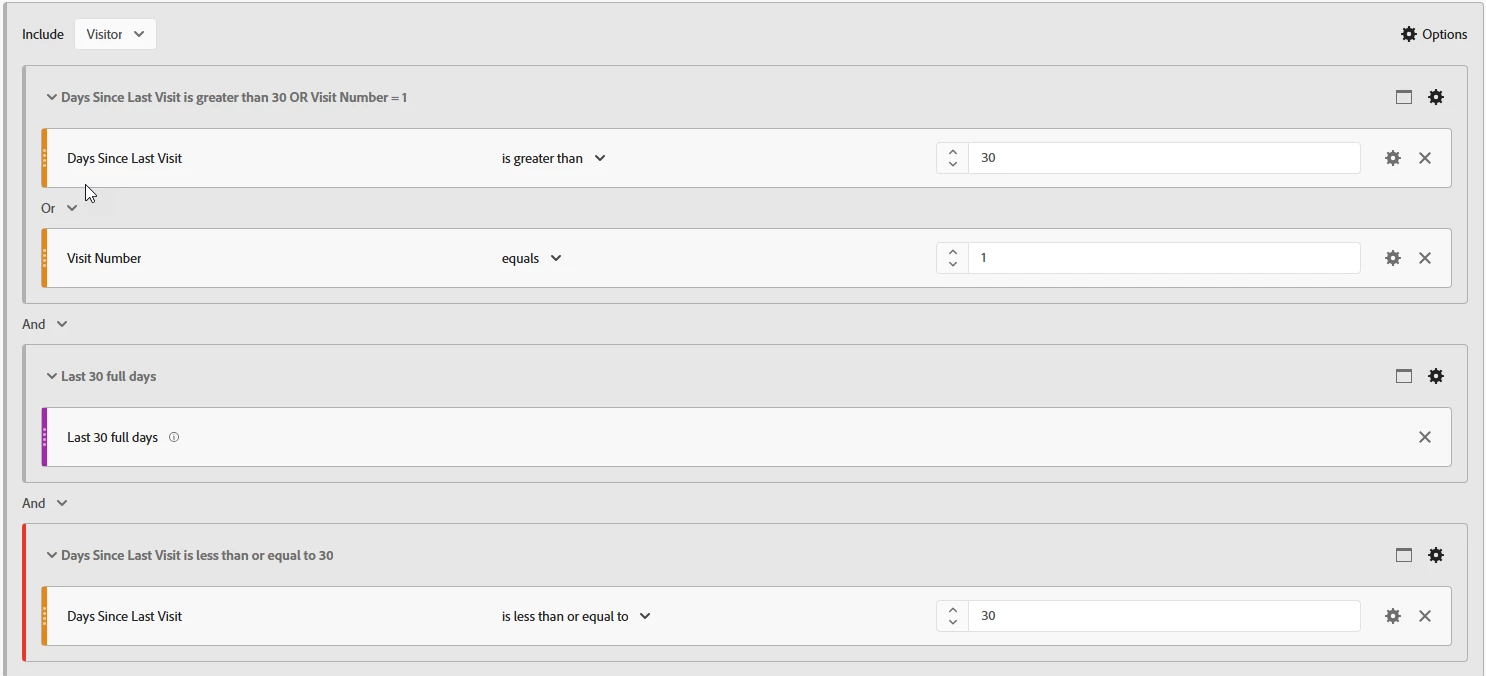
Hello.  I'm trying to create a segment for new users to our site however it keeps pulling in existing users.  This is the segment I am using, which I got from an Adobe tutorial.  I'd like to see all new users within the last 30 days regardless of whether they have only visited once or more.  Any help would be much appreciated.  


Best answer by Jennifer_Dungan

Maybe I am!  Ultimately I just want to be able to have a segment of users that have started using the site for the first time and any return visits since over a certain time frame e.g. last 30 days.  So for example if John Smith started using the site on 1st June and he came back again on 14th and 15th, he should be in the list.  If it means separate segments then that's fine.  I just thought Adobe might have had a way to do this but seems it's not so straight forward.


For reference, this is how the non-overlapping works in my segments:

Scenario Include in New Users Include in Repeat Users
Visit 1 (Net New User) Only Yes No
Visit 1 (Net New User) + Additional Visits in Time Frame No Yes
Returned to Site After More than a Month (one visit only) Yes No
Returned to Site After More than a Month + Additional Visits in Time Frame No Yes


We consider anyone who hasn't been to the site in over a month, then returns as "New" within the 30-day period... however, in that same 30-day time frame, if they come back, they are treated as "Repeat".


From the sounds of it, you aren't concerned about having non-overlapping groups; and so I think you would just need something like this:
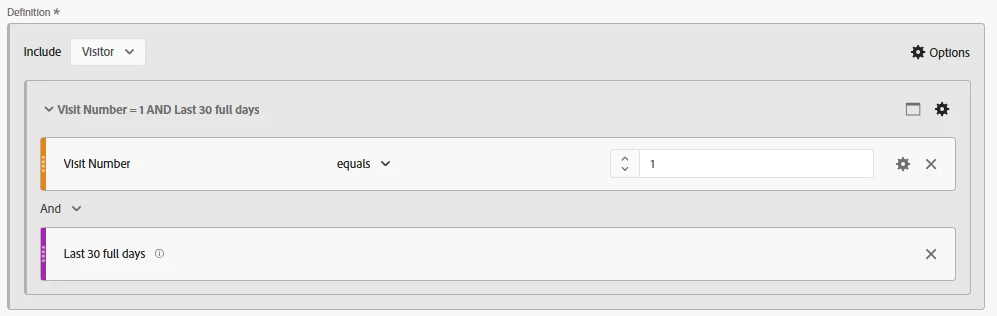
 

Basically, just grab all Visitors who had their First Visit in the last 30 Days...  
 

3 replies

Josh Stephens
Community Advisor
Community Advisor
June 18, 2025

Hi @tthmx9 

In your first container, you have OR between your two conditions. This means it'll look for visitors to meet either condition. And I notice that the first condition (days since last visit > 30 days) contradictors your last condition (days since last visit are <=30 days).

If you use a segment or ad hoc visitor-based segment with visit number = 1 and a date range of last 30 full days, I believe you'll get what you're wanting to see.

DanIMS1
Level 3
June 18, 2025

Hi @tthmx9,
If you only want to see the visits for those users change the segment to the following, the first part will show you the visits of those new users who haven't seen the site before. 
The second part will then show you the visits for those users who haven't been to the site in 30 days (the exclude part is optional but is just a fallback incase something dodgy happens). 
If you want to know the number of users who fall under this segment then use it with the unique visitors metric. That will give you the number you want. 
This will just show you the data for those first time vistis and first time returning in 30 days visits. 

Jennifer_Dungan
Community Advisor and Adobe Champion
June 18, 2025

The logic you are using is based on my Rockstar tips showing how to get non-overlapping groups of new and repeat users... the logic is supposed to removed users who repeated within the last 30 days so that they would appear in the "Repeat Group" only (thus being non-overlapping).


However, you missed a critical part of the logic... your exclusion container needs to be set to a Visitor Scope... not Hit.


If you make that change, then you will not be getting the users who came back to the site within the 30 Day Time Frame.


Also note, these segments should be used with a panel range of "Last 30 Full Days" so that the logic of the segment matches the period you are reviewing.

tthmx9Author
Level 2
June 19, 2025

Thank you for your reply, yes it was your tutorial!  Not sure what I'm doing wrong, perhaps it's my set up in Adobe but none of the users are new users.  There's over 2000 and their usage goes back a few months.  When I change it from Hit to Visitor scope I then get 0.


Jennifer_Dungan
Community Advisor and Adobe Champion
June 19, 2025

Don't use "Distinct Count" in the Exclusion container... just a normal "Is less than or equal to"