Segment Description on Information Hover (Analytics Workspace) | Community
Skip to main content
jeff_bloomer
Community Advisor and Adobe Champion
July 1, 2025
Solved

Segment Description on Information Hover (Analytics Workspace)

  • July 1, 2025
  • 2 replies
  • 781 views
Field Description
What product are you using? Adobe Analytics
What area of the product are you using? Segments - Descriptions
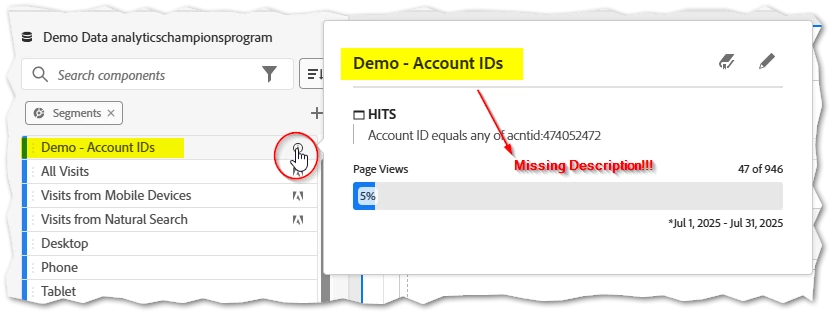
What are you trying to achieve? I am attempting to display segment descriptions upon information hover in Adobe Analytics workspace
What’s the problem or error? Based upon my memory of past performance in Adobe Analytics, it was originally possible to hover over the information icon to view the description of any segment.  Currently, this has changed to only show top initial values and no longer provides any description like it did in the past.
What have you tried so far? I have attempted to go back and find old screenshots, but I no longer have the old laptop I used to use that could prove this.  I don't believe this is a false memory, either, because we've depended upon the information icon to demonstrate information about segments and other components in the past.  It's what makes the information valuable!  Please do not incentivize our users to NOT provide descriptions even more!!
Environment / Version Adobe Analytics - June 2025 Release
Screenshots / Videos / Logs / Code See Below

This post is no longer active and is closed to new replies. Need help? Start a new post to ask your question.
Best answer by FarazHusain

Hey @jeff_bloomer @jennifer_dungan We have logged a bug for this issue. You can log a support ticket, and we can share the JIRA ID for reference. It seems something changed with the new UI release.

2 replies

pradnya_balvir
Community Advisor
Community Advisor
July 1, 2025

Hi @jeff_bloomer ,


The Segment Description is missing when you hover over a segment name in Adobe Analytics Workspace, it usually relates to how the segment was created or saved.


Root Cause:

No Description Was Entered When Saving Segment

  • When a segment is created or edited, there is an optional "Description" field.

  • If left blank, nothing will show on hover in Workspace.

You’re Not the Owner or Lack Permissions

  • If a segment was shared with you and you don’t have View or Edit rights to the full definition, you may not see the description.

Workspace UI Caching

  • Sometimes, Workspace doesn’t refresh segment metadata properly

Recommendation:


  • Always fill in the description field when creating or editing segments.

  • Use consistent naming + description formats so teams can understand segments quickly.


Jennifer_Dungan
Community Advisor and Adobe Champion
July 1, 2025

@pradnya_balvir, I'm having the exact same issue as @jeff_bloomer.


I am the admin for the entire system, and segments that I created that definitely have descriptions are not being shown in the information panel:


Despite there being a description:

I am sure that this a bug that was introduced around the same time as when the information panel stopped showing the segment logic... that's been fixed, but the missing description wasn't.

FarazHusain
Adobe Employee
FarazHusainAdobe EmployeeAccepted solution
Adobe Employee
July 1, 2025

Hey @jeff_bloomer @jennifer_dungan We have logged a bug for this issue. You can log a support ticket, and we can share the JIRA ID for reference. It seems something changed with the new UI release.

jeff_bloomer
Community Advisor and Adobe Champion
July 1, 2025

Hi @farazhusain,
I'm new enough here to not be able to submit a support ticket.  If it's possible for you to send that to the email address tied to this account, I would appreciate it.  I believe @jennifer_dungan can submit one on her end.
Thanks, and I look forward to this issue being fixed!

FarazHusain
Adobe Employee
Adobe Employee
July 1, 2025

Hey @jeff_bloomer, No worries, as soon as this is fixed or whatever the outcome is, I will update this thread with the information.