Michael_Soprano
Level 10
May 26, 2026
Question

Segment - container

  • May 26, 2026
  • 2 replies
  • 28 views


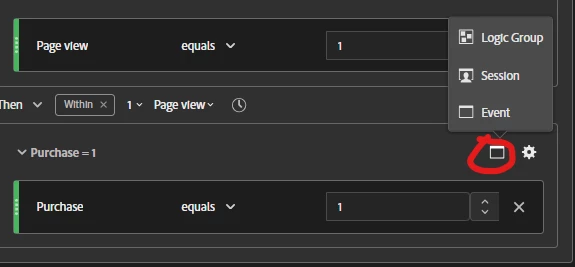
How would you explain the container levels:

  1. session  - pretty straight forward - separate session 
  2. event - is it required to have separate container for that if we use event?
  3. logic group - what is that?


2 replies

Jennifer_Dungan
Community Advisor and Adobe Champion
May 26, 2026

logic group = “something weird” lol


Logic Group takes the place of Visitor (in AA) or Person (in CJA) when the THEN operator is in use.


According to the documentation in AA (https://experienceleague.adobe.com/en/docs/analytics/components/segmentation/segmentation-workflow/seg-sequential-build#logic-group):

“Logic Group enables you to group conditions into a single sequential segment checkpoint. As part of the sequence, the logic defined in the container identified as Logic Group is evaluated after any prior sequential checkpoint and before any following sequential checkpoint.”


The description is basically identical on the CJA documentation (https://experienceleague.adobe.com/en/docs/analytics-platform/using/cja-components/segments/seg-sequential-build#logic-group)


I am not sure why Visitor is replaced by it, instead of just adding it as an option… but I guess because a logic group already acts at the visitor level, there was no need to add both?

MandyGeorge
Community Advisor and Adobe Champion
May 27, 2026

The logic container only comes into use when you have a sequential segment. ​@Jennifer_Dungan was mostly correct. What the logic container does is it takes the place of the level of the main segment, whatever that is. So yes, if your main segment is at a visitor level, it will replace visitor (or person in CJA). But if your main segment is at a visit level, it will replace visit (or session in CJA).


From my understanding, because when you build a segment it looks “within” whatever level you have. So a visit level segment is looking within the visit for condition A then condition B. But if you have a container with it that is at the same level, it sort of breaks the logic. If you’re looking within a visit for a visit (with A and B) then condition C, it could get a bit wonky. The creation of the logic group helps fix that wonky logic so that you can have multiple conditions in any order before/after another condition. 

Jennifer_Dungan
Community Advisor and Adobe Champion
May 27, 2026

Yes, sorry, I said it was at Person/Visitor level above, because in the screenshot, “Session” was still available as an option… meaning that in that case, Logic Group was at that Person level.