Secure Cookies? HttpOnly; secure | Community
Skip to main content
Level 4
June 6, 2019
Solved

Secure Cookies? HttpOnly; secure

  • June 6, 2019
  • 7 replies
  • 10941 views

Hello,

our servers are prepared for transaction testing.

Now the IT department said we need to switch the cookie from Adobe Analytics/ Adobe Tag Manager to Secure.

It's about the following:

Set cookie: CookieName=value; path=/; HttpOnly; secure

Quelle:

https://en.wikipedia.org/wiki/Secure_cookie

https://wiki.selfhtml.org/wiki/Grundlagen/sichere_Cookies

How do I set the cookie to Secure?

Example

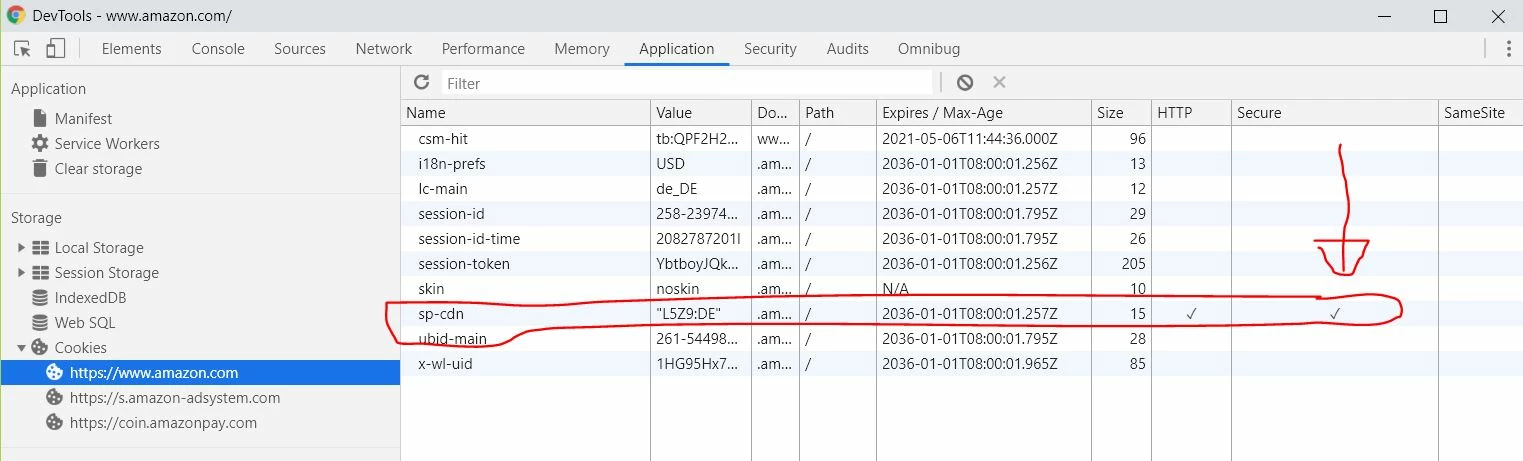
At Amazon, some cookies go as safe.

This post is no longer active and is closed to new replies. Need help? Start a new post to ask your question.
Best answer by vitalin58577727

Solutions

Many thanks to everyone together,

One of them was to overwrite all cookies.

function setCookieSecure(name,value,days,domain) {

var expires = "";

if (days) {

var date = new Date();

date.setTime(date.getTime() + (days*24*60*60*1000));

expires = "; expires=" + date.toUTCString();

}

document.cookie = name + "=" + (value || "")  + (expires || "") + "; path=/; domain=" + domain +"; secure";

}

var unsecureCookies = [

{

'matchNameRgxp' : new RegExp( '^AMCV_.*$' ),

'expire' : 731

},

{

'matchNameRgxp' : new RegExp( '^AMCVS_.*$' ),

'expire' : null

},

{

'matchNameRgxp' : new RegExp( '^tp$' ),

'expire' : null

},

{

'matchNameRgxp' : new RegExp( '^adb_mc$' ),

'expire' : null

},

];

if (document.cookie && document.cookie != '') {

var domain = window.location.hostname;

domain = domain.replace(/(www2|www)?/i, '');

var split = document.cookie.split(';');

for (var i = 0; i < split.length; i++) {

var name_value = split[i].split("=");

name_value[0] = name_value[0].replace(/^ /, '');

var cookieName = name_value[0];

var cookieValue = name_value[1];

for (var j = 0; j < unsecureCookies.length; j++) {

var unsecureCookie = unsecureCookies[j];

if( cookieName.match( unsecureCookie.matchNameRgxp ) ) {

setCookieSecure(cookieName, cookieValue, unsecureCookie.expire, domain);

}

}

}

}

The upper solution overwrites all cookies, from Adobe.

And a solution sent to me by the Adobe team.
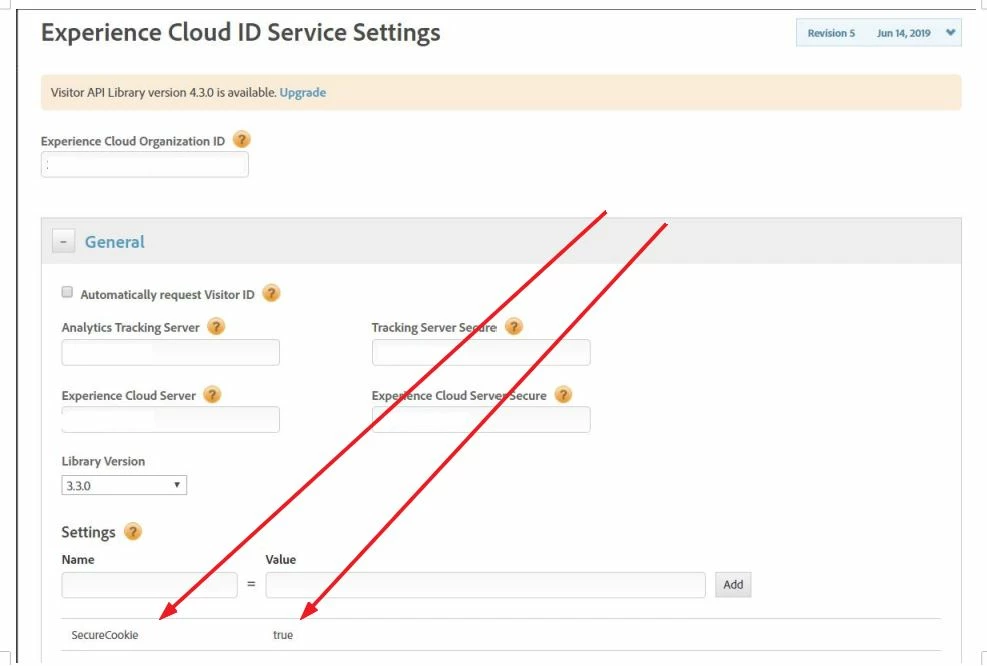
Das sollte funktionieren.
7 replies

Asheesh_Pandey
Community Advisor
Community Advisor
June 6, 2019

Hey Vitalin,

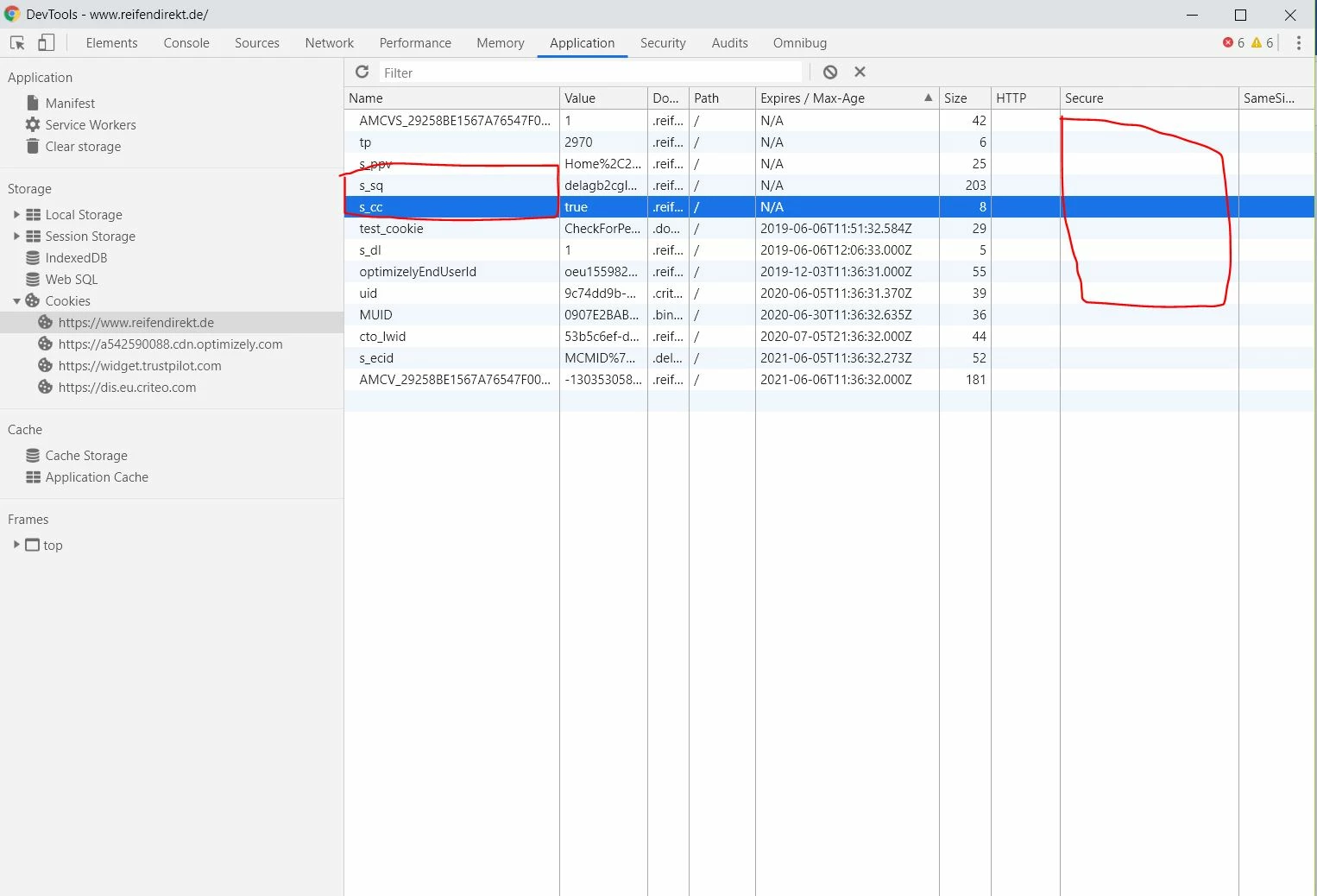
This s_sq cookie is for activity map (the previous link clicked) and s_cc is to read by the JavaScript code to determine if cookies are enabled.

Here is more info - Analytics Cookies

Thanks,

Asheesh

- Asheesh
pradeep_07
Level 4
January 14, 2021
anyone know how to set http to secure ? is that possible at all ?
Level 4
June 7, 2019

Hello community,

I received the following answer from Adobe Team.

I would like to implement the code, but unfortunately I don't know where the Marketing ID is?

Is this the Marketing Cloud ID?

And where do I have to implement the code?

var visitor = Visitor.getInstance("2924444444444444444444@AdobeOrg",{

        //Set secure cookie property

        secureCookie: true

});

Do I have to implement the code here?

Thank you in advance

Vitali

Asheesh_Pandey
Community Advisor
Community Advisor
June 7, 2019

That's correct you need to implement suggested code in this section, You can find your org id in experience cloud landing page. Find your ord ID

- Asheesh
Level 4
June 12, 2019

I have now integrated the function as follows.

Did someone look over it and say if that's OK?

Thank you in advance

Asheesh_Pandey
Community Advisor
Community Advisor
June 12, 2019

looks good to me ..thanks! once done check cookie in application tab to find it is being set as secure now.

- Asheesh
vitalin58577727AuthorAccepted solution
Level 4
June 17, 2019

Solutions

Many thanks to everyone together,

One of them was to overwrite all cookies.

function setCookieSecure(name,value,days,domain) {

var expires = "";

if (days) {

var date = new Date();

date.setTime(date.getTime() + (days*24*60*60*1000));

expires = "; expires=" + date.toUTCString();

}

document.cookie = name + "=" + (value || "")  + (expires || "") + "; path=/; domain=" + domain +"; secure";

}

var unsecureCookies = [

{

'matchNameRgxp' : new RegExp( '^AMCV_.*$' ),

'expire' : 731

},

{

'matchNameRgxp' : new RegExp( '^AMCVS_.*$' ),

'expire' : null

},

{

'matchNameRgxp' : new RegExp( '^tp$' ),

'expire' : null

},

{

'matchNameRgxp' : new RegExp( '^adb_mc$' ),

'expire' : null

},

];

if (document.cookie && document.cookie != '') {

var domain = window.location.hostname;

domain = domain.replace(/(www2|www)?/i, '');

var split = document.cookie.split(';');

for (var i = 0; i < split.length; i++) {

var name_value = split[i].split("=");

name_value[0] = name_value[0].replace(/^ /, '');

var cookieName = name_value[0];

var cookieValue = name_value[1];

for (var j = 0; j < unsecureCookies.length; j++) {

var unsecureCookie = unsecureCookies[j];

if( cookieName.match( unsecureCookie.matchNameRgxp ) ) {

setCookieSecure(cookieName, cookieValue, unsecureCookie.expire, domain);

}

}

}

}

The upper solution overwrites all cookies, from Adobe.

And a solution sent to me by the Adobe team.

Das sollte funktionieren.
sonalid49327489
Level 2
December 18, 2020

Hi, trying to implement the same way you did trhough custom code, couldn't set secure attribute. I'm setting few cookies through s.getPreviousValue, s.getNewRepeat plugins . Is there something I need to do further

Gigazelle
Adobe Employee
Adobe Employee
April 29, 2020

A recent update to AppMeasurement now allows this attribute natively. Check out the writeSecureCookies variable:

https://docs.adobe.com/content/help/en/analytics/implementation/vars/config-vars/writesecurecookies.html

pradeep_07
Level 4
January 6, 2021
@gigazelle I did check the securecookies checkbox and added the custom code . But I still see cookies like AMCV and AMCVS are not sucured.