Scroll Rate for Page Dimension in Report | Adobe Higher Education
Skip to main content
Level 4
March 28, 2021
解決済み

Scroll Rate for Page Dimension in Report

  • March 28, 2021
  • 2 の返信
  • 2541 ビュー

Here I need have metric i.e.scroll rate, so I have created numeric event for scroll rate. 

So, for this I have used below plugin code and assigned it to prop and event8. 
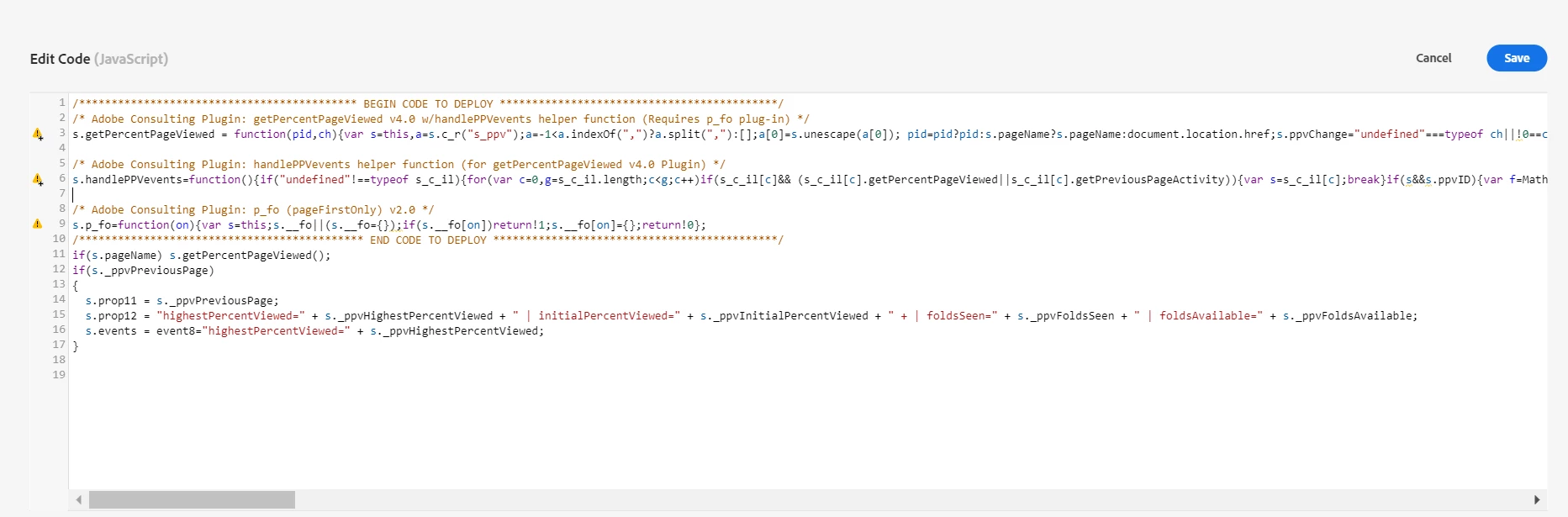
 

When I checked in debugger tool, the event is coming properly with the value, but no data is shown in the AA reports. Please suggest the any solution. As I am beginner and new to tool.


Thanks!!

このトピックへの返信は締め切られました。
ベストアンサー yuhuisg

I re-read your s.events line in your original post's screenshot, and realised that there's another error: the "event8" isn't within the string itself.

Your s.events string should be like this:

s.events = "event8=" + s._ppvHighestPercentViewed;


2 の返信

yuhuisg
Community Advisor
Community Advisor
March 29, 2021

In your event8, you should be tracking the number only. You should not include the "highestPercentViewed=" string.

Level 4
March 31, 2021
yuhuisg
Community Advisor
yuhuisgCommunity Advisor回答
Community Advisor
April 2, 2021

I re-read your s.events line in your original post's screenshot, and realised that there's another error: the "event8" isn't within the string itself.

Your s.events string should be like this:

s.events = "event8=" + s._ppvHighestPercentViewed;


Level 4
April 2, 2021
Thanks @yuhuisg. It worked.