Scroll data appears to be abnormal. | Community
Skip to main content
Level 2
October 27, 2023
Question

Scroll data appears to be abnormal.

  • October 27, 2023
  • 1 reply
  • 1166 views

I set the configuration to 80, 95, and 100 percent.

The call volume at 95% is higher than at 80%.

I can't figure out why this is happening.
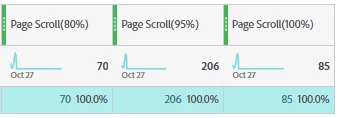
 

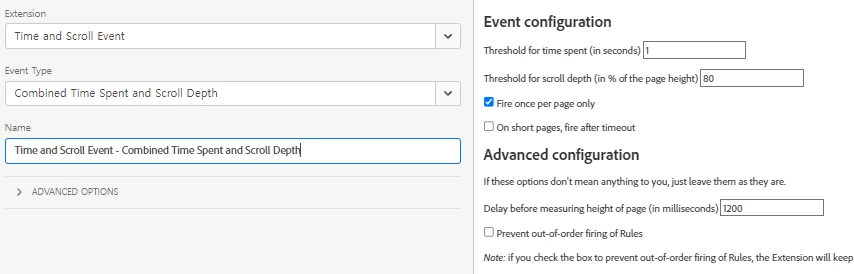
I set up three rules with only percentage changes.


This post is no longer active and is closed to new replies. Need help? Start a new post to ask your question.

1 reply

Jennifer_Dungan
Community Advisor and Adobe Champion
October 27, 2023

There is a 1 second threshold according to your screenshots.. are you sure that people aren't just scrolling past the 80% "marker" on the page and not tracking that? 


Depending on your site, if you have a lot of small pages, this could be a very easy scenario to have, where the threshold is small and easy to bypass, possibly even seeing both 95% and 80% at the same time and the extension defers to the larger of the two triggers?


This isn't an Adobe extension, but rather something that was coded by a consultant... I haven't used this extension myself, but if I were you, I would do some in-depth testing... on large pages, small pages, medium pages... try scrolling fast, try scrolling slow.. 


Using some debugger that lets you see when which triggers are being fired (using the debug log in the console)

// Turn on Debugging _satellite.setDebug(true); // Turn off Debugging _satellite.setDebug(false);


And the Adobe Platform Debuggers, or Omnibug, or both.... really look at what is happening when you try to use the site as a user.


The other possibility could be the way your site loads... if the page loads small first, then expands as the content loads in, it's possible that the small version of the page is triggering the 95% or 100% scroll depths at the beginning of the load...


Even navigating the site via the "Back" function, could be returning user to the bottom  (their last scroll depth) of the page and triggering tracking (the lower scroll depths weren't actually passed in this scenario).


There could be a lot of things happening.

jkleeAuthor
Level 2
October 28, 2023

I have confirmed that both when scrolling slowly and quickly, all the calls at 80%, 95%, and 100% are triggered on Omnibug.

I only observed 80% calls when I pressed the back button.

It seems that OmniBug is working as intended.

Before setting it to 95%, the data for 100% was more than twice that of 85%.

However, when I set it to 95%, the 100% decreased, and the 95% became significantly higher.


Jennifer_Dungan
Community Advisor and Adobe Champion
October 28, 2023

That is weird then...


As I said, this isn't an "official" plugin, but a user generated one... I don't know how it was coded, or if it works on most sites but not all (there are a lot of tech bases out there and a lot of different ways that websites are coded)... this is why testing how any plugin (Adobe or User Generated) is always in your best interest to understand exactly what is happening.


How are you at coding? Perhaps coding your own solution would be better? Then you would have more control over what is happening?


You should be able to create a script that loads once on the page and listens for specific scroll positions... when they are reached to trigger a custom JS event (you can either allow or prevent those points to re-trigger or just allow once per page)... 


Then you would have a tracking event looking for the specific custom JS events that you are triggering...


If you are good with JS code, but a little unsure, I would be happy to help you... if you are not a coder, then it could be hard for me to help remotely... but maybe one of your in-house developers could help you with a solution?
