SAINT Classification rule: is not working 100% | Community
Skip to main content
Level 4
March 16, 2021
Solved

SAINT Classification rule: is not working 100%

  • March 16, 2021
  • 4 replies
  • 2077 views

Hi Team, 


I am running a SAINT classification rule on eVar, most of the time it is working as expected but for few instances is not working even though when same data is validated correctly on Test rule. 

Sample values: 

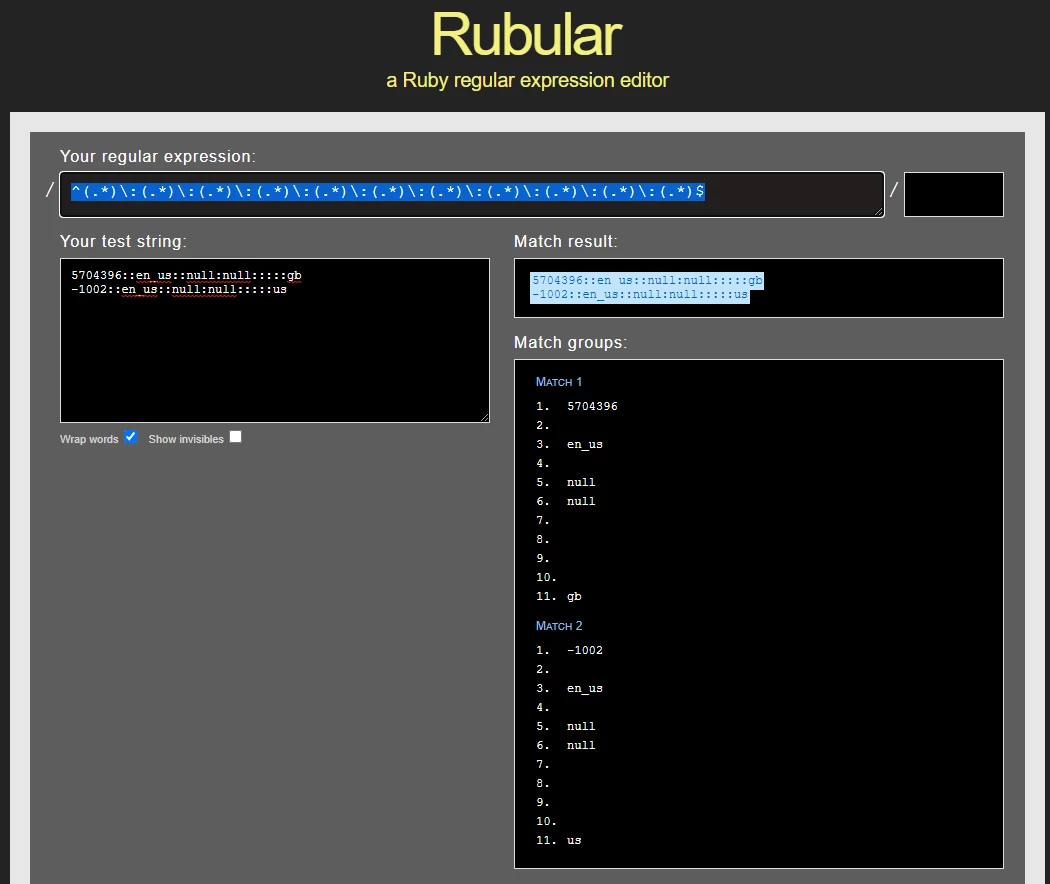
5704396::en_us::null:null:::::gb - Test rule result is correct

-1002::en_us::null:null:::::us - Test rule result is correct, however not classified when seeing the report.


Rule specification: 

11 fields separated with ":" & length should be less than 255 characters(eVar). Any help on this. 
 

This post is no longer active and is closed to new replies. Need help? Start a new post to ask your question.
Best answer by jeff_bloomer

@dinesh_kumar_r 
Being the type who doesn't make assumptions, can you provide the exact rule you used?  I'm asking just because everyone approaches problems differently, and this may feel like a super-simple approach.  The Regex I would start off using, based on what you stated in your question would be.

^(.*)\:(.*)\:(.*)\:(.*)\:(.*)\:(.*)\:(.*)\:(.*)\:(.*)\:(.*)\:(.*)$

I escaped the colons simply out of caution, but I would expect this to work.

The only other thing I would validate is the format of the first field in your classification.  If it's text, you should be fine.  If you are still having issues, I also agree you should be contacting Customer Care to determine the technical problem.  Best of luck!


4 replies

yuhuisg
Community Advisor
Community Advisor
March 16, 2021

Based on your 2 sample strings, I'd say your regex pattern may not be accounting for the "-" character.

If you've verified the correctness of your Classification rules with the "Test rule set", then you might want to bring this up with Client Care to see if there is an unknown bug that's causing your issue.

ShamshulA
Adobe Employee
Adobe Employee
March 16, 2021

Hi Dinesh,


Please check that there is no other browser upload or FTP upload happening to the same variable.


Regards,

Shamshul

Adobe Employee
March 18, 2021

If the test rule shows that the key should be classified and the report isn't showing the data even after 72 hours (when the key is reported), please reach out to Adobe Client Care.

jeff_bloomer
Community Advisor and Adobe Champion
jeff_bloomerCommunity Advisor and Adobe ChampionAccepted solution
Community Advisor and Adobe Champion
March 22, 2021

@dinesh_kumar_r 
Being the type who doesn't make assumptions, can you provide the exact rule you used?  I'm asking just because everyone approaches problems differently, and this may feel like a super-simple approach.  The Regex I would start off using, based on what you stated in your question would be.

^(.*)\:(.*)\:(.*)\:(.*)\:(.*)\:(.*)\:(.*)\:(.*)\:(.*)\:(.*)\:(.*)$

I escaped the colons simply out of caution, but I would expect this to work.

The only other thing I would validate is the format of the first field in your classification.  If it's text, you should be fine.  If you are still having issues, I also agree you should be contacting Customer Care to determine the technical problem.  Best of luck!