Reports: Looking at them with a segment applied | Community
Skip to main content
JohnOFarrell
Level 2
December 24, 2018
Solved

Reports: Looking at them with a segment applied

  • December 24, 2018
  • 3 replies
  • 3270 views

Hi, after a nearly 10 year hiatus from using Adobe Analytics (it was just Omniture Site Catalyst back then as most of you know), I find myself using it once again.

My challenges and questions for today are:

1) I'd like to view reports with a segment applied to it while I am in the reports section.  For example, if I am in REPORTS>CONTENT>PAGES,  the default view is unsegmented list of Pages and Pageviews

I know that I can use Compare to Segment and see how the unsegmented data compares to whatever segment I enter.

However I would like to apply a segment before this so I can just see data that is segmented (e.g. just pageviews generated by visits who have an iOS operating system)

Can this be done right in the reports section (the training video on Lynda.com shows this was possible back in 2016 but its now 2018 and the interface has changed and can't determine how to do this).

If it can't be done in REPORTS how do I go about doing this?

Thanks in advance!
This post is no longer active and is closed to new replies. Need help? Start a new post to ask your question.
Best answer by gflare

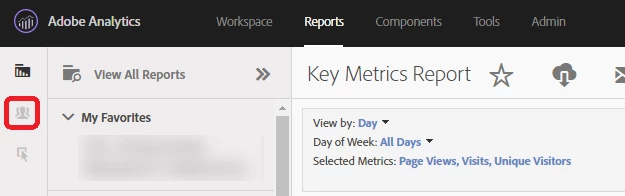
On the left-sidebar, you should see a series of 3 icons: Reports, Segments, and Metrics.  These toggle the additional sidebar navigation on and off, see below:

3 replies

gflareAccepted solution
Level 4
December 26, 2018

On the left-sidebar, you should see a series of 3 icons: Reports, Segments, and Metrics.  These toggle the additional sidebar navigation on and off, see below:

PratheepArunRaj
Community Advisor and Adobe Champion
December 28, 2018

Dear

Thank You, Pratheep Arun Raj B (Arun) | Xerago | Terryn Winter Analytics
JohnOFarrell
Level 2
January 2, 2019

Yes!  Thank you so much for the quick response and sorry for delay in thanking you.