Report Suite disable/enable offline tracking | timestamp | Community
Skip to main content
October 2, 2020
Solved

Report Suite disable/enable offline tracking | timestamp

  • October 2, 2020
  • 1 reply
  • 1325 views

Sorry, but please help,
I don't know where to set the Report Suite disable offline mode tracking.
I start a launch with no check for Offline Enabled but the RSID i selected have it on. I don't know where to disable the Offline mode of the Report Suite.
This post is no longer active and is closed to new replies. Need help? Start a new post to ask your question.
Best answer by shesingh

Hi There,


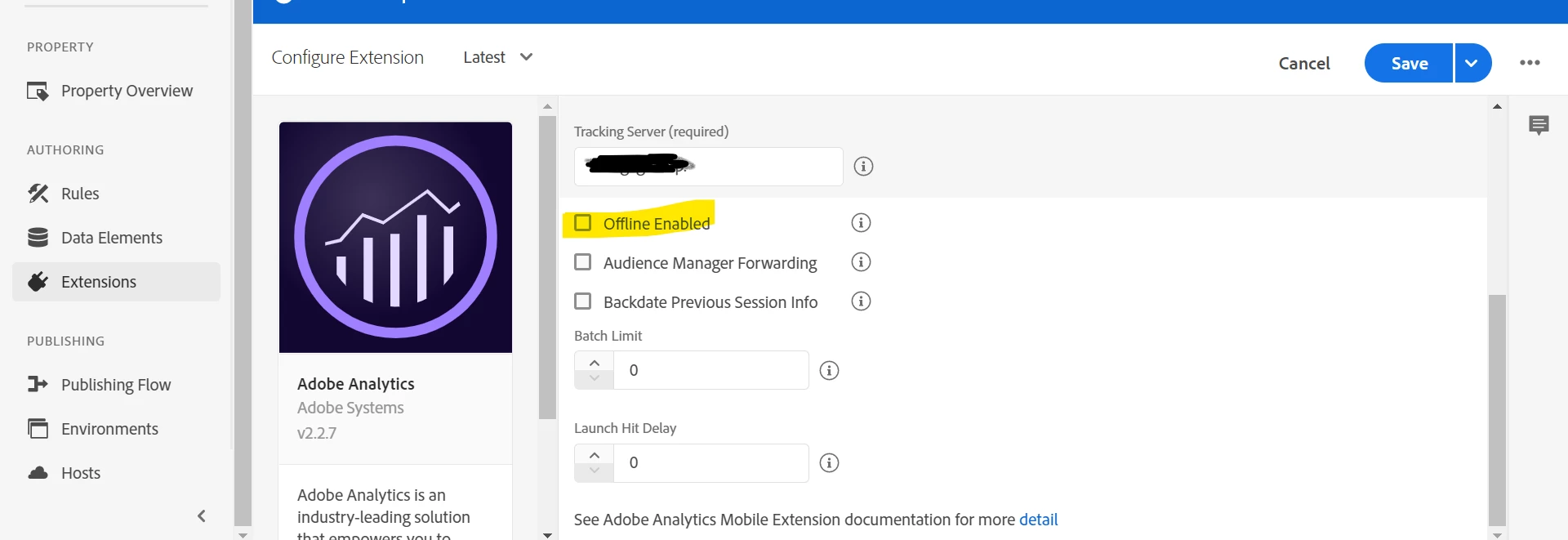
In order to disable "Offline Enabled" for Mobile Launch property, you need to go to Launch property >> Adobe Analytics extensions. A screen as below will appear to you:


https://docs.adobe.com/content/help/en/core-services-learn/implementing-in-mobile-android-apps-with-launch/configure-launch/launch-add-extensions.html


In case you want to change timestamp setting of the report suite,

Go to Adobe Analytics > Admin > Report Suites > Edit Settings > General > Timestamp Configuration .

https://docs.adobe.com/content/help/en/analytics/admin/admin-tools/timestamp-optional.html


Hope this helps!


Regards,

1 reply

shesinghAdobe EmployeeAccepted solution
Adobe Employee
October 2, 2020

Hi There,


In order to disable "Offline Enabled" for Mobile Launch property, you need to go to Launch property >> Adobe Analytics extensions. A screen as below will appear to you:


https://docs.adobe.com/content/help/en/core-services-learn/implementing-in-mobile-android-apps-with-launch/configure-launch/launch-add-extensions.html


In case you want to change timestamp setting of the report suite,

Go to Adobe Analytics > Admin > Report Suites > Edit Settings > General > Timestamp Configuration .

https://docs.adobe.com/content/help/en/analytics/admin/admin-tools/timestamp-optional.html


Hope this helps!


Regards,