
Report BuilderC CJA - Filtering dimensions | Community
Skip to main content
IñakideBilbao
Level 2
May 15, 2025
Solved

Report BuilderC CJA - Filtering dimensions

  • May 15, 2025
  • 1 reply
  • 406 views

Hi, I'm using "Report Builder for CJA" and I'm having trouble limiting the number of rows (or results) returned by the report builder with certain dimensions.


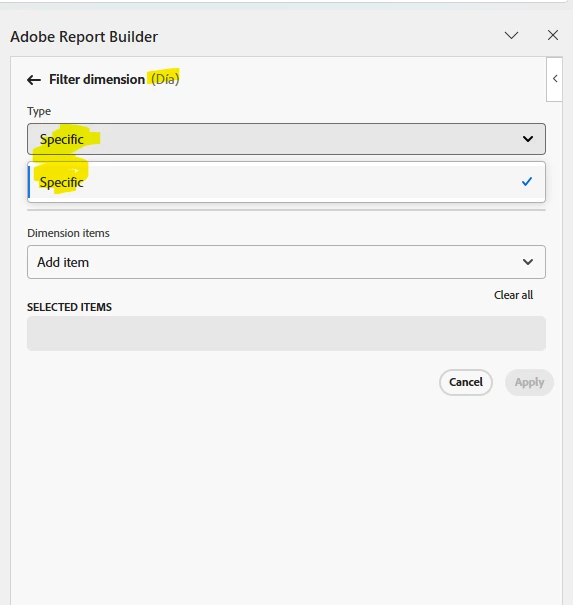
For some dimensions, I can filter using the "Most popular" filter and choose the number of rows I want to display. But in other cases, when I try to filter a dimension, I only get the "specific" option, and I'm not able to filter by the number of rows.


For example, I can not display 5 rows for the "day" and "month" dimensions.


Do you know what could be causing this?


This post is no longer active and is closed to new replies. Need help? Start a new post to ask your question.
Best answer by Jennifer_Dungan

I suspect this is because dimensions like "Month" or 'Day" are special dimensions, and I guess no one thought that someone might want to pull back data by "top X"....


You can log an Idea for this feature request (https://experienceleaguecommunities.adobe.com/t5/adobe-analytics-ideas/idb-p/adobe-analytics-ideas), but in the meantime, a workaround would be to pull back all data in your range by month or day granularity into a "Raw Data" sheet, sort by the metric you need, then use excel to pull the "Top X" rows into your visible report. Then I would hide the Raw Data Tab, so it just works in the background... 

1 reply

Jennifer_Dungan
Community Advisor and Adobe Champion
Jennifer_DunganCommunity Advisor and Adobe ChampionAccepted solution
Community Advisor and Adobe Champion
May 15, 2025

I suspect this is because dimensions like "Month" or 'Day" are special dimensions, and I guess no one thought that someone might want to pull back data by "top X"....


You can log an Idea for this feature request (https://experienceleaguecommunities.adobe.com/t5/adobe-analytics-ideas/idb-p/adobe-analytics-ideas), but in the meantime, a workaround would be to pull back all data in your range by month or day granularity into a "Raw Data" sheet, sort by the metric you need, then use excel to pull the "Top X" rows into your visible report. Then I would hide the Raw Data Tab, so it just works in the background...