Level 2
Aug 21, 2017 2:00 PM UTC
Solved

Report Builder - Refreshing Report dialogue hung up

Issue: Report Builder - Refreshing Report dialogue box stays open after reports are properly refreshed which leads to end-user confusion.

Scenario:

  • Running the following vba code:

  • The macro finishes and the data is clearly updated as expected... however the dialogue box (below) persists
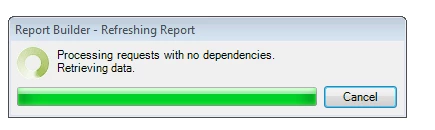
                   

Is there something I can add to the vba to force quit this upon success?

Thanks in advance

This post is no longer active and is closed to new replies. Need help? Start a new post to ask your question.
Gigazelle
GigazelleAccepted solution
Adobe Employee
Mar 29, 2018 10:09 PM UTC

That's basically a copy/paste of the code from our VBA KB article, so if the dialogue isn't going away and you're on the latest version of Report Builder, I'd recommend creating a ticket with customer care with exact steps to reproduce so the agent can clearly see the issue on their machine. Once that happens, we can get it to our engineering team for a fix. Thanks!

5 replies

Gigazelle
Adobe Employee
Adobe Employee
Aug 24, 2017 3:51 PM UTC

Does this error occur when you're working on a fresh workbook? Just trying to nail down the scope of this issue.

Translate
Level 2
Aug 24, 2017 3:55 PM UTC

There are some unrelated ODBC connections and a couple tabs. Nothing that should directly impact this macro functionality, though.

Translate
Gigazelle
Adobe Employee
Adobe Employee
Aug 25, 2017 11:06 PM UTC

Does it specifically work in a fresh workbook though? Determining if it's workbook-specific, macro-specific or machine-specific will provide a lot of headway into determining what the root cause of the issue is.

Translate
Level 2
Aug 28, 2017 1:14 PM UTC

Refresh works if I manually use the button in the ribbon and/or right-click within the data set to refresh. It's just when the above vba code is called via Macro that it hangs.

Translate
Gigazelle
Adobe Employee
GigazelleAdobe EmployeeAccepted solution
Adobe Employee
Mar 29, 2018 10:09 PM UTC

That's basically a copy/paste of the code from our VBA KB article, so if the dialogue isn't going away and you're on the latest version of Report Builder, I'd recommend creating a ticket with customer care with exact steps to reproduce so the agent can clearly see the issue on their machine. Once that happens, we can get it to our engineering team for a fix. Thanks!

Translate