Report Builder - Reference Date Selection for Report Refresh | Community
Skip to main content
Level 2
May 5, 2026
New

Report Builder - Reference Date Selection for Report Refresh

  • May 5, 2026
  • 1 reply
  • 21 views

In the old Report Builder, it was possible to set a "reference date" when refreshing a report. For example, you could configure the report to show "last month" and then decide at refresh time whether "last month" should be calculated from today or from an earlier date.
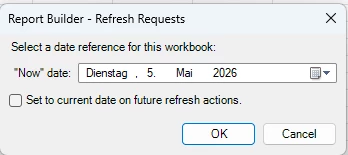
 

In the new Report Builder, this feature seems to be missing or only possible through multiple formulas.

It would be very helpful if we could reference a "reference date" from a cell, so that the report calculations (e.g., "last month") are based on the date specified in that cell. This would make it much easier to analyze data from different time perspectives without having to adjust multiple formulas.

1 reply

Jennifer_Dungan
Community Advisor and Adobe Champion
May 6, 2026

Hi, while I will upvote anything that improves functionality for Report Builder… my recommendation is just to use “Date from Cells" and use Date Formulas and Math in Excel to do your calculations.


But, in cell B2, use the formula:

=IF(F1<>"",EOMONTH(F1,-2)+1,EOMONTH(TODAY(),-2)+1)


and in B3, use the formula:

=IF(F1<>"",EOMONTH(F1, -1),EOMONTH(TODAY(), -1))


If you don’t put a reference date (cell F1), then “today” will be used as a reference…. if you do decide to put a reference date in, let’s say “Feb 15, 2026”, then you will get:


You can see that the “Last Month” is now Jan, because it’s based on the inclusion of the reference date…


In Report Builder, you will select cells B2 and B3:


If you need to re-run the report for any alternate date, all you need to do is update cell F1 in your Date Config sheet, no need to update any of your requests….  and you won’t have to update your formulas either…


Another option is just to provide “Override” cells for each date… so if someone wants to run more than a month of data…


In this case, B2 and B3 are simply:

=EOMONTH(TODAY(),-2)+1

and

=EOMONTH(TODAY(), -1)

Referencing Today()


Then the Override can have any date selected.


The “Final Dates” are simply:

=IF(C2<>"",C2,B2)

and

=IF(C3<>"",C3,B3)


If there’s an override, use it, otherwise use the date calculated based on Today().


While, yes, this is “multiple formulas”, even in the old report builder, ALL my reports were built this way… since I could make very quick changes to pull a report for any time frame (either 1 month as the original, or I could pull a partial month, or multiple months… ) and all without having to adjust my requests…

I don’t find this setup takes much time once you get used to it… and you don’t have to adjust formulas.. just adjust the override…