Renaming report | Adobe Higher Education
Skip to main content
ronatsai
Level 2
August 2, 2018
Risolto

Renaming report

  • August 2, 2018
  • 1 risposta
  • 1821 visualizzazioni

Hi,

I'm facing a small but kind of annoy problem.

I've rename custom report title through Admin > Report suite manager > Edit setting > General > Customize Menu(pic1), the report name in navigation interface has been successfully changed (pic2, changed it into "Test"), however, the report title hasn’t been changed (pic3, title remains as "Test 5"). Is there any way that I can change the report title?

Thank you for your great help.

Pic1: Rename the report from "Test 5" to "Test".
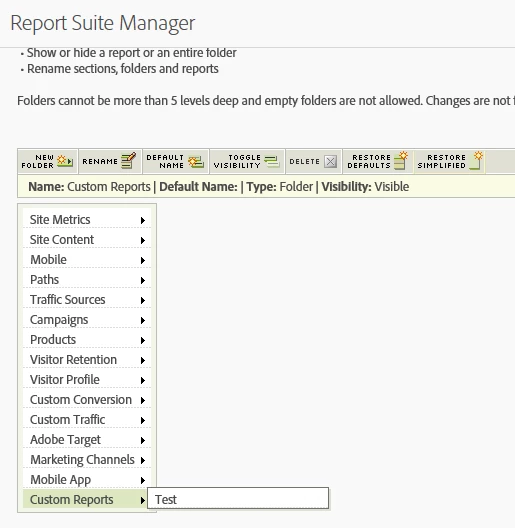
Pic2: report name successfully changed to "Test"

Pic3: report title remains as "Test 5"
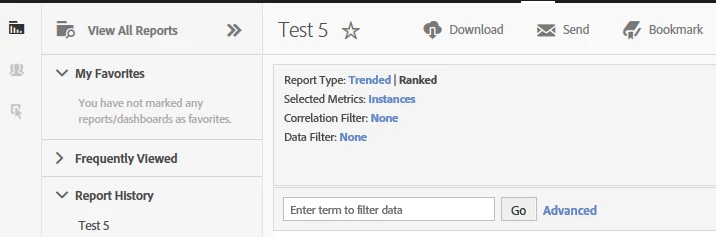

Questo argomento è stato chiuso alle risposte.
Migliore risposta di Gigazelle

Since it's just a custom report, you can save the custom report as a new one, then name it correctly there. Once it's correctly named, you can delete the old one.

1 risposta

Gigazelle
Adobe Employee
GigazelleAdobe EmployeeRisposta
Adobe Employee
November 7, 2018

Since it's just a custom report, you can save the custom report as a new one, then name it correctly there. Once it's correctly named, you can delete the old one.