Level 2
August 26, 2026
Question

Quick Segment Not Calculating Correct Values

  • August 26, 2026
  • 3 replies
  • 32 views

Hello, I'm trying to capture all pages that have received 20 or fewer page views on my company's site. I created a quick segment to do this. However, when I pulled in Page URL as the dimension against the Page Views metric and apply the segment, the number has not changed at all. (NOTE: in the screenshot, I just pulled in All Data for privacy).
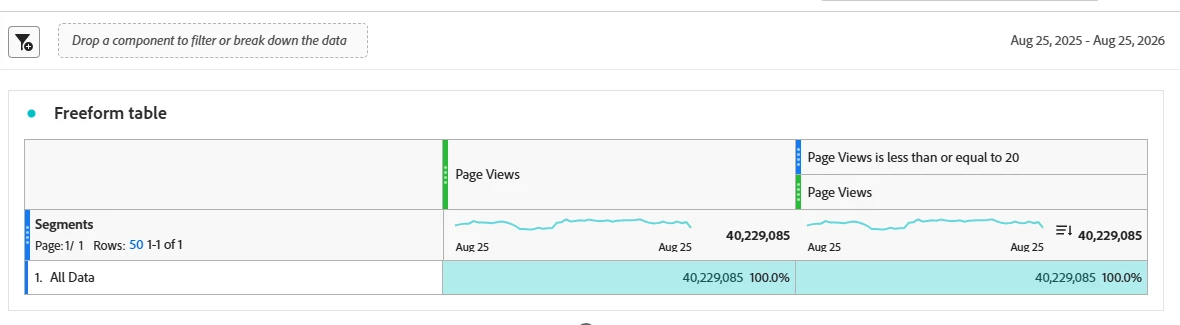
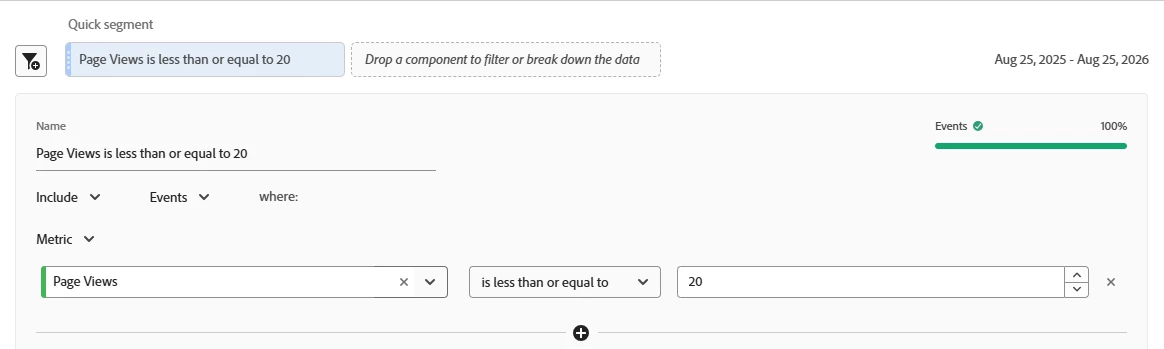
Does this have something to do with my metric settings? Any advice would be appreciated!

3 replies

Josh Stephens
Community Advisor
Community Advisor
August 27, 2026

Hi ​@Nicole_Hardy,

To achieve what you want, you can use a calculated metric.

In the calculated metric builder

  1. Add an “If” function
  2. In the logical test, add a Less Than or Equal To Function
  3. In the first metric box add page views
  4. In the second box add a static number 20
    (If “Page Views” is Less Than or Equal To “20”)
  5. In the value_if_true box, add page views again (If the above is true, you’ll get page views metric)
  6. In the value_if_false box, you could add a static number such as either 0 or 1000. This would allow you to sort so the pages you’re interested in are grouped together. (Note, if you select 1000 it would increase you’re totals, so I’d suggested disabling totals and grand totals).


Here’s an example. (Note, I used “events” instead of “page views” since the sandbox I was in doesn’t have page views.)


Level 2
August 27, 2026

Thanks ​@Josh Stephens! I found another post on here that discussed using a calculated metric and have been toying with that. Just to be sure: there is no function that would return metrics between two values, correct? I’d have to achieve that with nested functions? I’m wanting to look at values between 5 and 20. 

Jennifer_Dungan
Adobe Champion and Community Advisor
August 27, 2026

There are still caveats and issues with using Calculated Metrics like this… 


I posted this idea a few years ago, I am still hoping Adobe will add something like this, and it would support your needs: