OK, so trying to do a conversion based on the first page is going to be a little more complex. As it sounds like both your prop and eVar are just set to page type.
Example:
- Page 1 (home)
- prop5 set to "home"
- Entry Prop5 set to "home" (as the first value in the visit to be set)
- eVar5 set to "home"
- Instance of eVar5 triggered
- Page 2 (search results)
- prop5 set to "results"
- Entry Prop5 set to "home" (as the first value in the visit to be set)
- eVar5 set to "results"
- Instance of eVar5 triggered
- Page 3 (product page)
- prop5 set to "product"
- Entry Prop5 set to "home" (as the first value in the visit to be set)
- eVar5 set to "product"
- Instance of eVar5 triggered
- Add to Cart Action (assuming you aren't setting either value explicitly on this action)
- prop5 not set / no value
- Entry Prop5 set to "home" (as the first value in the visit to be set)
- eVar5 not set, but value of "product" persists due to Visit expiry
- Instance of eVar5 not triggered (since the eVar wasn't explicitly set)
- Page 4 (Cart)
- prop5 set to "cart"
- Entry Prop5 set to "home" (as the first value in the visit to be set)
- eVar5 set to "cart"
- Instance of eVar5 triggered
- Page 5 (Checkout)
- prop5 set to "checkout"
- Entry Prop5 set to "home" (as the first value in the visit to be set)
- eVar5 set to "checkout"
- Instance of eVar5 triggered
- Purchase Complete Action
- prop5 not set / no value
- Entry Prop5 set to "home" (as the first value in the visit to be set)
- eVar5 not set, but value of "checkout" persists due to Visit expiry
- Instance of eVar5 not triggered (since the eVar wasn't explicitly set)
If you look at your Order metric directly against your prop, you won't have any value, since no value was set on the action... You should have the "Entry Prop5" value, as once set, this value persists for the entire visit. Your eVar, despite not being set, due to the Visit expiry will show the last set value, in this case your "checkout" page, but it's not the first page in the visit, so it won't get you what you need.
Now, if you use a breakdown of Entry Page Type and your Order, Visits and Orders/Visit metrics... you will also have a problem:
| |
Order |
Visits |
Orders/Visit |
| Entry Page Type |
100 |
1000 |
10% |
| home |
20 |
800 |
2.5% |
| product |
80 |
200 |
40% |
Each row in this table will show the number of visits that has the entry page.. not the total visits to your site (I assume you want a breakdown of X% started from Page A, Y% started from Page B, etc... )
I am also not sure if you want to just look at Visits that had an order... so that those % add up to 100% (basically showing you a distribution of your orders against the entry page)?
To get "Total Visits with Orders", you will need a segment for:
Orders Exists
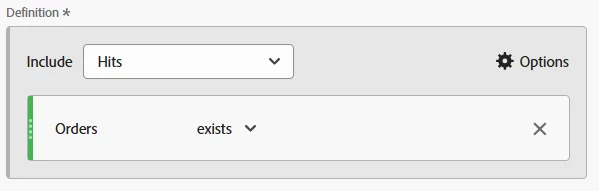
And a calculated metric for "Total Visits with Orders":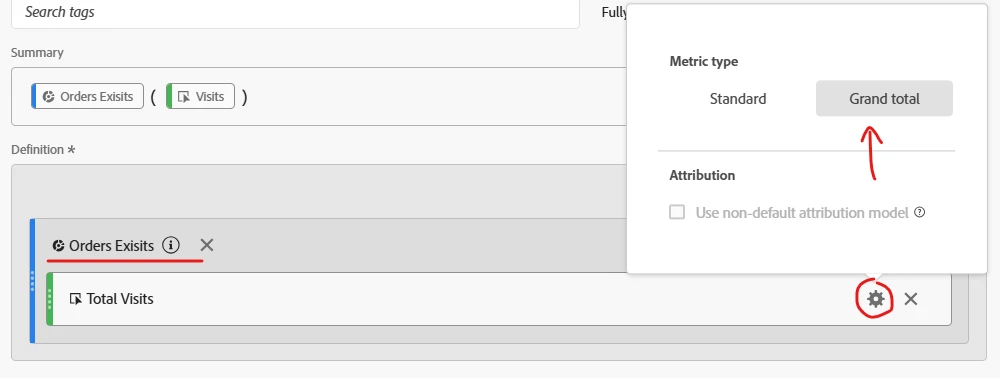
(You can see I have the segment as part of the calculated metric, and I made sure to set the visits to "Grand Total")
Now, you can use your breakdown of Entry Page Type with the Orders Metric, Total Visits with Orders, and a division of Orders/Total Visits with Orders