Processing rules - Default Condition | Adobe Higher Education
Skip to main content
V_Sirish_Kaushik1
Level 4
July 12, 2023
Respondido

Processing rules - Default Condition

  • July 12, 2023
  • 1 resposta
  • 645 Visualizações

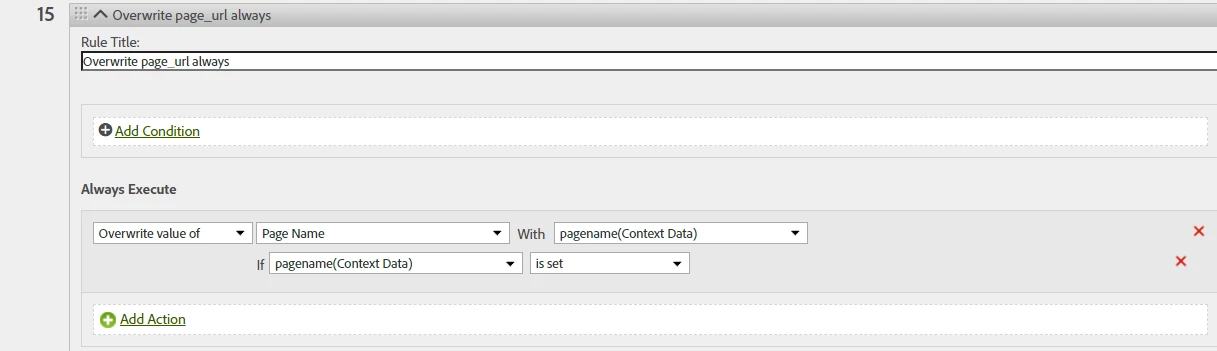
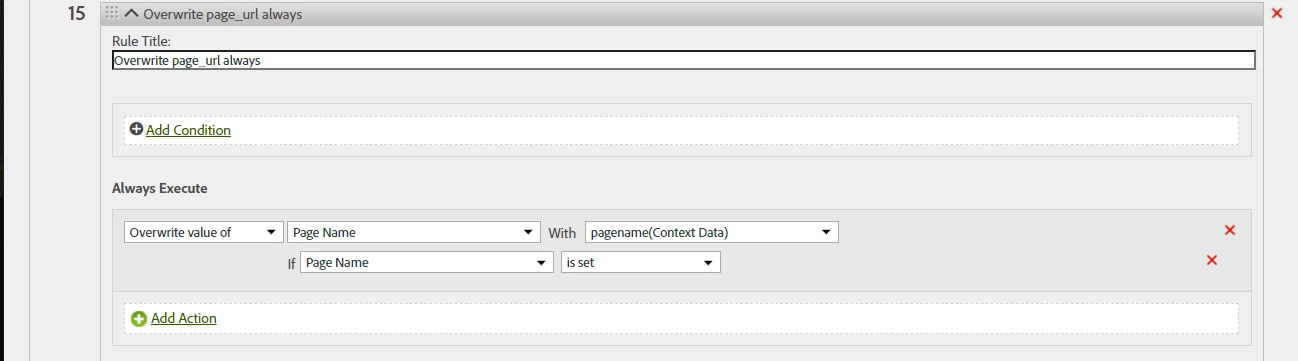
In processing rules, while mapping say, eVar1 with some contextData, I am seeing this behaviour for sometime, where when i click on Add Condition (in execute section), instead of default condition which should have been 'contextData' exists, it defaults to 'eVar1' exists (or whatever variable is on left). How does this default condition help? 


Este tópico foi fechado para respostas.
Melhor resposta por Jennifer_Dungan

It's kind of an old UI... I always get the "if Page Name is set" type of behaviour... I just accept that I will have to manually set up those conditions all the time.


Most of the time I am not even using the "if pagename(context data) is set" either.. since if it's not set, it will just be an empty string anyway (which won't track anything in the final result).. so you really don't need that logic for your rules to work... that's extra effort that doesn't make a difference to the end result..


When I use conditions, it's more if I need to fix an issue to overwrite a value with something else if the value equals "x".. or to set Events... "set Event X '1' IF Page Name equals Y" or "set Event Z '1' IF W (context data) is set" 


If you rules are just simple like set the dimension if the context data is set, you can save yourself time by not adding all those extra conditions.


Try one and see... don't just change all your rules without testing.. but since you are adding new rules, it's a low risk way to confirm.

1 Resposta

Jennifer_Dungan
Community Advisor and Adobe Champion
July 12, 2023

It's kind of an old UI... I always get the "if Page Name is set" type of behaviour... I just accept that I will have to manually set up those conditions all the time.


Most of the time I am not even using the "if pagename(context data) is set" either.. since if it's not set, it will just be an empty string anyway (which won't track anything in the final result).. so you really don't need that logic for your rules to work... that's extra effort that doesn't make a difference to the end result..


When I use conditions, it's more if I need to fix an issue to overwrite a value with something else if the value equals "x".. or to set Events... "set Event X '1' IF Page Name equals Y" or "set Event Z '1' IF W (context data) is set" 


If you rules are just simple like set the dimension if the context data is set, you can save yourself time by not adding all those extra conditions.


Try one and see... don't just change all your rules without testing.. but since you are adding new rules, it's a low risk way to confirm.